Learn from the best! Meet the four finalists headed to the FINALS of the Power BI Dataviz World Championships! Register now
Hello I want to add a conditional column based off the information below. The conditional column would be for the stores in column B. So for instance if Column B = Orange then Target. My issue is that I want column B to be a slicer but I have apples in 2 tables ( Walmart and Wholefoods).
How can I create it so that if Column A = Apple than Walmart
and also show that if column A = Apple than Wholefoods
I need it to show once I select wholefoods in the Slicer I see apple and once I select Walmart in the slicer I also see apple without combining the 2 names.
Solved! Go to Solution.
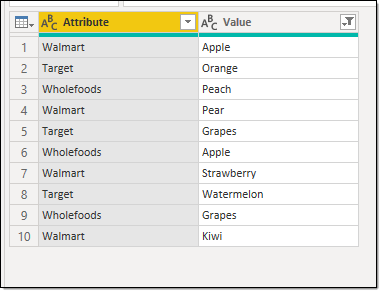
I'm not quite sure I understand. From what I see you need to unpivot your 'Store' table so it looks like:
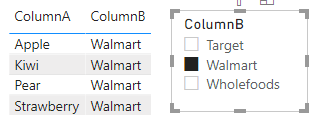
Then you can use [Value] as your slicer which then filters your [Attribute]
Proud to be a Super User!
Hi @Anonymous
You need to add the stores to Column B and then use the field Column B as a slicer to filter fruits .
Best Regards
Community Support Team _ Ailsa Tao
If this post helps, then please consider Accept it as the solution to help the other members find it more quickly.
Hi,
Please show the expected result.
Hi @Anonymous
You need to add the stores to Column B and then use the field Column B as a slicer to filter fruits .
Best Regards
Community Support Team _ Ailsa Tao
If this post helps, then please consider Accept it as the solution to help the other members find it more quickly.
I'm not quite sure I understand. From what I see you need to unpivot your 'Store' table so it looks like:
Then you can use [Value] as your slicer which then filters your [Attribute]
Proud to be a Super User!
| User | Count |
|---|---|
| 57 | |
| 44 | |
| 32 | |
| 18 | |
| 16 |
| User | Count |
|---|---|
| 71 | |
| 59 | |
| 39 | |
| 22 | |
| 21 |