Join us at FabCon Atlanta from March 16 - 20, 2026, for the ultimate Fabric, Power BI, AI and SQL community-led event. Save $200 with code FABCOMM.
Register now!The Power BI Data Visualization World Championships is back! Get ahead of the game and start preparing now! Learn more
I would like to add a column and set its value based on whether or not a value exists in a different table.
I have a table called Tasks which I want to add a column called WorkItemType. The value of this column will be a text entry that is defined by whether or not the parent of the row in tasks is in a different table.
So I have:
Tasks
| WorkItemId | ParentWorkItemId |
| 123 | 122 |
| 124 | 135 |
| 129 | 151 |
Bugs
| WorkItemId | Title |
| 122 | A |
| 128 | B |
User Stories
| WorkItemId | Title |
| 138 | Support01 |
| 135 | Feature01 |
| 151 | Feature02 |
And would like the result to be:
Tasks
| WorkItemId | ParentWorkItemId | WorkItemType |
| 123 | 122 | Bug |
| 124 | 138 | Support |
| 129 | 151 | Other |
The relationship structure looks like this:
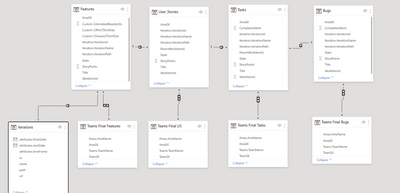
In order to break it down into smaller chunks I have tried to get just the bug determination working. I have tried to following
= Table.AddColumn(Custom1, "WorkItemType", each if( Table.Contains (Bugs, Bugs[WorkItemId] = [ParentWorkItemId])) then "bug" else "other" )
But I get an error stating that:
Expression.Error: We cannot convert the value false to type Record.
Details:
Value=FALSE
Type=[Type]
I have also tried:
= Table.AddColumn(Custom1, "WorkItemType", each if( Table.Contains (Bugs, Bugs[WorkItemId] = Tasks[ParentWorkItemId])) then "bug" else "other" )
But that ends up with an error: Expression.Error: A cyclic reference was encountered during evaluation.
Any help would be greatly appreciated.
Solved! Go to Solution.
Hi @BBurnett ,
You could try the following steps:
Step 1,create a new table base on User Stories:
User Stories2 = CALCULATETABLE('User Stories',FILTER(all('User Stories'),'User Stories'[Title]="Support01"))
Step 2, use the following measure :
final =
VAR test1 =
CONTAINS ( 'Bugs', Bugs[WorkItemId], MAX ( Tasks[ParentWorkItemId] ) )
VAR test2 =
IF ( test1 = TRUE, "Bugs", "Others" )
VAR test3 =
CONTAINS (
'User Stories2',
'User Stories2'[WorkItemId], MAX ( Tasks[ParentWorkItemId] )
)
VAR test4 =
IF ( test3 = TRUE, "Support", "Others" )
VAR test5 =
IF ( TEST2 = "Bugs", "Bugs", IF ( test4 = "Support", "Support", "Others" ) )
RETURN
test5
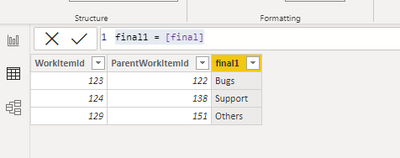
Step3 ,new column base on the measure:
final1 = [final]
Wish it is helpful for you!
Best Regards
Lucien
Hi @BBurnett ,
You could try the following steps:
Step 1,create a new table base on User Stories:
User Stories2 = CALCULATETABLE('User Stories',FILTER(all('User Stories'),'User Stories'[Title]="Support01"))
Step 2, use the following measure :
final =
VAR test1 =
CONTAINS ( 'Bugs', Bugs[WorkItemId], MAX ( Tasks[ParentWorkItemId] ) )
VAR test2 =
IF ( test1 = TRUE, "Bugs", "Others" )
VAR test3 =
CONTAINS (
'User Stories2',
'User Stories2'[WorkItemId], MAX ( Tasks[ParentWorkItemId] )
)
VAR test4 =
IF ( test3 = TRUE, "Support", "Others" )
VAR test5 =
IF ( TEST2 = "Bugs", "Bugs", IF ( test4 = "Support", "Support", "Others" ) )
RETURN
test5
Step3 ,new column base on the measure:
final1 = [final]
Wish it is helpful for you!
Best Regards
Lucien
Yes they are both the same data type. All integers.
@BBurnett , Are these of same datatype
Bugs[WorkItemId] = [ParentWorkItemId] ?
Also check this
https://eriksvensen.wordpress.com/2019/02/28/powerquery-replicate-doing-an-excel-vlookup-in-m/
The Power BI Data Visualization World Championships is back! Get ahead of the game and start preparing now!
| User | Count |
|---|---|
| 63 | |
| 55 | |
| 42 | |
| 41 | |
| 23 |
| User | Count |
|---|---|
| 167 | |
| 136 | |
| 120 | |
| 79 | |
| 54 |