Learn from the best! Meet the four finalists headed to the FINALS of the Power BI Dataviz World Championships! Register now
I would like to add a column and set its value based on whether or not a value exists in a different table.
I have a table called Tasks which I want to add a column called WorkItemType. The value of this column will be a text entry that is defined by whether or not the parent of the row in tasks is in a different table.
So I have:
Tasks
| WorkItemId | ParentWorkItemId |
| 123 | 122 |
| 124 | 135 |
| 129 | 151 |
Bugs
| WorkItemId | Title |
| 122 | A |
| 128 | B |
User Stories
| WorkItemId | Title |
| 138 | Support01 |
| 135 | Feature01 |
| 151 | Feature02 |
And would like the result to be:
Tasks
| WorkItemId | ParentWorkItemId | WorkItemType |
| 123 | 122 | Bug |
| 124 | 138 | Support |
| 129 | 151 | Other |
The relationship structure looks like this:
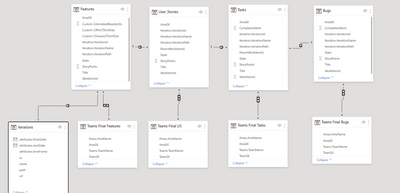
In order to break it down into smaller chunks I have tried to get just the bug determination working. I have tried to following
= Table.AddColumn(Custom1, "WorkItemType", each if( Table.Contains (Bugs, Bugs[WorkItemId] = [ParentWorkItemId])) then "bug" else "other" )
But I get an error stating that:
Expression.Error: We cannot convert the value false to type Record.
Details:
Value=FALSE
Type=[Type]
I have also tried:
= Table.AddColumn(Custom1, "WorkItemType", each if( Table.Contains (Bugs, Bugs[WorkItemId] = Tasks[ParentWorkItemId])) then "bug" else "other" )
But that ends up with an error: Expression.Error: A cyclic reference was encountered during evaluation.
Any help would be greatly appreciated.
Solved! Go to Solution.
Hi @BBurnett ,
You could try the following steps:
Step 1,create a new table base on User Stories:
User Stories2 = CALCULATETABLE('User Stories',FILTER(all('User Stories'),'User Stories'[Title]="Support01"))
Step 2, use the following measure :
final =
VAR test1 =
CONTAINS ( 'Bugs', Bugs[WorkItemId], MAX ( Tasks[ParentWorkItemId] ) )
VAR test2 =
IF ( test1 = TRUE, "Bugs", "Others" )
VAR test3 =
CONTAINS (
'User Stories2',
'User Stories2'[WorkItemId], MAX ( Tasks[ParentWorkItemId] )
)
VAR test4 =
IF ( test3 = TRUE, "Support", "Others" )
VAR test5 =
IF ( TEST2 = "Bugs", "Bugs", IF ( test4 = "Support", "Support", "Others" ) )
RETURN
test5
Step3 ,new column base on the measure:
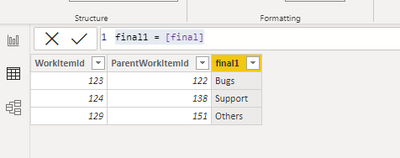
final1 = [final]
Wish it is helpful for you!
Best Regards
Lucien
Hi @BBurnett ,
You could try the following steps:
Step 1,create a new table base on User Stories:
User Stories2 = CALCULATETABLE('User Stories',FILTER(all('User Stories'),'User Stories'[Title]="Support01"))
Step 2, use the following measure :
final =
VAR test1 =
CONTAINS ( 'Bugs', Bugs[WorkItemId], MAX ( Tasks[ParentWorkItemId] ) )
VAR test2 =
IF ( test1 = TRUE, "Bugs", "Others" )
VAR test3 =
CONTAINS (
'User Stories2',
'User Stories2'[WorkItemId], MAX ( Tasks[ParentWorkItemId] )
)
VAR test4 =
IF ( test3 = TRUE, "Support", "Others" )
VAR test5 =
IF ( TEST2 = "Bugs", "Bugs", IF ( test4 = "Support", "Support", "Others" ) )
RETURN
test5
Step3 ,new column base on the measure:
final1 = [final]
Wish it is helpful for you!
Best Regards
Lucien
Yes they are both the same data type. All integers.
@BBurnett , Are these of same datatype
Bugs[WorkItemId] = [ParentWorkItemId] ?
Also check this
https://eriksvensen.wordpress.com/2019/02/28/powerquery-replicate-doing-an-excel-vlookup-in-m/
A new Power BI DataViz World Championship is coming this June! Don't miss out on submitting your entry.
Share feedback directly with Fabric product managers, participate in targeted research studies and influence the Fabric roadmap.
| User | Count |
|---|---|
| 45 | |
| 35 | |
| 30 | |
| 15 | |
| 15 |
| User | Count |
|---|---|
| 58 | |
| 55 | |
| 38 | |
| 21 | |
| 21 |