cancel
Showing results for 
Search instead for 
Did you mean: 

July 7 - July 17 | Round 2 of the Power BI Dataviz World Championships. Don't miss your chance! Learn more

Reply
PGAT
Helper III
Helper III

Conditional Column - Else if

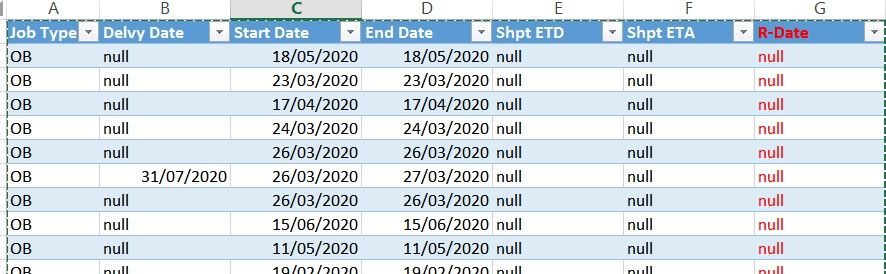
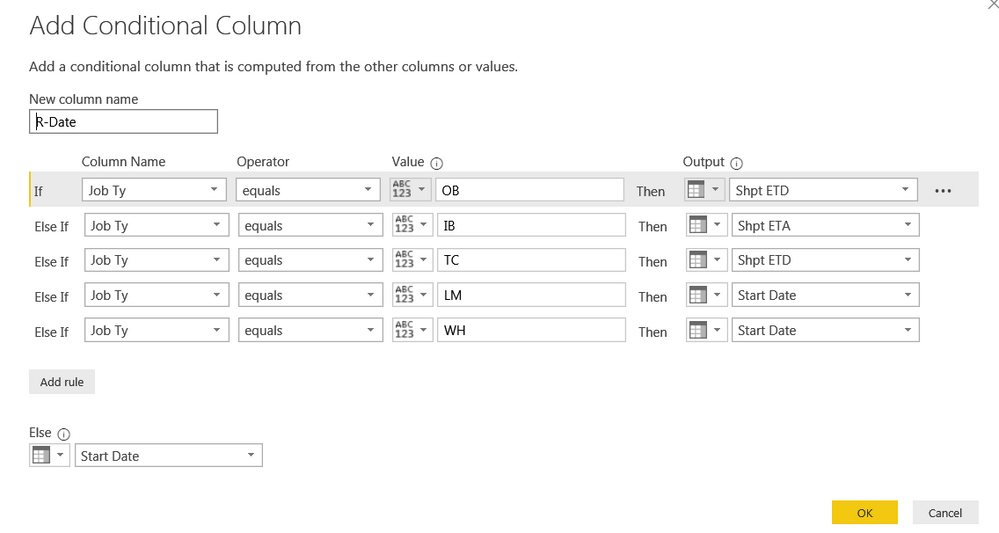
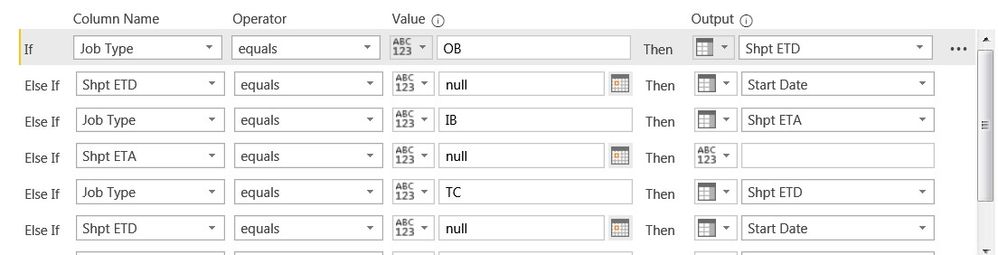
Hi Experts, I thought I had this covered and after some months, i realised I have overlooked the mistake on Conditional Column.  I have these dates columns - Start date, End Date, Shpt ETD, Shpt ETA...  and by job type, I set the conditional column to pick the date into the column (R-Date I call it).  If the job is "OB", it will take Shpt ETD.  Else, Start Date.  Somehow, when Shpt ETD is null, it does not take the Start date. 


R-date table.jpg


R-Date Conditional Column.png

I attach a screen grab of the file and conditional column setting. 


https://atmms-my.sharepoint.com/:x:/g/personal/patrick_goh_atmms_onmicrosoft_com1/Efl6QmhoN31Enj-1QE...


I will very grateful if someone can help me to understand "Else if" in this issue here.  Thanks.


Sincerely.

Patrick 

1 ACCEPTED SOLUTION
Anonymous
Not applicable

Hi @PGAT ,


From your statement of requirement , Somehow, when Shpt ETD is null, it does not take the Start date. 

You have only specified the condition for JobType Equals OB then Shpt ETD, but does not specify that if Shpt ETD is null take Start Date.


Can you post this step in Power Query here to make changes.


Cheers


CheenuSing 

View solution in original post

5 REPLIES 5
Anonymous
Not applicable

Hi @PGAT ,


From your statement of requirement , Somehow, when Shpt ETD is null, it does not take the Start date. 

You have only specified the condition for JobType Equals OB then Shpt ETD, but does not specify that if Shpt ETD is null take Start Date.


Can you post this step in Power Query here to make changes.


Cheers


CheenuSing 

Hi CheenuSing,


Thanks.  I have thought that the "ELSE" = Start Date will apply if the rule above does not apply.   How do I use "ELSE"?


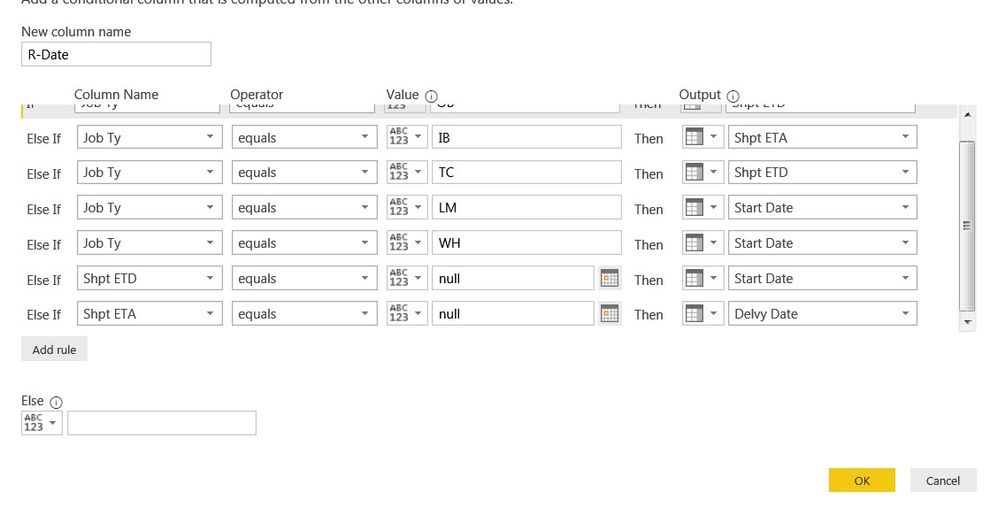
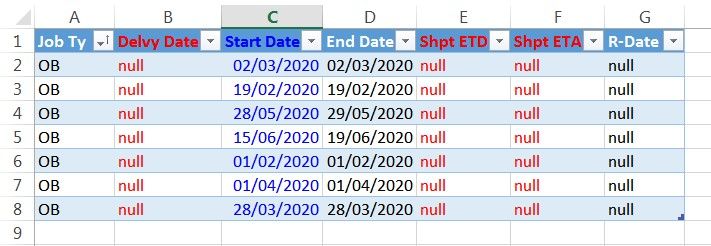
I added the last two steps as per your advice.  The "null" in R-Date has gone down in numbers but still I cannot figure out why some records are null.

  1. OB = ETD
  2. ETD = null = Take Start Date
  3. R-Date = Did not show the Start Date


R-Date2.jpg


R-DateTable.jpg

Hi CheenuSing, further to my reply below, I thought I may have done it wrong.  I tried moving the condition up to the right place but despite the shift, i still cannot get "start date" when ETD = null.  Appreciate your advice to this, and also your guidance on how to use "ELSE" at the end of it.  Thanks. 


R-Date3.jpg

Hi CheenuSing, I got it now. I moved the rule (ETD=null, use Start) to the 1st rule.  Thank you!

Hi,


If the first reply has solved your issue, please mark it as a solution for others to see.
Thanks!


Best Regards,

Giotto

Helpful resources

Announcements
FabCon and SQLCon Barcelona 2026

FabCon & SQLCon – Barcelona 2026

Join us in Barcelona for FabCon and SQLCon, the Fabric, Power BI, SQL, and AI community event. Save €200 with code FABCMTY200.

60 days of Data Days Carousel

Data Days 2026

Join Fabric Data Days 2026: 60 days of free live/on-demand sessions, challenges, study groups, and certification opportunities.

Power BI DataViz World Championships carousel

Power BI DataViz World Championships - June 2026

A new Power BI DataViz World Championship is coming this June! Don't miss out on submitting your entry.