Share feedback directly with Fabric product managers, participate in targeted research studies and influence the Fabric roadmap.
Sign up nowGet Fabric certified for FREE! Don't miss your chance! Learn more
Hi All,
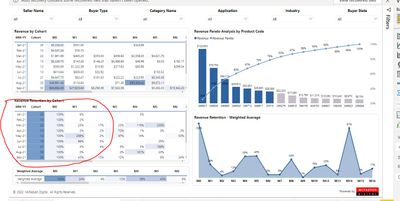
i want to give Condition format start from 3rd column(M0). but its starts from 23nd how do i change.
note:- i dont want merge first 2 column (MM-YY & Cohot)
PowerBI File availble here - https://drive.google.com/file/d/1ORn_w3A05a_B0ZfY0cIZi_nGw_0BppKQ/view?usp=sharing
I think this happens because you use a single measure. You cannot split conditional format for a single measure. You have to split the measure in to two separate measures or use seperate visuals.
Hi,
Could you plz explaine me how do i split measure in collumn level.
What I mean is that you create separate measures and add conditional formatting on each of them.
@Chiyanmurali , Not very clear. You can use measure based conditional formatting, if needed
How to do conditional formatting by measure and apply it on pie?
https://www.youtube.com/watch?v=RqBb5eBf_I4&list=PLPaNVDMhUXGYo50Ajmr4SgSV9HIQLxc8L
https://community.powerbi.com/t5/Community-Blog/Power-BI-Conditional-formatting-the-Pie-Visual/ba-p/...
https://amitchandak.medium.com/power-bi-where-is-the-conditional-formatting-option-in-new-format-pan...
The information you have provided is not making the problem clear to me. Can you please explain with an example.
Appreciate your Kudos.
Hi @amitchandak ,
Thanks for your reply, but i am looking different solution kindly check my requiemnent once again.
i want to give condotion format from 2nd column onwards.
Share feedback directly with Fabric product managers, participate in targeted research studies and influence the Fabric roadmap.
| User | Count |
|---|---|
| 68 | |
| 59 | |
| 44 | |
| 20 | |
| 15 |
| User | Count |
|---|---|
| 108 | |
| 105 | |
| 37 | |
| 26 | |
| 26 |