cancel
Showing results for 
Search instead for 
Did you mean: 

The Power BI Data Visualization World Championships is back! Get ahead of the game and start preparing now! Learn more

Reply
Anonymous
Not applicable

Condition Formula

Does anyone know how I can embed the following formula 100(sum(KPI1)/sum(KPI1_COUNT))* as a new column. With the sum being based on each unique "Applicant_Company" and "Work_Area" and each month (See below)


screenshot.png

1 ACCEPTED SOLUTION
Anonymous
Not applicable

Hi @Anonymous ,


According to my understanding , you want to calculate SUM(KPI1)/SUM(KPI1_COUNT) based on three categories,right?


You could use EARLIER() or ALLEXCEPT() function shown below:

Column =
CALCULATE (
    SUM ( 'Table'[KPI1] ) / SUM ( 'Table'[KPI1_COUNT] ),
    FILTER (
        'Table',
        'Table'[Applicant_Company] = EARLIER ( 'Table'[Applicant_Company] )
            && 'Table'[Work_Area] = EARLIER ( 'Table'[Work_Area] )
            && 'Table'[Date].[MonthNo] = EARLIER ( 'Table'[Date].[MonthNo] )
    )
)
Column 2 =
CALCULATE (
    SUM ( 'Table'[KPI1] ) / SUM ( 'Table'[KPI1_COUNT] ),
    ALLEXCEPT (
        'Table',
        'Table'[Applicant_Company],
        'Table'[Work_Area],
        'Table'[Date].[MonthNo]
    )
)

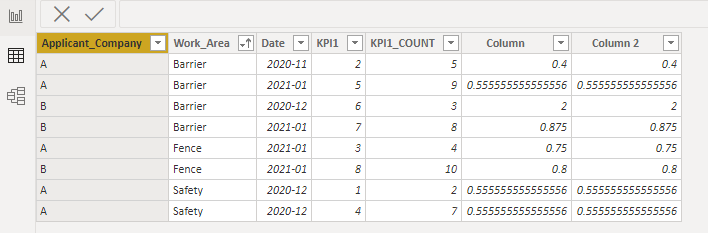
Here is the final output :

1.22.2.1.PNG


Please take a look at the pbix file here.


Best Regards,
Eyelyn Qin
If this post helps, then please consider Accept it as the solution to help the other members find it more quickly.

View solution in original post

4 REPLIES 4
Anonymous
Not applicable

Hi @Anonymous ,


According to my understanding , you want to calculate SUM(KPI1)/SUM(KPI1_COUNT) based on three categories,right?


You could use EARLIER() or ALLEXCEPT() function shown below:

Column =
CALCULATE (
    SUM ( 'Table'[KPI1] ) / SUM ( 'Table'[KPI1_COUNT] ),
    FILTER (
        'Table',
        'Table'[Applicant_Company] = EARLIER ( 'Table'[Applicant_Company] )
            && 'Table'[Work_Area] = EARLIER ( 'Table'[Work_Area] )
            && 'Table'[Date].[MonthNo] = EARLIER ( 'Table'[Date].[MonthNo] )
    )
)
Column 2 =
CALCULATE (
    SUM ( 'Table'[KPI1] ) / SUM ( 'Table'[KPI1_COUNT] ),
    ALLEXCEPT (
        'Table',
        'Table'[Applicant_Company],
        'Table'[Work_Area],
        'Table'[Date].[MonthNo]
    )
)

Here is the final output :

1.22.2.1.PNG


Please take a look at the pbix file here.


Best Regards,
Eyelyn Qin
If this post helps, then please consider Accept it as the solution to help the other members find it more quickly.

Anonymous
Not applicable

Hi thats great thanks! can I ask, if both the KPI1 and KPI_COUNT columns are 0, do you know how within the formula I can put a IF clause which will make the calculation revert to 100?

Anonymous
Not applicable

Hi @Anonymous ,


The DIVIDE() function was designed to automatically handle division by zero cases.


See the differences between DIVIDE() and / here.

1.27.1.1.PNG

Best Regards,
Eyelyn Qin
If this post helps, then please consider Accept it as the solution to help the other members find it more quickly.


Anonymous
Not applicable

Not sure I follow exacly, maybe you could knock up a mock table to show what you currently have and what the expected result would be with the additional column? 

Helpful resources

Announcements
Power BI DataViz World Championships

Power BI Dataviz World Championships

The Power BI Data Visualization World Championships is back! Get ahead of the game and start preparing now!

December 2025 Power BI Update Carousel

Power BI Monthly Update - December 2025

Check out the December 2025 Power BI Holiday Recap!

FabCon Atlanta 2026 carousel

FabCon Atlanta 2026

Join us at FabCon Atlanta, March 16-20, for the ultimate Fabric, Power BI, AI and SQL community-led event. Save $200 with code FABCOMM.