cancel
Showing results for 
Search instead for 
Did you mean: 

The FabCon + SQLCon recap series starts April 14th at 8am Pacific. If you’re tracking where AI is going inside Fabric, this first session is a can't miss. Register now

Reply
Anonymous
Not applicable

Condicionales!

Hola, tengo una consulta


Tengo las siguientes columnas  ON HAND (Numero), ON ORDER(Numero), FECHA(Numero), SELL OUT(Numero), Semana(Numero) lo que necesito son las siguientes condiciones,


Siempre se tiene que cumplir para SELL OUT = 0,


Si On hand = 0 y On order se mantiene con respecto a las dos semanas anteriores arrojar comentario Transito Pegado.

Si On Hand es distinto a Cero y el On Order es 0 tiene que arrojar comentario Stock Fantasma.


Estoy haciendo una columna con el siguiente codigo DAX, el espacio es donde falta condiciones, cualquier ayuda con esa codicion muchas gracias!

Status =
SWITCH(TRUE(),
'Historial Export'[ON HAND] <> 0  && 'Historial Export'[ON ORDER] = 0"Stock Fantasma",
'Historial Export'[ON HAND] = 0 &&                                                                  "Tránsito Pegado",
BLANK()
 
Saludos
)
1 ACCEPTED SOLUTION
Anonymous
Not applicable

Hi  @Anonymous ,


Here are the steps you can follow:

1. Create calculated column.

Column =
var _sum=
SUMX(FILTER(ALL('Table'),'Table'[Producto]=EARLIER('Table'[Producto])&&
'Table'[Semana]>=EARLIER('Table'[Semana])-2&&'Table'[Semana]<=EARLIER('Table'[Semana])-1),[OH ORDER])
return
SWITCH(
    TRUE(),
    'Table'[OH HAND]=0 && 'Table'[OH ORDER]<>0&&'Table'[OH ORDER]=_sum / 2,"comment Transito Pastado",
    'Table'[OH HAND]<>0 && 'Table'[OH ORDER]=0,"throw Ghost Stock comment",
    'Table'[Producto]="Producto2"&&'Table'[OH HAND]<>0 && 'Table'[OH ORDER]<>0,"170",
  'Table'[Producto]="Producto3"&&'Table'[OH HAND]<>0 && 'Table'[OH ORDER]<>0,"82")

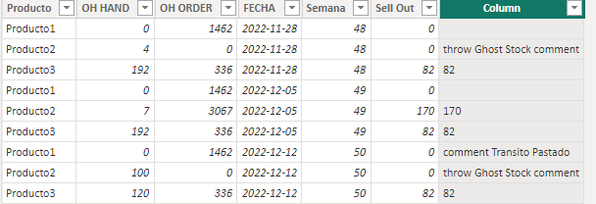
2. Result:

vyangliumsft_0-1672193116540.png


Best Regards,

Liu Yang

If this post helps, then please consider Accept it as the solution to help the other members find it more quickly

View solution in original post

3 REPLIES 3
Anonymous
Not applicable

Hi  @Anonymous ,


Here are the steps you can follow:

1. Create calculated column.

Column =
var _sum=
SUMX(FILTER(ALL('Table'),'Table'[Producto]=EARLIER('Table'[Producto])&&
'Table'[Semana]>=EARLIER('Table'[Semana])-2&&'Table'[Semana]<=EARLIER('Table'[Semana])-1),[OH ORDER])
return
SWITCH(
    TRUE(),
    'Table'[OH HAND]=0 && 'Table'[OH ORDER]<>0&&'Table'[OH ORDER]=_sum / 2,"comment Transito Pastado",
    'Table'[OH HAND]<>0 && 'Table'[OH ORDER]=0,"throw Ghost Stock comment",
    'Table'[Producto]="Producto2"&&'Table'[OH HAND]<>0 && 'Table'[OH ORDER]<>0,"170",
  'Table'[Producto]="Producto3"&&'Table'[OH HAND]<>0 && 'Table'[OH ORDER]<>0,"82")

2. Result:

vyangliumsft_0-1672193116540.png


Best Regards,

Liu Yang

If this post helps, then please consider Accept it as the solution to help the other members find it more quickly

amitchandak
Super User
Super User

@Anonymous , not very clear, what condition you need there, earlier can help


last week on hand

sumx(filter(Table, [Week] = earlier([Week]) -1), [On Hand])


The information you have provided is not making the problem clear to me. Can you please explain with an example.

Can you share sample data and sample output in table format? Or a sample pbix after removing sensitive data.
Appreciate your Kudos.

Share with Power BI Enthusiasts: Full Power BI Video (20 Hours) YouTube
Microsoft Fabric Series 60+ Videos YouTube
Microsoft Fabric Hindi End to End YouTube
Anonymous
Not applicable

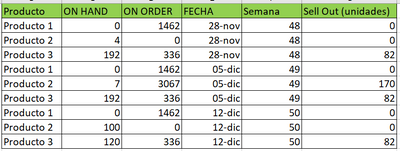
felipevargaspob_0-1672161438476.png


Por ejemplo en este caso para producto 1  seria que el ON HAND es 0 y el ON ORDER se matiene en para cada semana, entonces necesito que esa condicional arroje el mensaje de Transito Pegado, y el caso de Stock Fantasma seria el caso que el ON HAND es distinto a Cero y el ON ORDER es 0, y para todas estas condiciones siempre tiene que cumplirse que el SELL OUT (UNIDADES) es 0 esto seria el caso del producto 2

Helpful resources

Announcements
New to Fabric survey Carousel

New to Fabric Survey

If you have recently started exploring Fabric, we'd love to hear how it's going. Your feedback can help with product improvements.

Power BI DataViz World Championships carousel

Power BI DataViz World Championships - June 2026

A new Power BI DataViz World Championship is coming this June! Don't miss out on submitting your entry.

Join our Fabric User Panel

Join our Fabric User Panel

Share feedback directly with Fabric product managers, participate in targeted research studies and influence the Fabric roadmap.

March Power BI Update Carousel

Power BI Community Update - March 2026

Check out the March 2026 Power BI update to learn about new features.