Join us at FabCon Atlanta from March 16 - 20, 2026, for the ultimate Fabric, Power BI, AI and SQL community-led event. Save $200 with code FABCOMM.
Register now!The Power BI Data Visualization World Championships is back! Get ahead of the game and start preparing now! Learn more
Hi
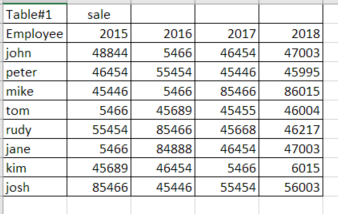
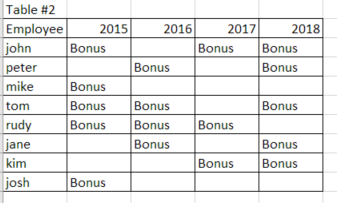
I would like to make visible in the table # 1 with sale per emplyee when they were eligible for bonus.
The bonus is based on other criteria than sale and it is showing displayed in the table #2. so the table #2 is the source of the conditions that should aply to the table #1
and this is how the end result should look like it can be also different font color
thank you
Hi @Anonymous,
Current power bi only support condditional formating by current value, it not supoort highlight cells by other table.
I try to look for custom visuals which has the similar feature but failed, so I'd like to suggest you share it to ideas forum.
Regards,
Xiaoxin Sheng
hi @Anonymous
Thank you for your qick response. I was affraid that woudl be the case.
Isnt there a way how to do this with help of DAX.
Lets say i have the total sale data in a different table where i would need to calculate it first
- something like
john sale = calculate (sum(table all sale,table all sale[2015]),filter(tabletable all sale[employee]="john")
and then
= if(table#2[2015]="Bonus", format("john sale", "red", text), "john sale"
i mean this is very simplistic but i am still very new to dax .. but you might get the idea and maybe you can help
thank you
Hi @Anonymous,
>>= if(table#2[2015]="Bonus", format("john sale", "red", text), "john sale"
Dax not a programming language, it not support to access/modify visual property.
Regards,
XIaoxin Sheng
The Power BI Data Visualization World Championships is back! Get ahead of the game and start preparing now!
| User | Count |
|---|---|
| 38 | |
| 36 | |
| 33 | |
| 31 | |
| 28 |
| User | Count |
|---|---|
| 129 | |
| 88 | |
| 79 | |
| 68 | |
| 63 |