Join us at FabCon Atlanta from March 16 - 20, 2026, for the ultimate Fabric, Power BI, AI and SQL community-led event. Save $200 with code FABCOMM.
Register now!Get Fabric Certified for FREE during Fabric Data Days. Don't miss your chance! Request now
Hi All,
I am new to Power BI from Tableau. I have a very basic question.
I am trying to concatenate an 'ACCOUNT NUMBER' which is a number to its 'Description' a string. The new field is new column. For example:
ACCOUNT NUMBER = 124768009
DESCRIPTION = Allocations from Sites
My new column 'ACCOUNT DETAILS' should be '124768009 - Allocations from Sites'.
Please help me acheive this. Thanks a ton.
Regards
DP
Solved! Go to Solution.
Hi @Anonymous ,
Use the following DAX expression to create a new column:
You can do this in Power Query by doing the following:
Note you will have to change the names of the columns to your names.
This way it will be created when you load the data.
Thanks!
Dawn
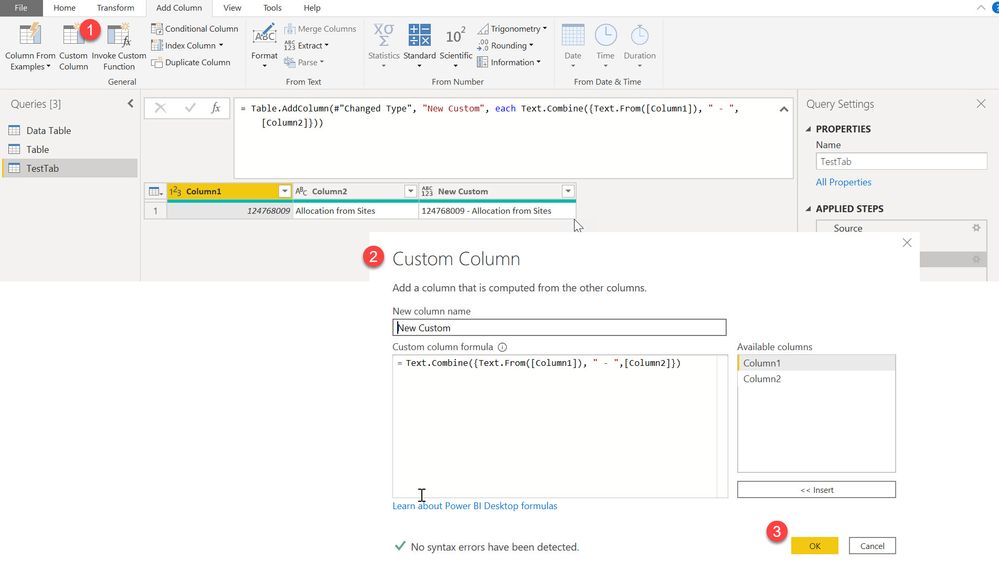
Hi @Anonymous ,
follow the figure:
Regards FrankAT
Thanks Frank. This also worked.
Hi @Anonymous ,
Use the following DAX expression to create a new column:
Kudos
Check out the November 2025 Power BI update to learn about new features.
Advance your Data & AI career with 50 days of live learning, contests, hands-on challenges, study groups & certifications and more!