Join us at FabCon Atlanta from March 16 - 20, 2026, for the ultimate Fabric, Power BI, AI and SQL community-led event. Save $200 with code FABCOMM.
Register now!The Power BI Data Visualization World Championships is back! Get ahead of the game and start preparing now! Learn more
I've been looking for this for a while so thought I'd ask.
I use a matrix with ah Date hierarchy field to drill down in to lower levels (Year/Quarter/Month).
However, when I drill down you don't see what previous level you were on
e.g. if you drill down in to 2018 - Q1 - January you only see that you are in January and need to know what year you went in to.
Is there a quick way/option I'm missing to turn on to show the full "path" on the label/row? (without building a custom hierarchy where you add calculated columns and build it yourself)
Thanks!
Solved! Go to Solution.
@DirkRonsmans,
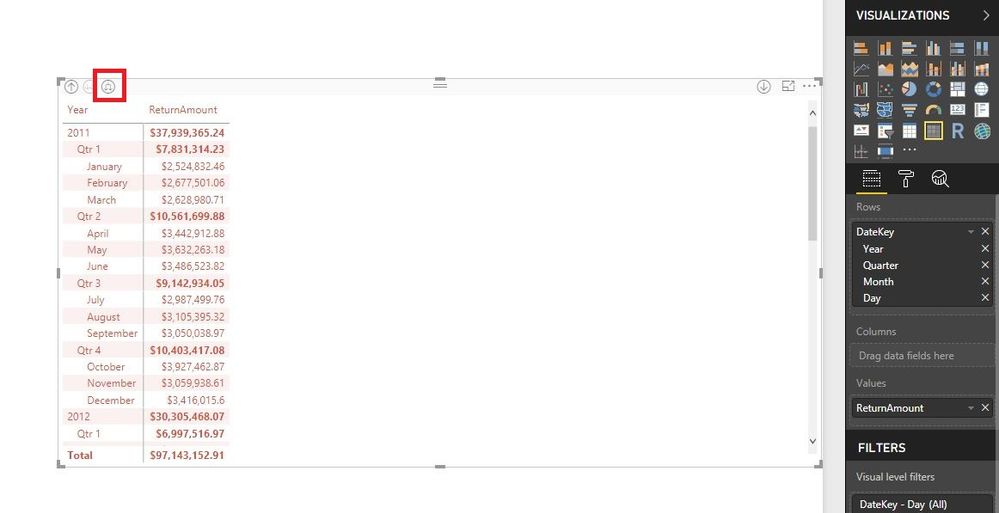
Please use the highlighted button to drill down your Matrix visual.
Regards,
Lydia
@DirkRonsmans,
Please use the highlighted button to drill down your Matrix visual.
Regards,
Lydia
@Anonymous Can't believe I missed that one. I use it all the time when using multiple fields so they are stepped but it didn't occur to me that it would do the same for a Date hierarchy!
Thanks!
The Power BI Data Visualization World Championships is back! Get ahead of the game and start preparing now!
Check out the November 2025 Power BI update to learn about new features.
| User | Count |
|---|---|
| 59 | |
| 43 | |
| 42 | |
| 23 | |
| 17 |
| User | Count |
|---|---|
| 190 | |
| 122 | |
| 96 | |
| 66 | |
| 47 |