cancel
Showing results for 
Search instead for 
Did you mean: 

Get Fabric Certified for FREE during Fabric Data Days. Don't miss your chance! Request now

Reply
maxduff59
Helper II
Helper II

Compute mean instead of sum in the subtotal of a matrix

Hello,

I have a matrix with several informations as rows (positions of players, name of players) and I have some data as values. When using the subtotal of rows, the matrix is showing for each position the sum of all players but is it possible to change the sum in order to have the average of each position ?

Thanks in advance for your time and your answer

1 ACCEPTED SOLUTION
Mikelytics
Resident Rockstar
Resident Rockstar

HI @maxduff59 


Do you work with measures or without? In general you should work with measures. But if you do not in this case then please look on the following erxample:


I put fields product and product group and a values into a matrix. you see that the sub totals are a sum by default.
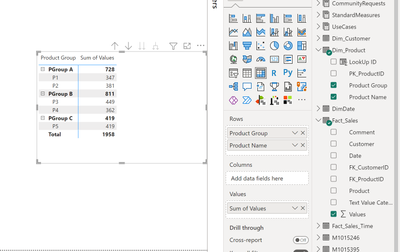
Mikelytics_0-1671456761397.png

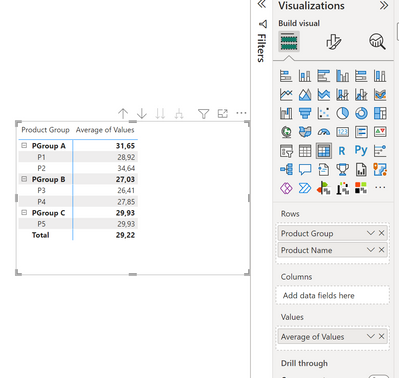
switch to average

Mikelytics_1-1671456858607.png

result:

Mikelytics_2-1671456877671.png

but now everything is in average. 


second approach if you want to keep the sum below and get the average on top you would create a measure like this.


Measure with sum and average on sub level = 

AVERAGEX(
    VALUES(Dim_Product[Product Name]),
    CALCULATE(SUM(Fact_Sales[Values]))
)


Mikelytics_3-1671457022138.png

Best regards
Michael
-----------------------------------------------------
If this post helps, then please consider Accept it as the solution to help the other members find it more quickly.
Appreciate your thumbs up!
@ me in replies or I'll lose your thread.


------------------------------------------------------------------
Visit my blog datenhungrig which I recently started with content about business intelligence and Power BI in German and English or follow me on LinkedIn!

View solution in original post

1 REPLY 1
Mikelytics
Resident Rockstar
Resident Rockstar

HI @maxduff59 


Do you work with measures or without? In general you should work with measures. But if you do not in this case then please look on the following erxample:


I put fields product and product group and a values into a matrix. you see that the sub totals are a sum by default.

Mikelytics_0-1671456761397.png

switch to average

Mikelytics_1-1671456858607.png

result:

Mikelytics_2-1671456877671.png

but now everything is in average. 


second approach if you want to keep the sum below and get the average on top you would create a measure like this.


Measure with sum and average on sub level = 

AVERAGEX(
    VALUES(Dim_Product[Product Name]),
    CALCULATE(SUM(Fact_Sales[Values]))
)


Mikelytics_3-1671457022138.png

Best regards
Michael
-----------------------------------------------------
If this post helps, then please consider Accept it as the solution to help the other members find it more quickly.
Appreciate your thumbs up!
@ me in replies or I'll lose your thread.


------------------------------------------------------------------
Visit my blog datenhungrig which I recently started with content about business intelligence and Power BI in German and English or follow me on LinkedIn!

Helpful resources

Announcements
November Power BI Update Carousel

Power BI Monthly Update - November 2025

Check out the November 2025 Power BI update to learn about new features.

Fabric Data Days Carousel

Fabric Data Days

Advance your Data & AI career with 50 days of live learning, contests, hands-on challenges, study groups & certifications and more!

FabCon Atlanta 2026 carousel

FabCon Atlanta 2026

Join us at FabCon Atlanta, March 16-20, for the ultimate Fabric, Power BI, AI and SQL community-led event. Save $200 with code FABCOMM.

Top Solution Authors
Top Kudoed Authors