Share feedback directly with Fabric product managers, participate in targeted research studies and influence the Fabric roadmap.
Sign up nowGet Fabric certified for FREE! Don't miss your chance! Learn more
Hello. This might be complicated.
I have a claims table that is the lookup table and a work table attached. The work order tables has work order number, work order type, work order pricing agreement and work order status.
I want to associate work orders with a "type" = "cashout" with their pricing agreement type.
Here are the rules:
1) For ALL cashouts (cashouts are only counted if work order status= closed/completed), use the pricing agreement of the first work order on that specific claim.
2) If there is a redispatch work order AND the status of the first time dispatch = closed/cancelled
3) Only count cashouts if they have a status of "closed/completed"
4) Sort all this based on claims created date.
Picture of spreadsheet attached. Thanks!!
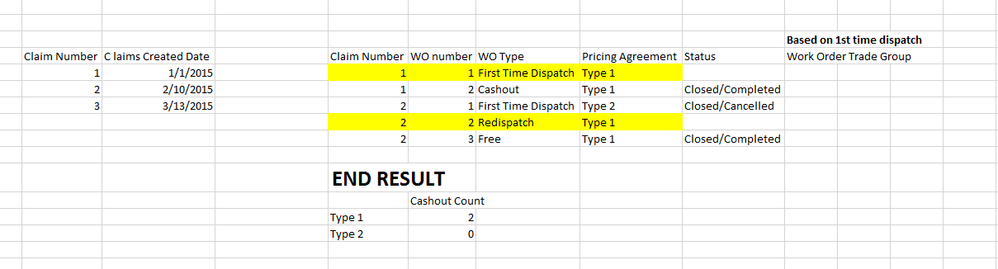
I was able to work this out in the claims table, but this still doesn't help me with the pricing agreement aspect of things.
=CALCULATE(counta(WorkOrder[WO Type]),WorkOrder[WO Type]="Cashout",WorkOrder[Status]="Closed/Completed")
Hi @ammartino44,
You can try to use bleow measure if it works on your side.
Count of Specify Rules= var currType= LastNoBlank(TABLE[Pricing Agreement],[Pricing Agreement]) return COUNTROWS( FILTER( ALL(TABLE), [Pricing Agreement]=currType&& OR( OR([WO Type]="First TIme Dispath",[WO Type]="Cashout")&&[Status]= "closed/completed", [WO Type]="Redispath"&&[Status]= "closed/cancelled")))
If above is not help, please share me a sample file to test.
Regards,
Xiaoxin Sheng
Share feedback directly with Fabric product managers, participate in targeted research studies and influence the Fabric roadmap.
| User | Count |
|---|---|
| 63 | |
| 62 | |
| 42 | |
| 19 | |
| 16 |
| User | Count |
|---|---|
| 113 | |
| 105 | |
| 36 | |
| 28 | |
| 28 |