We've captured the moments from FabCon & SQLCon that everyone is talking about, and we are bringing them to the community, live and on-demand. Starts on April 14th. Register now
This is all detailed in a question I posted in another MPBI forum: https://community.powerbi.com/t5/DAX-Commands-and-Tips/Conditional-formatting-DAX/m-p/2561478#M72884
Posting here for more visibility.
Hi, @Back2Basics
You can try the following methods.
Matrix select =
IF (
ISFILTERED ( 'Report measures'[Unique ID] ),
IF (
SELECTEDVALUE ( 'Report measures'[Unique ID] ) IN VALUES ( Workbook[Unique ID] ),
1
)
)
Color =
IF([Matrix select]=1,"Green")
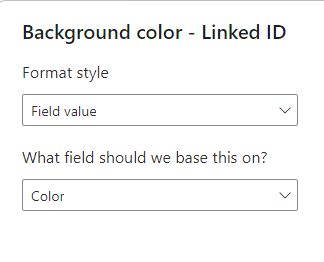
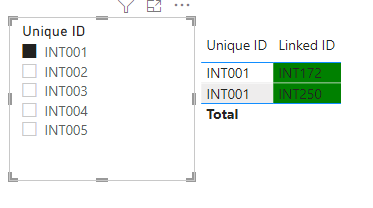
Select the background color of Linked ID and set Color measure.
Is this the output you expect?
Best Regards,
Community Support Team _Charlotte
If this post helps, then please consider Accept it as the solution to help the other members find it more quickly.
Thanks so much for the reply @v-zhangti
Unfortunately what I'm trying to do is slightly different. The table I have oes not display the Linked ID field, but a field called 'outcomes'. This is setup as a matrix and counts the outcomes against impact level, with the count being number of ID's.
I'm trying it a different route now but having errors when merging which I can' figure out either: https://community.powerbi.com/t5/Power-Query/Merge-not-working/m-p/2563769
If you have recently started exploring Fabric, we'd love to hear how it's going. Your feedback can help with product improvements.
A new Power BI DataViz World Championship is coming this June! Don't miss out on submitting your entry.
Share feedback directly with Fabric product managers, participate in targeted research studies and influence the Fabric roadmap.
| User | Count |
|---|---|
| 54 | |
| 39 | |
| 34 | |
| 18 | |
| 18 |
| User | Count |
|---|---|
| 69 | |
| 64 | |
| 38 | |
| 34 | |
| 23 |