This is best Fabric, Power BI, SQL and AI community event. How do we know? The last event sold out! Save €200 with code FABCMTY200.
Register nowA new Data Days event is coming soon! This time we’re going bigger than ever. Fabric, Power BI, SQL, AI and more. Don't miss out.
All,
I am completely new to PBI and have a challenge to resolve. Let's assume I have the following data set:
Column 1: Company name
Column 2: Sales
Column 3: Industry
Let's also assume I have 10 companies within 2 industries. Rather simple data set.
I need to create 2 reports whereby table 1 is showing sales (sum of sales) information related to a selected company and table 2 is showing sales (average of sales) information to companies that are within the same industry but excluding the selected company for table 1 analysis. Also, I would like to have the ability to manually exclude remaining companies from the average calculation (table 2) by deselecting them from a filter object.
For example: (assuming companies 1 - 5 are in the same industry)
Selected company: 1
Table 1 shows sum of sales for company 1
Table 2 shows average of sales for companies 2 - 5
If I deselect company 4 from the industry peer group then table 2 should show average of sales for companies 2, 3, and 5
Any help will be appreciated!
Hi,
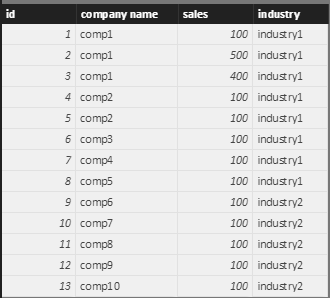
I assume you have a table like below:
1. Create a measure to get sum of sales in the selected industry excluding the selected company.
allExceptSum = CALCULATE(sum(companySales[sales]),ALLEXCEPT(companySales,companySales[industry]))-CALCULATE(SUM(companySales[sales]),ALLSELECTED(companySales[company name]))
2. Create a measure to get count of company in the selected industry excluding the selected company.
allExceptCount = CALCULATE(distinctcount(companySales[company name]),ALLEXCEPT(companySales,companySales[industry]))-CALCULATE(DISTINCTCOUNT(companySales[company name]),ALLSELECTED(companySales[company name]))
3. Create a measure to get average sales in the selected industry excluding the selected compay.
allExceptAverage = [allExceptSum]/[allExceptCount]
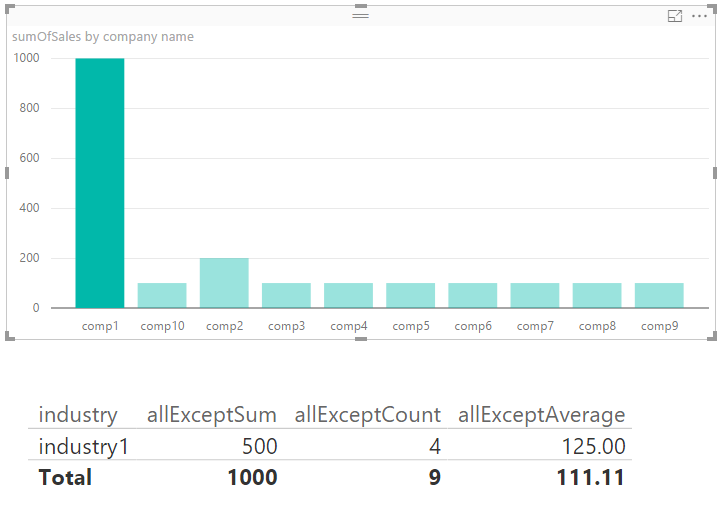
4. Now you can create 2 visuals to show them.
Best Regards
Alex
Hi Alex,
Thank you for your message and for taking the time to help me out. I really do appreciate it! Your solution definitely helped. I made one adjustment to the allExceptSum measure. Now the measure is calculating correctly for related companies:
allExceptSum2 = CALCULATE(sum(Table1[Sales]),ALLEXCEPT(Table1,Table1[Industry]))-CALCULATE(SUM(Table1[Sales]),ALLSELECTED(Table1[Company]))
One remaining question is how can I further manually deselect specific companies from this measure's calcuation? Filter object reduces records acutomatically. So example, if I select Comp1 to do sum of sales then allExceptSum2 will calcuatate sum of Comp2, 3, 4, and 5. How can I deselect Comp5 for this?
Again, thank you for taking the time!
Marko
Hi,
If you want to disselect comp5, you can minus the sum of sales from allExceptSum:
allExceptSum = CALCULATE(sum(companySales[sales]),ALLEXCEPT(companySales,companySales[industry]))-CALCULATE(SUM(companySales[sales]),ALLSELECTED(companySales[company name]))-CALCULATE(sum(companySales[sales]), companySales[company name] = "comp5")
Best Regards
Alex
Check out the May 2026 Power BI update to learn about new features.
Sign up to receive a private message when registration opens and key events begin.
If you have recently started exploring Fabric, we'd love to hear how it's going. Your feedback can help with product improvements.
| User | Count |
|---|---|
| 32 | |
| 25 | |
| 24 | |
| 24 | |
| 14 |
| User | Count |
|---|---|
| 61 | |
| 47 | |
| 27 | |
| 24 | |
| 19 |