Join us at FabCon Atlanta from March 16 - 20, 2026, for the ultimate Fabric, Power BI, AI and SQL community-led event. Save $200 with code FABCOMM.
Register now!The Power BI Data Visualization World Championships is back! Get ahead of the game and start preparing now! Learn more
Hello,
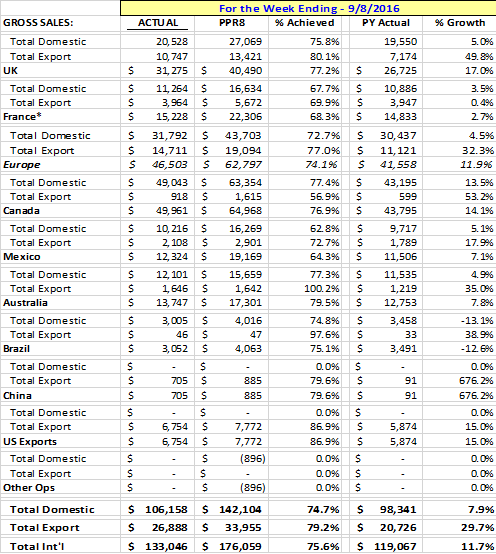
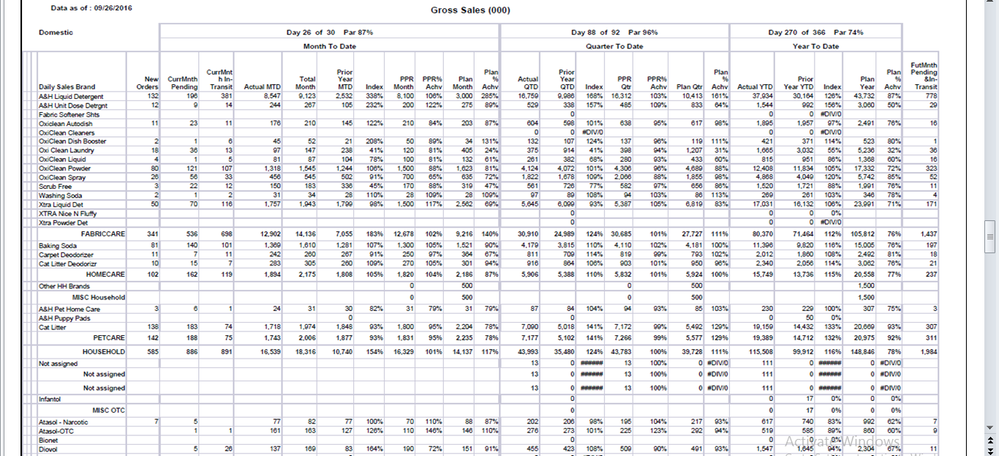
How can I create following report in power bi.
1. Report One
2. Second Report
Please provide your valuable suggestion
Regards,
Sandeep Bhaduairya
Solved! Go to Solution.
Hi Sandeep,
For complete Time intelligence Patterns in DAX, Please refer to this blog by Marco Russo and Albero Ferrari at here. This will give you the idea of how to create all the measures shown in your Reports.
Hi devssolution,
In general, the basic steps to generate the report in Power BI should be:
1. Get the fact Data;
2. Create reference table (such as date table) or measure to help building the report;
3. Choose the Visual;
To get the actual data, we should make sure we could import the data into Power BI (Desktop), check: Data sources in Power BI Desktop;
For the measure, as suggested by BhaveshPatel, requires time functions in DAX. DAX have the function to calculate the total sales based on dates, like MTD, QTD or YTD.
In addition to the blog already shared, please also take a look at the following one, which explains different kinds of date and time functions:
Time Intelligence Functions in DAX
The reports style you posted could be accompulished through table or Matrix Visuals in Power BI:
How to Use Tables and Matrixes
If you need any further assistance on this, please post back.
Regards
Hi devssolution,
In general, the basic steps to generate the report in Power BI should be:
1. Get the fact Data;
2. Create reference table (such as date table) or measure to help building the report;
3. Choose the Visual;
To get the actual data, we should make sure we could import the data into Power BI (Desktop), check: Data sources in Power BI Desktop;
For the measure, as suggested by BhaveshPatel, requires time functions in DAX. DAX have the function to calculate the total sales based on dates, like MTD, QTD or YTD.
In addition to the blog already shared, please also take a look at the following one, which explains different kinds of date and time functions:
Time Intelligence Functions in DAX
The reports style you posted could be accompulished through table or Matrix Visuals in Power BI:
How to Use Tables and Matrixes
If you need any further assistance on this, please post back.
Regards
Hi Sandeep,
For complete Time intelligence Patterns in DAX, Please refer to this blog by Marco Russo and Albero Ferrari at here. This will give you the idea of how to create all the measures shown in your Reports.
The Power BI Data Visualization World Championships is back! Get ahead of the game and start preparing now!
| User | Count |
|---|---|
| 41 | |
| 38 | |
| 36 | |
| 31 | |
| 28 |
| User | Count |
|---|---|
| 128 | |
| 88 | |
| 79 | |
| 68 | |
| 63 |