cancel
Showing results for 
Search instead for 
Did you mean: 

The Power BI Data Visualization World Championships is back! Get ahead of the game and start preparing now! Learn more

Reply
baijumohan1990
Helper II
Helper II

Complex Relationship with Multiple Conditions

Hi All,

I have two tables Product and Sales. The relationship between two tables all like below ( In Sql)

Select *from Product P
Inner Join Sales S
On S.SalesProductID = P.ProductID
and P.TransactionDate Between S.SalesValidFromDate and S.ValidToDate

While Modelling tables in Power BI/SSAS Tabular How do we specify the above relationship between these tables. I Couldn’t find any option to write conditions/expressions in the Relationship options provided. Any suggestions much appreciated. ( I have come across calculated tables is that only way to achieve this scenario?)

1 ACCEPTED SOLUTION
v-frfei-msft
Community Support
Community Support

Hi @baijumohan1990 ,


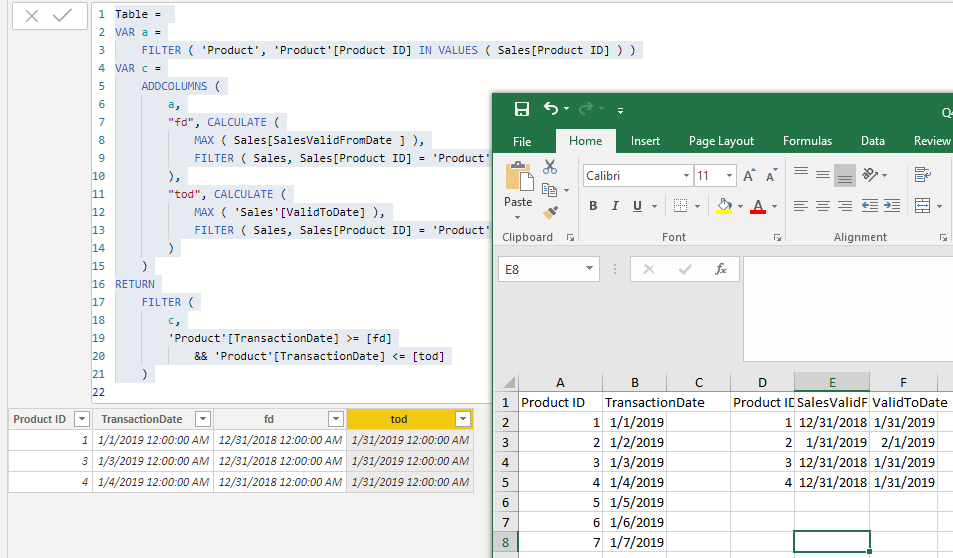
We can create a calculated table as below in power bi.


Table = 
VAR a =
    FILTER ( 'Product', 'Product'[Product ID] IN VALUES ( Sales[Product ID] ) )
VAR c =
    ADDCOLUMNS (
        a,
        "fd", CALCULATE (
            MAX ( Sales[SalesValidFromDate ] ),
            FILTER ( Sales, Sales[Product ID] = 'Product'[Product ID] )
        ),
        "tod", CALCULATE (
            MAX ( 'Sales'[ValidToDate] ),
            FILTER ( Sales, Sales[Product ID] = 'Product'[Product ID] )
        )
    )
RETURN
    FILTER (
        c,
        'Product'[TransactionDate] >= [fd]
            && 'Product'[TransactionDate] <= [tod]
    )

Capture.PNG


For more details, please check the pbix as attached.


Community Support Team _ Frank
If this post helps, then please consider Accept it as the solution to help the others find it more quickly.

View solution in original post

2 REPLIES 2
v-frfei-msft
Community Support
Community Support

Hi @baijumohan1990 ,


We can create a calculated table as below in power bi.


Table = 
VAR a =
    FILTER ( 'Product', 'Product'[Product ID] IN VALUES ( Sales[Product ID] ) )
VAR c =
    ADDCOLUMNS (
        a,
        "fd", CALCULATE (
            MAX ( Sales[SalesValidFromDate ] ),
            FILTER ( Sales, Sales[Product ID] = 'Product'[Product ID] )
        ),
        "tod", CALCULATE (
            MAX ( 'Sales'[ValidToDate] ),
            FILTER ( Sales, Sales[Product ID] = 'Product'[Product ID] )
        )
    )
RETURN
    FILTER (
        c,
        'Product'[TransactionDate] >= [fd]
            && 'Product'[TransactionDate] <= [tod]
    )

Capture.PNG


For more details, please check the pbix as attached.


Community Support Team _ Frank
If this post helps, then please consider Accept it as the solution to help the others find it more quickly.

Hi @v-frfei-msft 

I have a similar case, But there is no link key between the two tables.
ONLY this condition P.TransactionDate Between S.SalesValidFromDate and S.ValidToDate

S
o, what are the possible ideas for this?

Thanks in Advance.

Helpful resources

Announcements
Power BI DataViz World Championships

Power BI Dataviz World Championships

The Power BI Data Visualization World Championships is back! Get ahead of the game and start preparing now!

December 2025 Power BI Update Carousel

Power BI Monthly Update - December 2025

Check out the December 2025 Power BI Holiday Recap!

FabCon Atlanta 2026 carousel

FabCon Atlanta 2026

Join us at FabCon Atlanta, March 16-20, for the ultimate Fabric, Power BI, AI and SQL community-led event. Save $200 with code FABCOMM.

Top Solution Authors