FabCon is coming to Atlanta
Join us at FabCon Atlanta from March 16 - 20, 2026, for the ultimate Fabric, Power BI, AI and SQL community-led event. Save $200 with code FABCOMM.
Register now!- Power BI forums
- Get Help with Power BI
- Desktop
- Service
- Report Server
- Power Query
- Mobile Apps
- Developer
- DAX Commands and Tips
- Custom Visuals Development Discussion
- Health and Life Sciences
- Power BI Spanish forums
- Translated Spanish Desktop
- Training and Consulting
- Instructor Led Training
- Dashboard in a Day for Women, by Women
- Galleries
- Data Stories Gallery
- Themes Gallery
- Contests Gallery
- QuickViz Gallery
- Quick Measures Gallery
- Visual Calculations Gallery
- Notebook Gallery
- Translytical Task Flow Gallery
- TMDL Gallery
- R Script Showcase
- Webinars and Video Gallery
- Ideas
- Custom Visuals Ideas (read-only)
- Issues
- Issues
- Events
- Upcoming Events
The Power BI Data Visualization World Championships is back! It's time to submit your entry. Live now!
- Power BI forums
- Forums
- Get Help with Power BI
- Desktop
- Comparison between two data set within same databa...
- Subscribe to RSS Feed
- Mark Topic as New
- Mark Topic as Read
- Float this Topic for Current User
- Bookmark
- Subscribe
- Printer Friendly Page


- Mark as New
- Bookmark
- Subscribe
- Mute
- Subscribe to RSS Feed
- Permalink
- Report Inappropriate Content
Comparison between two data set within same database with multiple filters
Hi,
I currently have this set of database:

I would like to create the following view in Power BI where I can compare the gross profit and operating for states regions and products at once.
Expected Results:

The gross and operating profit are calculated measures in Power BI with following formulas:
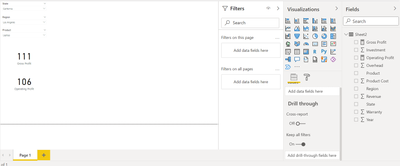
I would need another replica of these filters and cards and find difference when slicers are selected. I cannot duplicate the tables as my actual work has about 50 calculated fields to achieve the operating profit so would like to seek for some expert opinions without the need of duplicating another table.
Please find the links to the excel and power bi file here:
https://drive.google.com/drive/folders/1_iiFNWrVGAyAhHY5hWnSbETcNGygRMYJ?usp=sharing
Thanks!
Thanks!
Solved! Go to Solution.
- Mark as New
- Bookmark
- Subscribe
- Mute
- Subscribe to RSS Feed
- Permalink
- Report Inappropriate Content
Hi @milkywaypowerbi ,
I updated the sample pbix file(see attachment) again, please check whether that is what you want.
1. Update the formula of measure [Gross Profit1] and [Gross Profit2]as below
| Gross Profit1 = VAR _selstate1=SELECTEDVALUE('Slicer1'[State]) VAR _selregion1=SELECTEDVALUE('Slicer1'[Region]) VAR _selproduct1=SELECTEDVALUE('Slicer1'[Product ]) VAR _grossprofit1 =CALCULATE([Gross Profit],FILTER('Sheet2','Sheet2'[State]=_selstate1&&'Sheet2'[Region]=_selregion1&&'Sheet2'[Product ]=_selproduct1)) RETURN _grossprofit1 |
|
Gross Profit2 =
VAR _selstate2=SELECTEDVALUE('Slicer2'[State])
VAR _selregion2=SELECTEDVALUE('Slicer2'[Region])
VAR _selproduct2=SELECTEDVALUE('Slicer2'[Product ])
VAR _grossprofit2 =CALCULATE([Gross Profit],FILTER('Sheet2','Sheet2'[State]=_selstate2&&'Sheet2'[Region]=_selregion2&&'Sheet2'[Product ]=_selproduct2))
RETURN _grossprofit2
|
2. Please don't create any relationship between slicer tables and fact table(Sheet2)
Best Regards

- Mark as New
- Bookmark
- Subscribe
- Mute
- Subscribe to RSS Feed
- Permalink
- Report Inappropriate Content
Hi @milkywaypowerbi ,
I updated your sample pbix file(see attachment), please check whether that is what you want.
1. Create two dimension table and use the fields in these two tables as slicer options
Slicer1 = SUMMARIZE('Sheet2','Sheet2'[State],'Sheet2'[Region],'Sheet2'[Product ])Slicer2 = SUMMARIZE('Sheet2','Sheet2'[State],'Sheet2'[Region],'Sheet2'[Product ])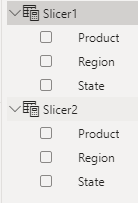
2. Create multiple measures to get the gross profit, Operating profit and the differences
Gross Profit1 =
VAR _selstate1=SELECTEDVALUE('Slicer1'[State])
VAR _selregion1=SELECTEDVALUE('Slicer1'[Region])
VAR _selproduct1=SELECTEDVALUE('Slicer1'[Product ])
VAR _grossprofit1 =CALCULATE(SUM(Sheet2[Revenue])-SUM(Sheet2[Product Cost])-sum(Sheet2[Warranty]),FILTER('Sheet2','Sheet2'[State]=_selstate1&&'Sheet2'[Region]=_selregion1&&'Sheet2'[Product ]=_selproduct1))
RETURN _grossprofit1
Gross Profit2 =
VAR _selstate2=SELECTEDVALUE('Slicer2'[State])
VAR _selregion2=SELECTEDVALUE('Slicer2'[Region])
VAR _selproduct2=SELECTEDVALUE('Slicer2'[Product ])
VAR _grossprofit2 =CALCULATE(SUM(Sheet2[Revenue])-SUM(Sheet2[Product Cost])-sum(Sheet2[Warranty]),FILTER('Sheet2','Sheet2'[State]=_selstate2&&'Sheet2'[Region]=_selregion2&&'Sheet2'[Product ]=_selproduct2))
RETURN _grossprofit2Difference of Gross Profit = [Gross Profit1]-[Gross Profit2]Operating Profit1 =
VAR _selstate1=SELECTEDVALUE('Slicer1'[State])
VAR _selregion1=SELECTEDVALUE('Slicer1'[Region])
VAR _selproduct1=SELECTEDVALUE('Slicer1'[Product ])
VAR _investment1 =CALCULATE(SUM(Sheet2[Investment ]),FILTER('Sheet2','Sheet2'[State]=_selstate1&&'Sheet2'[Region]=_selregion1&&'Sheet2'[Product ]=_selproduct1))
RETURN
[Gross Profit1]-_investment1Operating Profit2 =
VAR _selstate2=SELECTEDVALUE('Slicer2'[State])
VAR _selregion2=SELECTEDVALUE('Slicer2'[Region])
VAR _selproduct2=SELECTEDVALUE('Slicer2'[Product ])
VAR _investment2 =CALCULATE(SUM(Sheet2[Investment ]),FILTER('Sheet2','Sheet2'[State]=_selstate2&&'Sheet2'[Region]=_selregion2&&'Sheet2'[Product ]=_selproduct2))
RETURN
[Gross Profit2]-_investment2Difference of Operationg Profit = ([Gross Profit1]-[Operating Profit1])-([Gross Profit2]-[Operating Profit2])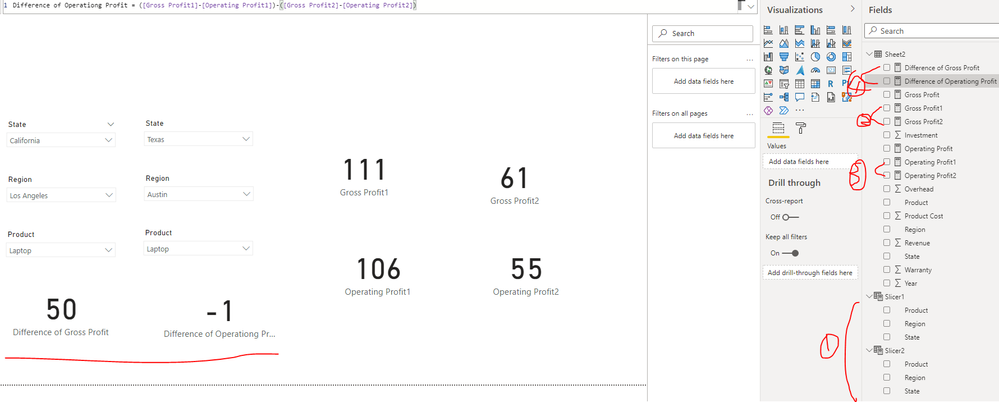
Best Regards
- Mark as New
- Bookmark
- Subscribe
- Mute
- Subscribe to RSS Feed
- Permalink
- Report Inappropriate Content
Hi @Anonymous
Thank you for your solution. However, is it possible to use the calculated measure directly in the formula instead of repeating the formula in the measure? I have a gross profit measure written already.

The issue is that I have quite a a lot of calculated measure in my actual work which affects subsequent calculated measure so I would like to check if I can use calculated measure in Var _grossprofit instead of SUM(Sheet2[Revenue])-SUM(Sheet2[Product Cost])-sum(Sheet2[Warranty]).
Another issue is that I have formed relationship between the database and one slicer table so the second formula is still reacting to the first slicer table since there are relationship
Thanks in advance
- Mark as New
- Bookmark
- Subscribe
- Mute
- Subscribe to RSS Feed
- Permalink
- Report Inappropriate Content
Hi @milkywaypowerbi ,
I updated the sample pbix file(see attachment) again, please check whether that is what you want.
1. Update the formula of measure [Gross Profit1] and [Gross Profit2]as below
| Gross Profit1 = VAR _selstate1=SELECTEDVALUE('Slicer1'[State]) VAR _selregion1=SELECTEDVALUE('Slicer1'[Region]) VAR _selproduct1=SELECTEDVALUE('Slicer1'[Product ]) VAR _grossprofit1 =CALCULATE([Gross Profit],FILTER('Sheet2','Sheet2'[State]=_selstate1&&'Sheet2'[Region]=_selregion1&&'Sheet2'[Product ]=_selproduct1)) RETURN _grossprofit1 |
|
Gross Profit2 =
VAR _selstate2=SELECTEDVALUE('Slicer2'[State])
VAR _selregion2=SELECTEDVALUE('Slicer2'[Region])
VAR _selproduct2=SELECTEDVALUE('Slicer2'[Product ])
VAR _grossprofit2 =CALCULATE([Gross Profit],FILTER('Sheet2','Sheet2'[State]=_selstate2&&'Sheet2'[Region]=_selregion2&&'Sheet2'[Product ]=_selproduct2))
RETURN _grossprofit2
|
2. Please don't create any relationship between slicer tables and fact table(Sheet2)
Best Regards


- Mark as New
- Bookmark
- Subscribe
- Mute
- Subscribe to RSS Feed
- Permalink
- Report Inappropriate Content
@milkywaypowerbi , we need an independent table for the second set of slicers
example for the two date slicer - How to use two Date/Period slicers: https://www.youtube.com/watch?v=WSeZr_-MiTg
Check
Need of an Independent Table in Power BI: https://youtu.be/lOEW-YUrAbE
Helpful resources


| User | Count |
|---|---|
| 56 | |
| 41 | |
| 38 | |
| 21 | |
| 21 |


| User | Count |
|---|---|
| 141 | |
| 103 | |
| 63 | |
| 36 | |
| 35 |


