Join us at FabCon Atlanta from March 16 - 20, 2026, for the ultimate Fabric, Power BI, AI and SQL community-led event. Save $200 with code FABCOMM.
Register now!The Power BI Data Visualization World Championships is back! Get ahead of the game and start preparing now! Learn more
Hello,
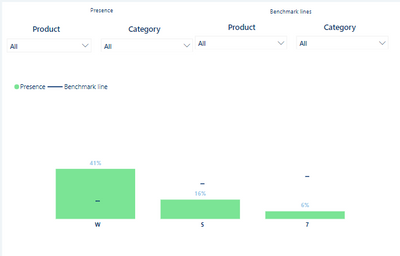
I would like to prepare a comparision/benchmark chart like one down below, where "Presence" bar is filtered by "Presence" filters and it doesn't change "Benchmark line" values and vice versa - "Benchmark lines" filters changes % on "Benchmark line" but doesnt change "Presence" bar. The measure used in both will be the same, but business will compare for instance Presence of Category = "Audio" with Benchmark line of Category = "TV". Hope it clarifies a bit. I'd also mention that Product and Category are from different tables if that counts
Thank you in advance for your help
@Pbiuserr , Refer if this can help
Compare Categorical Data Using Slicers - Compare two Brands: https://youtu.be/exN4nTewgbc
Thanks. What if instead of Brand I have like 5 columns which I want to compare? How to create such measure
I understand and can recreate this on single slicer but I'd need few of them
The Power BI Data Visualization World Championships is back! Get ahead of the game and start preparing now!
| User | Count |
|---|---|
| 40 | |
| 37 | |
| 33 | |
| 29 | |
| 26 |
| User | Count |
|---|---|
| 134 | |
| 104 | |
| 63 | |
| 60 | |
| 55 |