Learn from the best! Meet the four finalists headed to the FINALS of the Power BI Dataviz World Championships! Register now
Hello,
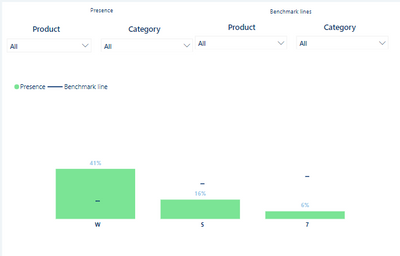
I would like to prepare a comparision/benchmark chart like one down below, where "Presence" bar is filtered by "Presence" filters and it doesn't change "Benchmark line" values and vice versa - "Benchmark lines" filters changes % on "Benchmark line" but doesnt change "Presence" bar. The measure used in both will be the same, but business will compare for instance Presence of Category = "Audio" with Benchmark line of Category = "TV". Hope it clarifies a bit. I'd also mention that Product and Category are from different tables if that counts
Thank you in advance for your help
@Pbiuserr , Refer if this can help
Compare Categorical Data Using Slicers - Compare two Brands: https://youtu.be/exN4nTewgbc
Thanks. What if instead of Brand I have like 5 columns which I want to compare? How to create such measure
I understand and can recreate this on single slicer but I'd need few of them
| User | Count |
|---|---|
| 50 | |
| 36 | |
| 29 | |
| 18 | |
| 17 |
| User | Count |
|---|---|
| 66 | |
| 58 | |
| 39 | |
| 21 | |
| 20 |