Learn from the best! Meet the four finalists headed to the FINALS of the Power BI Dataviz World Championships! Register now
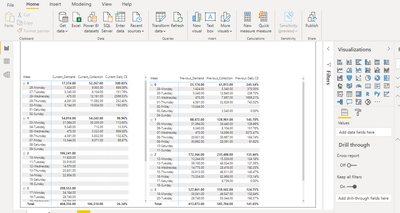
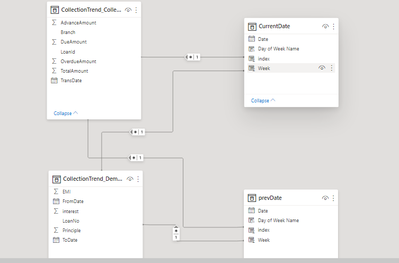
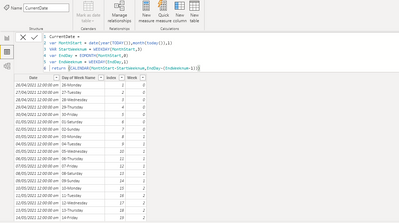
Currently I have two different matrix one which has current month data and one with previous month data (the months r not actual month dates but business month date logic attached as image). I want to subtract current collection and previous collection (Sum of total amount from collection table) and show it in a third matrix or in first or second matrix (eg :26th monday value from first matrix - 29th Monday value from second matrix this is needed for each row in the visuals(Basically like a cell to cell subtraction in excel like A4-B4). A simple measure with Current collection - Previous collection is not working because of how the model is . Have attached some reference images . I am quite new to power BI and might be missing something obvious so any suggestion is welcome.
Solved! Go to Solution.
I was able to do this calculation using the given measure hope it helps out someone in the future
Please note I added this measure into the Current Month matrix and the measure calculation is based on that .
I was able to do this calculation using the given measure hope it helps out someone in the future
Please note I added this measure into the Current Month matrix and the measure calculation is based on that .
@Anonymous , Usually in such cases either on the period start date or with YYYYPP we create a rank and try to create this month vs last month
With a separate year period table say Date
new column
Period Rank = RANKX(all('Period'),'Period'[year period],,ASC,Dense)
measures
This Period = CALCULATE(sum('order'[Qty]), FILTER(ALL('Period'),'Period'[Period Rank]=max('Period'[Period Rank])))
Last Period = CALCULATE(sum('order'[Qty]), FILTER(ALL('Period'),'Period'[Period Rank]=max('Period'[Period Rank])-1))
@amitchandak Thank you for your response . I already have index columns created in current month and prev month table(both are of 2021) using RANKX function can that be used somehow as index 1 in both the tables are the ones to be compared(similary each index) . Also could you plz provide some more insight on this year table concept I couldnt quite grasp it.
A new Power BI DataViz World Championship is coming this June! Don't miss out on submitting your entry.
Share feedback directly with Fabric product managers, participate in targeted research studies and influence the Fabric roadmap.
| User | Count |
|---|---|
| 46 | |
| 31 | |
| 29 | |
| 15 | |
| 15 |
| User | Count |
|---|---|
| 58 | |
| 56 | |
| 38 | |
| 21 | |
| 21 |