cancel
Showing results for 
Search instead for 
Did you mean: 

Learn from the best! Meet the four finalists headed to the FINALS of the Power BI Dataviz World Championships! Register now

Reply
RVLee
Frequent Visitor

Comparing two list from a single table

Hi,


I'm trying to get a list of province up to current year and to be compared with a list of province up to last year, which eventually to get the new province name occurred in the current year.

Which is looked like below

Table: Location Comparison

RVLee_1-1652860211665.png

And I expect to get the CY Province where LY Province is blank.


There are 1 fact table and 1 dimension table used that is related with this requirement. The fact table is the list of location and its start date. The dimension table is the location list and its province.

For example

RVLee_2-1652860793621.png     RVLee_3-1652860817154.png

Note: let's assume that current year (CY) is 2019


I'm looking for an efficient way to get the result. Tried to create a single DAX to compare the lists, by using 2 variable tables summarizing the CY Province and LY Province. However, I stuck at combining the two variable tables in the DAX.

Hope to get help on this. More efficient ways are welcomed.


Btw, here's what I tried - which is still returning an error DAX.


Summary Table =
VAR _maxDate =
MAX ( 'Location'[Location Start Date] )
 
VAR _CYtable =
SUMMARIZECOLUMNS (
'Location List'[Province],
FILTER (
'Location',
'Location'[Location Start Date]
<= _maxDate
)
)
 
VAR _maxLastYearDate =
DATE (
YEAR ( _maxDate )
- 1,
12,
31
)
 
VAR _LYtable =
SELECTCOLUMNS (
SUMMARIZECOLUMNS (
'Location List'[Province],
FILTER (
'Location',
'Location'[Location Start Date]
<= _maxLastYearDate
)
),
"LY Province", [Province]
)
 
RETURN
NATURALLEFTOUTERJOIN (
_CYtable,
_LYtable
)
1 ACCEPTED SOLUTION
v-yalanwu-msft
Community Support
Community Support

Hi, @RVLee ,

Try it.

Summary Table = 
VAR _maxDate =
    MAX ( 'Location'[Start Date])
VAR _CYtable =
    SUMMARIZECOLUMNS (
        'Location List'[Province],
        FILTER ( 'Location', 'Location'[Start Date] <= _maxDate )
    )
VAR _maxLastYearDate =
    DATE ( YEAR ( _maxDate ) - 1, 12, 31 )
VAR _LYtable =
    SELECTCOLUMNS (
        SUMMARIZECOLUMNS (
            'Location List'[Province],
            FILTER ( 'Location', 'Location'[Start Date] <= _maxLastYearDate )
        ),
        "LY Province", [Province]
    )
RETURN
EXCEPT(  _CYtable, _LYtable )

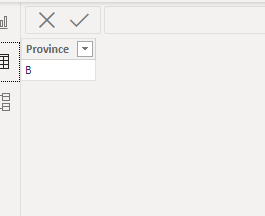
The final show:

vyalanwumsft_0-1653273617342.png


Best Regards,
Community Support Team _ Yalan Wu
If this post helps, then please consider Accept it as the solution to help the other members find it more quickly.

View solution in original post

2 REPLIES 2
v-yalanwu-msft
Community Support
Community Support

Hi, @RVLee ,

Try it.

Summary Table = 
VAR _maxDate =
    MAX ( 'Location'[Start Date])
VAR _CYtable =
    SUMMARIZECOLUMNS (
        'Location List'[Province],
        FILTER ( 'Location', 'Location'[Start Date] <= _maxDate )
    )
VAR _maxLastYearDate =
    DATE ( YEAR ( _maxDate ) - 1, 12, 31 )
VAR _LYtable =
    SELECTCOLUMNS (
        SUMMARIZECOLUMNS (
            'Location List'[Province],
            FILTER ( 'Location', 'Location'[Start Date] <= _maxLastYearDate )
        ),
        "LY Province", [Province]
    )
RETURN
EXCEPT(  _CYtable, _LYtable )

The final show:

vyalanwumsft_0-1653273617342.png


Best Regards,
Community Support Team _ Yalan Wu
If this post helps, then please consider Accept it as the solution to help the other members find it more quickly.

Hi @v-yalanwu-msft,


It works! Thanks a lot!


Regards

Helpful resources

Announcements
Power BI DataViz World Championships carousel

Power BI DataViz World Championships - June 2026

A new Power BI DataViz World Championship is coming this June! Don't miss out on submitting your entry.

Join our Fabric User Panel

Join our Fabric User Panel

Share feedback directly with Fabric product managers, participate in targeted research studies and influence the Fabric roadmap.

March Power BI Update Carousel

Power BI Community Update - March 2026

Check out the March 2026 Power BI update to learn about new features.