Don't miss your chance to take the Fabric Data Engineer (DP-600) exam for FREE! Find out how by watching the DP-600 session on-demand now through April 28th.
Learn moreJoin the FabCon + SQLCon recap series. Up next: Power BI, Real-Time Intelligence, IQ and AI, and Data Factory take center stage. All sessions are available on-demand after the live show. Register now
Howdy PBI GURUS! I'm having a hard time creating a comparison with multiple columns subtotal as rows. From the sample data below, I want to compare sales, cos and gp for two user selected period. Sales, cos, and gp are columns in the data set, I want to flip it and subtotal it as rows.
TIA!
Data:
| Region | Sales | COS | GP | Month |
| West | $ 678.00 | $ 542.40 | $ 135.60 | May |
| East | $ 631.00 | $ 504.80 | $ 126.20 | May |
| North | $ 812.00 | $ 649.60 | $ 162.40 | May |
| South | $ 960.00 | $ 768.00 | $ 192.00 | May |
| West | $ 651.00 | $ 520.80 | $ 130.20 | June |
| East | $ 611.00 | $ 488.80 | $ 122.20 | June |
| North | $ 904.00 | $ 723.20 | $ 180.80 | June |
| South | $ 956.00 | $ 764.80 | $ 191.20 | June |
| West | $ 729.00 | $ 583.20 | $ 145.80 | July |
| East | $ 872.00 | $ 697.60 | $ 174.40 | July |
| North | $ 643.00 | $ 514.40 | $ 128.60 | July |
| South | $ 893.00 | $ 714.40 | $ 178.60 | July |
Results: User selected June from one slicer and July from another slicer
| Values | May | July | Var |
| Sum of Sales | 3480 | 3176 | -304 |
| Sum of COS | 2784 | 2540.8 | -243.2 |
| Sum of GP | 696 | 635.2 | -60.8 |
Solved! Go to Solution.
Hi @lpd82 ,
Based on my test,
1. Create a new table with summarized data
Table =
VAR _T =
CROSSJOIN (
{ "Sum of Sales", "Sum of COS", "Sum of GP" },
VALUES ( Data[Month] )
)
RETURN
ADDCOLUMNS (
_T,
"Sum",
VAR _m = [Month]
RETURN
SWITCH (
[Value],
"Sum of Sales", CALCULATE ( SUM ( Data[Sales] ), FILTER ( 'Data', 'Data'[Month] = _m ) ),
"Sum of COS", CALCULATE ( SUM ( Data[COS] ), FILTER ( 'Data', 'Data'[Month] = _m ) ),
"Sum of GP", CALCULATE ( SUM ( Data[GP] ), FILTER ( 'Data', 'Data'[Month] = _m ) )
)
)
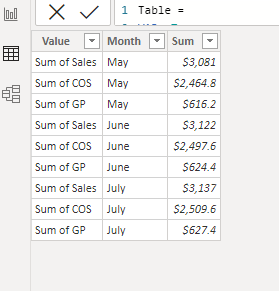
2. As you mentioned, you have two slicers to select months and you want to dynamically change the column/measure names.
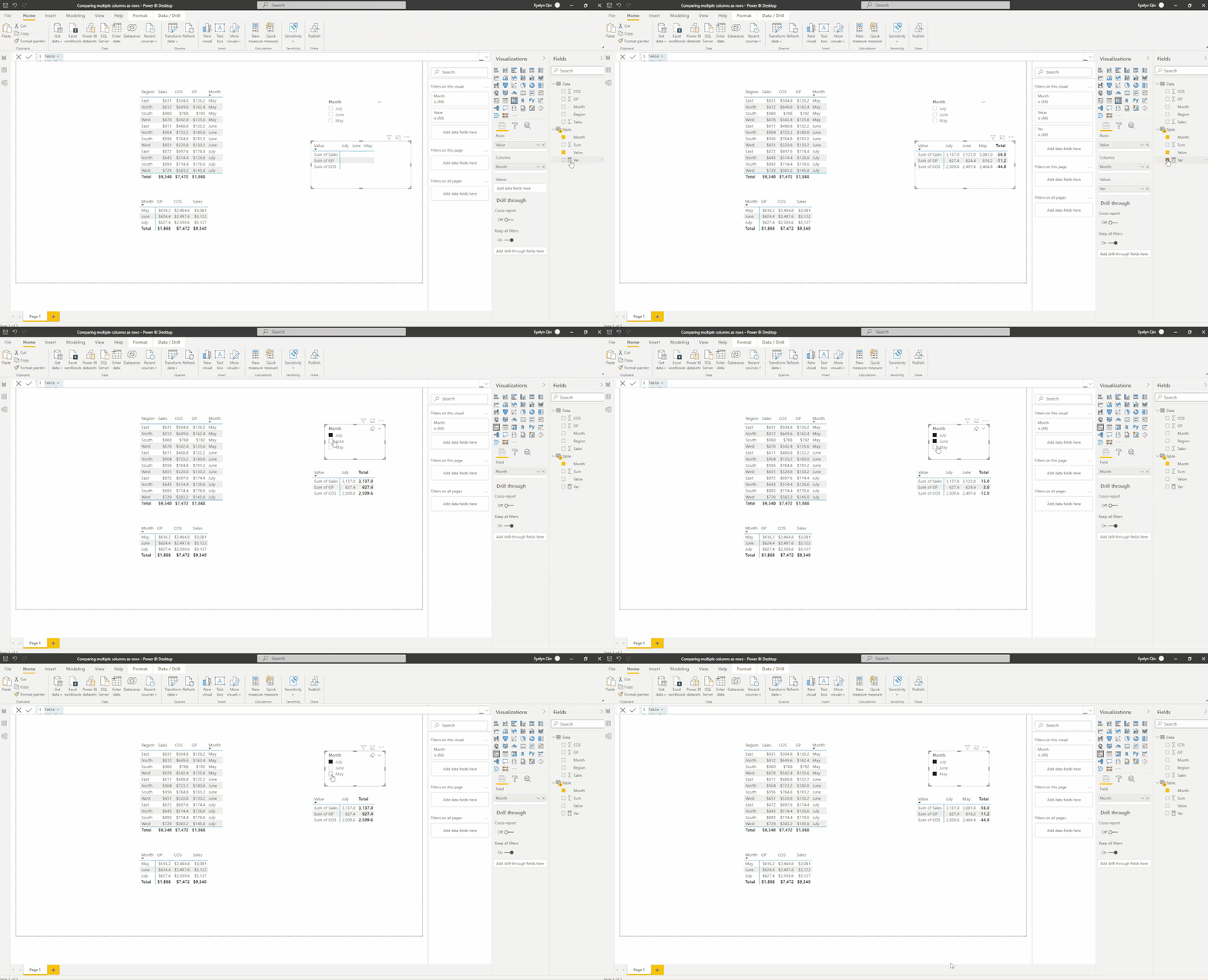
To be more effective, I'd suggest you use only one slicer for multiple selections:
Var =
VAR _min =
MIN ( 'Table'[Month] )
VAR _max =
MAX ( 'Table'[Month] )
RETURN
IF (
HASONEVALUE ( 'Table'[Month] ),
MAX ( 'Table'[Sum] ),
CALCULATE ( MAX ( 'Table'[Sum] ), FILTER ( 'Table', 'Table'[Month] = _max ) )
- CALCULATE ( MAX ( 'Table'[Sum] ), FILTER ( 'Table', 'Table'[Month] = _min ) )
)
Here is the final output :
Best Regards,
Eyelyn Qin
If this post helps, then please consider Accept it as the solution to help the other members find it more quickly.
Hi @lpd82 ,
Based on my test,
1. Create a new table with summarized data
Table =
VAR _T =
CROSSJOIN (
{ "Sum of Sales", "Sum of COS", "Sum of GP" },
VALUES ( Data[Month] )
)
RETURN
ADDCOLUMNS (
_T,
"Sum",
VAR _m = [Month]
RETURN
SWITCH (
[Value],
"Sum of Sales", CALCULATE ( SUM ( Data[Sales] ), FILTER ( 'Data', 'Data'[Month] = _m ) ),
"Sum of COS", CALCULATE ( SUM ( Data[COS] ), FILTER ( 'Data', 'Data'[Month] = _m ) ),
"Sum of GP", CALCULATE ( SUM ( Data[GP] ), FILTER ( 'Data', 'Data'[Month] = _m ) )
)
)
2. As you mentioned, you have two slicers to select months and you want to dynamically change the column/measure names.
To be more effective, I'd suggest you use only one slicer for multiple selections:
Var =
VAR _min =
MIN ( 'Table'[Month] )
VAR _max =
MAX ( 'Table'[Month] )
RETURN
IF (
HASONEVALUE ( 'Table'[Month] ),
MAX ( 'Table'[Sum] ),
CALCULATE ( MAX ( 'Table'[Sum] ), FILTER ( 'Table', 'Table'[Month] = _max ) )
- CALCULATE ( MAX ( 'Table'[Sum] ), FILTER ( 'Table', 'Table'[Month] = _min ) )
)
Here is the final output :
Best Regards,
Eyelyn Qin
If this post helps, then please consider Accept it as the solution to help the other members find it more quickly.
Eyelyn - thank you for the great efforts. I also need a variance column for the selected periods, any suggestions?
Thanks again.
@lpd82 Use the "Show measures on row" feature.
Greg,
Thanks for the prompt reply. "show meaure on row" will put the sumation on rows, but how do I configure the user select on the measure for the comparison?
Check out the April 2026 Power BI update to learn about new features.
If you have recently started exploring Fabric, we'd love to hear how it's going. Your feedback can help with product improvements.
A new Power BI DataViz World Championship is coming this June! Don't miss out on submitting your entry.
| User | Count |
|---|---|
| 44 | |
| 38 | |
| 34 | |
| 20 | |
| 16 |
| User | Count |
|---|---|
| 66 | |
| 65 | |
| 30 | |
| 26 | |
| 25 |