
Join us at FabCon Atlanta from March 16 - 20, 2026, for the ultimate Fabric, Power BI, AI and SQL community-led event. Save $200 with code FABCOMM.
Register now!The Power BI Data Visualization World Championships is back! Get ahead of the game and start preparing now! Learn more
Hi all,
Can anyone help with this formula in Power BI DAX please.
The result I need is in precentage.
Thanks,
Solved! Go to Solution.
Hi @Ling_wen97 ,
Try formula like below:
M =
VAR cur =
MONTH ( MAX ( test[Date] ) )
VAR pre1 =
MONTH ( EOMONTH ( MAX ( test[Date] ), 0 ) )
VAR pre2 =
MONTH ( EOMONTH ( MAX ( test[Date] ), -2 ) )
VAR nex1 =
MONTH ( EOMONTH ( MAX ( test[Date] ), -3 ) )
VAR nex2 =
MONTH ( EOMONTH ( MAX ( test[Date] ), -5 ) )
VAR per =
CALCULATE (
SUM ( test[Order Qty] ),
FILTER ( ALL ( test ), cur <= pre1 && cur >= pre2 )
)
VAR nex =
CALCULATE (
SUM ( test[Order Qty] ),
FILTER ( ALL ( test ), cur <= nex1 && cur >= nex2 )
)
RETURN
DIVIDE ( per, nex )
If the problem is still not resolved, please provide detailed error information and let me know immediately. Looking forward to your reply.
Best Regards,
Henry
If this post helps, then please consider Accept it as the solution to help the other members find it more quickly.
Hi @Ling_wen97 ,
Try formula like below:
M =
VAR cur =
MONTH ( MAX ( test[Date] ) )
VAR pre1 =
MONTH ( EOMONTH ( MAX ( test[Date] ), 0 ) )
VAR pre2 =
MONTH ( EOMONTH ( MAX ( test[Date] ), -2 ) )
VAR nex1 =
MONTH ( EOMONTH ( MAX ( test[Date] ), -3 ) )
VAR nex2 =
MONTH ( EOMONTH ( MAX ( test[Date] ), -5 ) )
VAR per =
CALCULATE (
SUM ( test[Order Qty] ),
FILTER ( ALL ( test ), cur <= pre1 && cur >= pre2 )
)
VAR nex =
CALCULATE (
SUM ( test[Order Qty] ),
FILTER ( ALL ( test ), cur <= nex1 && cur >= nex2 )
)
RETURN
DIVIDE ( per, nex )
If the problem is still not resolved, please provide detailed error information and let me know immediately. Looking forward to your reply.
Best Regards,
Henry
If this post helps, then please consider Accept it as the solution to help the other members find it more quickly.
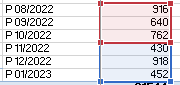
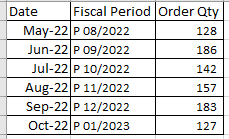
This will be the sameple data for example
Named table - Test
DAX depends on context/scenario heavily, you will get your solution faster if you could provide some sample data, ideally with named table and columns.
The Power BI Data Visualization World Championships is back! Get ahead of the game and start preparing now!
| User | Count |
|---|---|
| 38 | |
| 36 | |
| 33 | |
| 30 | |
| 28 |
| User | Count |
|---|---|
| 127 | |
| 88 | |
| 78 | |
| 66 | |
| 65 |