Learn from the best! Meet the four finalists headed to the FINALS of the Power BI Dataviz World Championships! Register now
Hi
hope you're able to help me with this issue.
In a table of service request, I want to list requsts, which has been closed (solutiondate) within a given date range.
the calendar table is link to the CreateDate of the request, so it won't work.
I've this meassure.
On every row the meassure is evaluated to "yes". What am I missing?
Solved! Go to Solution.
Hi @torbenani
From my test, you just need to build an unrelated Calendar Table, then your measure works well.
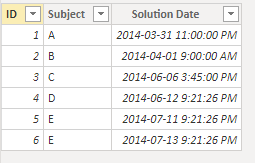
I build a easy sample.
Calendar Table:
Calendar = CALENDARAUTO()
You don't need to build a relationship between two tables.
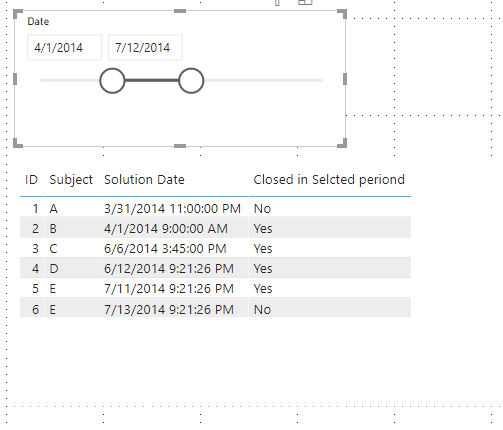
I try your measure.
Closed in Selcted periond = if(SELECTEDVALUE('Table'[Solution Date]) < MAX('Calendar'[date]) && SELECTEDVALUE('Table'[Solution Date]) > CALCULATE(MIN('Calendar'[Date])) , "Yes", "No")
Result:
Best Regards,
Rico Zhou
If this post helps, then please consider Accept it as the solution to help the other members find it more quickly.
Hi @torbenani
From my test, you just need to build an unrelated Calendar Table, then your measure works well.
I build a easy sample.
Calendar Table:
Calendar = CALENDARAUTO()
You don't need to build a relationship between two tables.
I try your measure.
Closed in Selcted periond = if(SELECTEDVALUE('Table'[Solution Date]) < MAX('Calendar'[date]) && SELECTEDVALUE('Table'[Solution Date]) > CALCULATE(MIN('Calendar'[Date])) , "Yes", "No")
Result:
Best Regards,
Rico Zhou
If this post helps, then please consider Accept it as the solution to help the other members find it more quickly.
Hi @torbenani ,
For this you need to create an inactive relationship between the calendar table and the solutiondate column then you can make a simple measure using the USERELATIONSHIP formula, it should look something similar to this:
Closed number =
IF (
CALCULATE (
COUNT ( bi_request[ID] ),
USERELATIONSHIP ( bi_request[solutiondate], Calendar[Date] )
) > 0,
"Yes",
"No"
)
Check result below and in attach file
Regards
Miguel Félix
Proud to be a Super User!
Check out my blog: Power BI em PortuguêsThanks Miguel. This is great. You've tought med about userrelationship.
For others, who don't know about USERRELATIONSHIP - check aout this video.
https://www.youtube.com/watch?v=zZLH8Y1tO1g
A new Power BI DataViz World Championship is coming this June! Don't miss out on submitting your entry.
Share feedback directly with Fabric product managers, participate in targeted research studies and influence the Fabric roadmap.
| User | Count |
|---|---|
| 49 | |
| 33 | |
| 33 | |
| 16 | |
| 16 |
| User | Count |
|---|---|
| 60 | |
| 59 | |
| 39 | |
| 25 | |
| 24 |