FabCon is coming to Atlanta
Join us at FabCon Atlanta from March 16 - 20, 2026, for the ultimate Fabric, Power BI, AI and SQL community-led event. Save $200 with code FABCOMM.
Register now!- Power BI forums
- Get Help with Power BI
- Desktop
- Service
- Report Server
- Power Query
- Mobile Apps
- Developer
- DAX Commands and Tips
- Custom Visuals Development Discussion
- Health and Life Sciences
- Power BI Spanish forums
- Translated Spanish Desktop
- Training and Consulting
- Instructor Led Training
- Dashboard in a Day for Women, by Women
- Galleries
- Data Stories Gallery
- Themes Gallery
- Contests Gallery
- QuickViz Gallery
- Quick Measures Gallery
- Visual Calculations Gallery
- Notebook Gallery
- Translytical Task Flow Gallery
- TMDL Gallery
- R Script Showcase
- Webinars and Video Gallery
- Ideas
- Custom Visuals Ideas (read-only)
- Issues
- Issues
- Events
- Upcoming Events
The Power BI Data Visualization World Championships is back! Get ahead of the game and start preparing now! Learn more
- Power BI forums
- Forums
- Get Help with Power BI
- Desktop
- Re: Comparing actual to previous month relative to...
- Subscribe to RSS Feed
- Mark Topic as New
- Mark Topic as Read
- Float this Topic for Current User
- Bookmark
- Subscribe
- Printer Friendly Page

- Mark as New
- Bookmark
- Subscribe
- Mute
- Subscribe to RSS Feed
- Permalink
- Report Inappropriate Content
Comparing actual to previous month relative to week number
Hello Power BI Community,
I have a problem with comparing the data from the actual month with the previous month. For my managment revenue-report I want to show to tables with the revenue figures of the acutal and the previous month, seperated into 4 Weeks. The table should look like the following one:
| Region | 1. Week | 2. Week | 3. Week | 4. Week |
| Germany | ### | ### | ||
| East Europe | ### | |||
| West Europe | ||||
| North America |
What I did so far was creating two measures:
revenue pm = CALCULATE(SUM(Data[revenue]), PREVIOUSMONTH(Date[date]))
And they both work out very well. To seperate the revenue into 4 weeks I created a date table, where all the dates are assigned to a week number, so 1st-7th = 1. Week, 8th-14th = 2. Week and so on.
Than I creates a matrix visiual with regions in the rows, weeks from the date table in the columns and the two measures provide the data. This concept works out very well form the data of the actual month, but for some reason it doesn't work for the previous month matrix. In fact my two tables look like this:
Actual Month
| Region | 1. Week | 2. Week | 3. Week | 4. Week | Sum |
| Germany | 25 | 25 | 25 | 25 | 100 |
| East Europe | 25 | 25 | 25 | 25 | 100 |
| West Europe | 25 | 25 | 25 | 25 | 100 |
| North America | 25 | 25 | 25 | 25 | 100 |
| Sum | 100 | 100 | 100 | 100 | 400 |
Previous Month
| Region | 1. Week | 2. Week | 3. Week | 4. Week | Sum |
| Germany | 100 | 100 | 100 | 100 | 100 |
| East Europe | 100 | 100 | 100 | 100 | 100 |
| West Europe | 100 | 100 | 100 | 100 | 100 |
| North America | 100 | 100 | 100 | 100 | 100 |
| Sum | 400 | 400 | 400 | 400 | 400 |
So I am asking for your support, helping me to solve the problem or coming up with another interesting idea to achieve my goals.
Thank you!
Best regards
Julius
*Unfortunatly I am not able to upload pictures, so I hope my table examples above show were the problem could be. If you have any further questions just ask me.
Solved! Go to Solution.


- Mark as New
- Bookmark
- Subscribe
- Mute
- Subscribe to RSS Feed
- Permalink
- Report Inappropriate Content
Try using DATEADD instead of PreviousMonth, because PreviousMonth will give you all dates in the previous month, while DATEADD will shift the current dates (keeping the week number filter).
revenue pm = CALCULATE(SUM(Data[revenue]), DATEADD(Date[date], -1, Month))
Please @mention me in your reply if you want a response.
Copying DAX from this post? Click here for a hack to quickly replace it with your own table names
Has this post solved your problem? Please Accept as Solution so that others can find it quickly and to let the community know your problem has been solved.
If you found this post helpful, please give Kudos C
I work as a Microsoft trainer and consultant, specialising in Power BI and Power Query.
www.excelwithallison.com
- Mark as New
- Bookmark
- Subscribe
- Mute
- Subscribe to RSS Feed
- Permalink
- Report Inappropriate Content
@Anonymous Hi Julius,
May I ask a quesiton... I'd also like to seperate my data into 4 weeks each month while I am not sure how to assigne week number like what you have done (1st-7th = 1. Week, 8th-14th = 2). Right now I am using WEEKNUM with the fomula:
1 + WEEKNUM (Index[Date])-WEEKNUM(STARTOFMONTH (Index[Date]))
but it sets week based on weekday, so for example 2021/02/01 is a monday, than only 2021/02/01-2021/02/06 will be set as week 1, but what I want is 1st-7th every month being set as week 1... Could you please kindly share how you did it?
Many thanks!
- Mark as New
- Bookmark
- Subscribe
- Mute
- Subscribe to RSS Feed
- Permalink
- Report Inappropriate Content
https://excelwithallison.blogspot.com/2020/04/dimdate-what-why-and-how.html
Please @mention me in your reply if you want a response.
Copying DAX from this post? Click here for a hack to quickly replace it with your own table names
Has this post solved your problem? Please Accept as Solution so that others can find it quickly and to let the community know your problem has been solved.
If you found this post helpful, please give Kudos C
I work as a Microsoft trainer and consultant, specialising in Power BI and Power Query.
www.excelwithallison.com
- Mark as New
- Bookmark
- Subscribe
- Mute
- Subscribe to RSS Feed
- Permalink
- Report Inappropriate Content
Hey @AllisonKennedy ,
thank you for your fast support.
My date table looks like this:
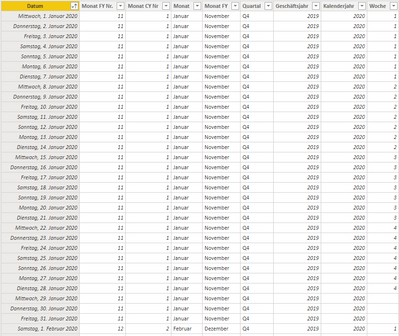
Its in german, I hope your are not confused. And yes there is a slicer on the page.

- Mark as New
- Bookmark
- Subscribe
- Mute
- Subscribe to RSS Feed
- Permalink
- Report Inappropriate Content
- Mark as New
- Bookmark
- Subscribe
- Mute
- Subscribe to RSS Feed
- Permalink
- Report Inappropriate Content
revenue am = CALCULATE(SUM(Data[revenue]))
revenue pm = CALCULATE(SUM(Data[revenue]), PREVIOUSMONTH(Date[date]))
Please @mention me in your reply if you want a response.
Copying DAX from this post? Click here for a hack to quickly replace it with your own table names
Has this post solved your problem? Please Accept as Solution so that others can find it quickly and to let the community know your problem has been solved.
If you found this post helpful, please give Kudos C
I work as a Microsoft trainer and consultant, specialising in Power BI and Power Query.
www.excelwithallison.com
- Mark as New
- Bookmark
- Subscribe
- Mute
- Subscribe to RSS Feed
- Permalink
- Report Inappropriate Content
Try using DATEADD instead of PreviousMonth, because PreviousMonth will give you all dates in the previous month, while DATEADD will shift the current dates (keeping the week number filter).
revenue pm = CALCULATE(SUM(Data[revenue]), DATEADD(Date[date], -1, Month))
Please @mention me in your reply if you want a response.
Copying DAX from this post? Click here for a hack to quickly replace it with your own table names
Has this post solved your problem? Please Accept as Solution so that others can find it quickly and to let the community know your problem has been solved.
If you found this post helpful, please give Kudos C
I work as a Microsoft trainer and consultant, specialising in Power BI and Power Query.
www.excelwithallison.com
- Mark as New
- Bookmark
- Subscribe
- Mute
- Subscribe to RSS Feed
- Permalink
- Report Inappropriate Content
Hey @AllisonKennedy ,
thank you for the solution. The formula does work perfectly. In fact I tried it before and it didn't work, maybe because the date table was not declared as a date table. With adjusting the settings of the date table and rewriting the dax formula with DATEADD it now works.
Thanks to everybody for your support!
Best regards
Julius


- Mark as New
- Bookmark
- Subscribe
- Mute
- Subscribe to RSS Feed
- Permalink
- Report Inappropriate Content
Have you marked your date table as "Date Table"
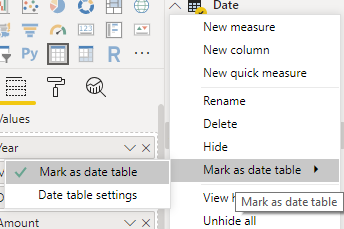
Did I answer your question? Mark my post as a solution! Appreciate your Kudos!!
Proud to be a Super User!
- Mark as New
- Bookmark
- Subscribe
- Mute
- Subscribe to RSS Feed
- Permalink
- Report Inappropriate Content
@Anonymous , what is the formula used for previous month?
Can you share sample data and sample output in table format?
refer
Power BI — MTD Questions — Time Intelligence 3–5
https://medium.com/@amitchandak.1978/power-bi-mtd-questions-time-intelligence-3-5-64b0b4a4090e
Power BI — WTD Questions— Time Intelligence 4–5
https://medium.com/@amitchandak.1978/power-bi-wtd-questions-time-intelligence-4-5-98c30fab69d3
Helpful resources

Power BI Dataviz World Championships
The Power BI Data Visualization World Championships is back! Get ahead of the game and start preparing now!

Power BI Monthly Update - December 2025
Check out the December 2025 Power BI Holiday Recap!

FabCon Atlanta 2026
Join us at FabCon Atlanta, March 16-20, for the ultimate Fabric, Power BI, AI and SQL community-led event. Save $200 with code FABCOMM.

| User | Count |
|---|---|
| 38 | |
| 36 | |
| 33 | |
| 30 | |
| 28 |


| User | Count |
|---|---|
| 128 | |
| 88 | |
| 79 | |
| 67 | |
| 62 |


