Get Fabric or SQL Certified for Free.
Get certified for free when you join Fabric Data Days 2026 and dive into Fabric, Power BI, SQL, AI, and other essential data skills.
Join now- Power BI forums
- Get Help with Power BI
- Desktop
- Service
- Report Server
- Power Query
- Mobile Apps
- Developer
- DAX Commands and Tips
- Custom Visuals Development Discussion
- Health and Life Sciences
- Power BI Spanish forums
- Translated Spanish Desktop
- Training and Consulting
- Instructor Led Training
- Dashboard in a Day for Women, by Women
- Galleries
- Data Stories Gallery
- Themes Gallery
- Contests Gallery
- QuickViz Gallery
- Quick Measures Gallery
- Visual Calculations Gallery
- Fabric Apps Gallery
- Notebook Gallery
- Translytical Task Flow Gallery
- TMDL Gallery
- R Script Showcase
- Webinars and Video Gallery
- Ideas
- Custom Visuals Ideas (read-only)
- Issues
- Issues
- Events
- Upcoming Events
July 7 - July 17 | Round 2 of the Power BI Dataviz World Championships. Don't miss your chance! Learn more
- Power BI forums
- Forums
- Get Help with Power BI
- Desktop
- Re: Comparing Values with Offset?
- Subscribe to RSS Feed
- Mark Topic as New
- Mark Topic as Read
- Float this Topic for Current User
- Bookmark
- Subscribe
- Printer Friendly Page


- Mark as New
- Bookmark
- Subscribe
- Mute
- Subscribe to RSS Feed
- Permalink
- Report Inappropriate Content
Comparing Values with Offset?
Hey,
I'd like to create a measure that can help me find the difference between 2 values but not sure of the best way to do it.
I have a week slicer that goes from 1-6 and I'd like to create a measure that compares the latest value so like Week 6 with the other largest selected slicer value.
So if slicer had WK6, WK2, WK4 selected: Comparison would be WK6-WK4
If slicer had WK4, WK2, WK1 selected: Comparison would be WK4-WK2
If slicer had WK5, WK4, WK3 selected: Comparison would be WK5-WK4
How can I get this consistent everytime?
Solved! Go to Solution.

- Mark as New
- Bookmark
- Subscribe
- Mute
- Subscribe to RSS Feed
- Permalink
- Report Inappropriate Content
Hi @TotunG ,
Here are the steps you can follow:
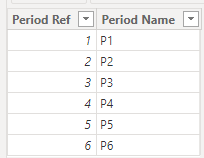
1. You reposition the two columns of the Period Ref table, with [Period Ref] first and [Period Name] last.
2. Create calculated column.
Table 2 =
var _table1=
SUMMARIZE(
    'Table','Table'[Period Ref],
    "Period Name",
    "P_Total")
return
UNION(
    'Table',_table1)
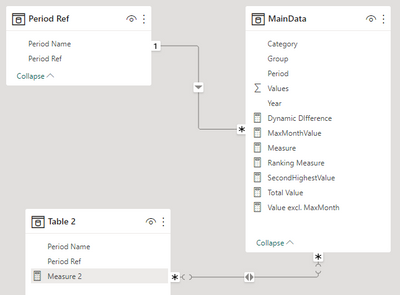
3. Combine the relationship between two tables.
4. Create measure.
Flag=
IF(
    MAX('Table 2'[Period Ref]) in SELECTCOLUMNS('MainData',"1",[Period]) && MAX('Table 2'[Period Name]) <> "P_Total",
    [Total Value],[Dynamic DIfference])
5. Result:

Best Regards,
Liu Yang
If this post helps, then please consider Accept it as the solution to help the other members find it more quickly
- Mark as New
- Bookmark
- Subscribe
- Mute
- Subscribe to RSS Feed
- Permalink
- Report Inappropriate Content
Hi @TotunG ,
Table 2 =
var _table1=
SUMMARIZE(
    'Table','Table'[Period Ref],
    "Period Name",
    "P_Total")
return
UNION(
    'Table',_table1)
This allows the new table to be appended to the previous table using the Union() formula, forming
UNION function (DAX) - DAX | Microsoft Learn
SUMMARIZE function (DAX) - DAX | Microsoft Learn
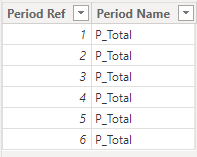
This will add a column of p_Total when it is put into the matrix
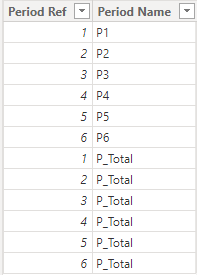
This adds a column of p_Total when it is put into the matrix
Flag=IF( MAX('Table 2'[Period Ref]) in SELECTCOLUMNS('MainData',"1",[Period]) && MAX('Table 2'[Period Name]) <> "P_Total", [Total Value],[Dynamic DIfference])SELECTCOLUMNS('MainData',"1",[Period]):
Returns a table that contains the columns of [Period]
This is used to determine whether 'Table 2[Period ref] exists in the [Period] of Main Data Table and the [Period Name] of Table2 is not the character "p_Total", if everything matches, then it is [Total Value], otherwise the result is [Dynamic DIfference])
IF function (DAX) - DAX | Microsoft Learn
SELECTCOLUMNS function (DAX) - DAX | Microsoft Learn
Best Regards,
Liu Yang
If this post helps, then please consider Accept it as the solution to help the other members find it more quickly.
- Mark as New
- Bookmark
- Subscribe
- Mute
- Subscribe to RSS Feed
- Permalink
- Report Inappropriate Content
Hi @TotunG ,
Here are the steps you can follow:
1. You reposition the two columns of the Period Ref table, with [Period Ref] first and [Period Name] last.
2. Create calculated column.
Table 2 =
var _table1=
SUMMARIZE(
    'Table','Table'[Period Ref],
    "Period Name",
    "P_Total")
return
UNION(
    'Table',_table1)
3. Combine the relationship between two tables.
4. Create measure.
Flag=
IF(
    MAX('Table 2'[Period Ref]) in SELECTCOLUMNS('MainData',"1",[Period]) && MAX('Table 2'[Period Name]) <> "P_Total",
    [Total Value],[Dynamic DIfference])
5. Result:
Best Regards,
Liu Yang
If this post helps, then please consider Accept it as the solution to help the other members find it more quickly
- Mark as New
- Bookmark
- Subscribe
- Mute
- Subscribe to RSS Feed
- Permalink
- Report Inappropriate Content
Seems like it might work - will try this out. Do you mind briefly breaking down the steps in this and why you did them? No worries if not as appreciate your help regardless.
- Mark as New
- Bookmark
- Subscribe
- Mute
- Subscribe to RSS Feed
- Permalink
- Report Inappropriate Content
Hi @TotunG ,
It's not clear what your table structure is, you can try placing the formula in a PBIX file to see if that works.
If the results are not what you expected, Can you share sample data and sample output in table format? Or a sample pbix after removing sensitive data. We can better understand the problem and help you.
Best Regards,
Liu Yang
If this post helps, then please consider Accept it as the solution to help the other members find it more quickly
- Mark as New
- Bookmark
- Subscribe
- Mute
- Subscribe to RSS Feed
- Permalink
- Report Inappropriate Content
Okay sample file is attached with explaination (also a photo if needed). There is a relationship between 2 tables with columns Period and Period Name so that user can use Period Name to filter MainData periods:

https://drive.google.com/file/d/19KDNuA7CRElc-O1H8WwschGNoU29qUBv/view?usp=sharing
- Mark as New
- Bookmark
- Subscribe
- Mute
- Subscribe to RSS Feed
- Permalink
- Report Inappropriate Content
Hi @TotunG ,
I created some data:

Here are the steps you can follow:
1. Create measure.
Measure =
var _select=
SELECTCOLUMNS('Table',"1",[Week_Slicer])
var _maxx=
MAXX(
    FILTER(ALL('Table'),'Table'[Week_Slicer] in _select),[Week])
var _secondlargest=
MAXX(
    FILTER(ALL('Table'),'Table'[Week_Slicer] in _select&&'Table'[Week]<_maxx),[Week])
return
SUMX(
    FILTER(ALL('Table'),'Table'[Week]=_maxx),[Value])
    -
SUMX(
    FILTER(ALL('Table'),'Table'[Week]=_secondlargest),[Value])
2. Result:
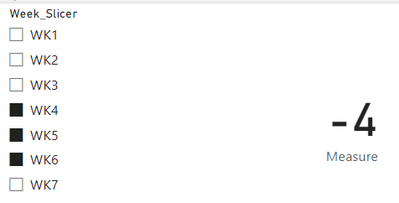
Best Regards,
Liu Yang
If this post helps, then please consider Accept it as the solution to help the other members find it more quickly
- Mark as New
- Bookmark
- Subscribe
- Mute
- Subscribe to RSS Feed
- Permalink
- Report Inappropriate Content
Thank you - would this still work if Week table is different from the Data table but connected with a relationship and the value being filtered is a measure?


- Mark as New
- Bookmark
- Subscribe
- Mute
- Subscribe to RSS Feed
- Permalink
- Report Inappropriate Content
should be possible, even without offset. Ideally you would have numeric week numbers though, otherwise you run into trouble comparing WK10 with WK6 (for example)
Helpful resources

FabCon & SQLCon – Barcelona 2026
Join us in Barcelona for FabCon and SQLCon, the Fabric, Power BI, SQL, and AI community event. Save €200 with code FABCMTY200.

Power BI Monthly Update - July 2026
Check out the July 2026 Power BI update to learn about new features.

Data Days 2026
Join Data Days 2026: 60 days of free live/on-demand sessions, challenges, study groups, and certification opportunities.

Power BI DataViz World Championships - June 2026
A new Power BI DataViz World Championship is coming this June! Don't miss out on submitting your entry.

| User | Count |
|---|---|
| 30 | |
| 25 | |
| 25 | |
| 25 | |
| 16 |


| User | Count |
|---|---|
| 51 | |
| 31 | |
| 23 | |
| 21 | |
| 20 |


