cancel
Showing results for 
Search instead for 
Did you mean: 

Learn from the best! Meet the four finalists headed to the FINALS of the Power BI Dataviz World Championships! Register now

Reply
Anonymous
Not applicable

Comparing Values from One Column to Another Sumarraizing

Hello,


I think this should be a straightforward probelm - but I can't figure it out!  I think some combination of variables and SUMMARIZE() will get me there but struggling to put it all together.


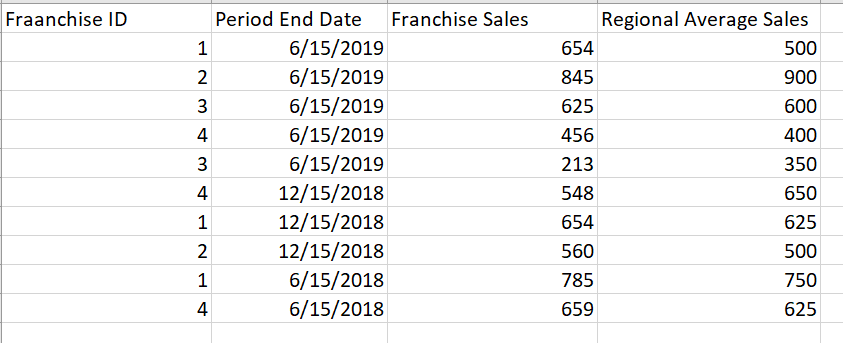
I have a table of bi annual sales data for different franchises:

Sales.png


What I would like to do, is create a measure (or series of measures) that help me determine how many Franchises (denoted by franchiseID) beat the regional average sales.  So, something like IF: Franchise Sales >= Regional Average sales, Return 1, Count all return positives to get total number.


I have tried some variation of Summarize, and I can get the number of sales entires for each date period and for each franchise, but I'm struggling to find the DAX procedure to allo wme to compare values against each other. 


Should I just create a calculated column? Create a SUMMARIZE measure?  Help!


So grateful for the expertise this site provides.

1 ACCEPTED SOLUTION
amitchandak
Super User
Super User

@Anonymous , try like


countx(filter(table[Franchise Sales] >= table[Regional Average sales]),table[ franchiseID])
sumx(summarize(Table,Table[franchiseID],"_1",sum(table[Franchise Sales]),"_2",sum(table[Regional Average sales])),if([_1]>=[_2],1,0))

Share with Power BI Enthusiasts: Full Power BI Video (20 Hours) YouTube
Microsoft Fabric Series 60+ Videos YouTube
Microsoft Fabric Hindi End to End YouTube

View solution in original post

4 REPLIES 4
Ashish_Mathur
Super User
Super User

Hi,

Your data is vague.  If the sale of Franchise ID 1 for 12/15/2018 was 54 (instead of 654), then would that Franchise ID be counted?  That same Franchise ID on 06/15/2018 reported a Franchise sale > Average sale.  On the date that you have shared, show the expected result very clearly.


Regards,
Ashish Mathur
http://www.ashishmathur.com
https://www.linkedin.com/in/excelenthusiasts/
amitchandak
Super User
Super User

@Anonymous , try like


countx(filter(table[Franchise Sales] >= table[Regional Average sales]),table[ franchiseID])
sumx(summarize(Table,Table[franchiseID],"_1",sum(table[Franchise Sales]),"_2",sum(table[Regional Average sales])),if([_1]>=[_2],1,0))

Share with Power BI Enthusiasts: Full Power BI Video (20 Hours) YouTube
Microsoft Fabric Series 60+ Videos YouTube
Microsoft Fabric Hindi End to End YouTube
Anonymous
Not applicable

Thank you thank you thank you!


@amitchandak 

Anonymous
Not applicable

@amitchandak 


I have a quick follow-up question.  Let's say I wanted to determine how many unique franchises beat an arbitrary sales goal in a fiscal year. I'm struggling trying to get the "unique" franchiseIDs using Distinct or Distinct Count.


I'm trying the following:


COUNTROWS(DISTINCT(FILTER('Table','Table'[Franchise Sales] >= 500 && 'Table'[Franchise Sales] <> BLANK())))


This is returning the number of franchises that reported biannual sales of >=500.  But some franchises might have reported >= 500 for both biannual reports. While it's useful to know the total number of reports that had franchise sales >= 500. I want the unique number of franchises that beat that number.


This measure is not getting the expected value. 


Helpful resources

Announcements
New to Fabric survey Carousel

New to Fabric Survey

If you have recently started exploring Fabric, we'd love to hear how it's going. Your feedback can help with product improvements.

Power BI DataViz World Championships carousel

Power BI DataViz World Championships - June 2026

A new Power BI DataViz World Championship is coming this June! Don't miss out on submitting your entry.

Join our Fabric User Panel

Join our Fabric User Panel

Share feedback directly with Fabric product managers, participate in targeted research studies and influence the Fabric roadmap.

March Power BI Update Carousel

Power BI Community Update - March 2026

Check out the March 2026 Power BI update to learn about new features.