cancel
Showing results for 
Search instead for 
Did you mean: 

Get Fabric Certified for FREE during Fabric Data Days. Don't miss your chance! Request now

Reply
deanbland
Helper III
Helper III

Comparing Values Within The Same Table

Hi, 


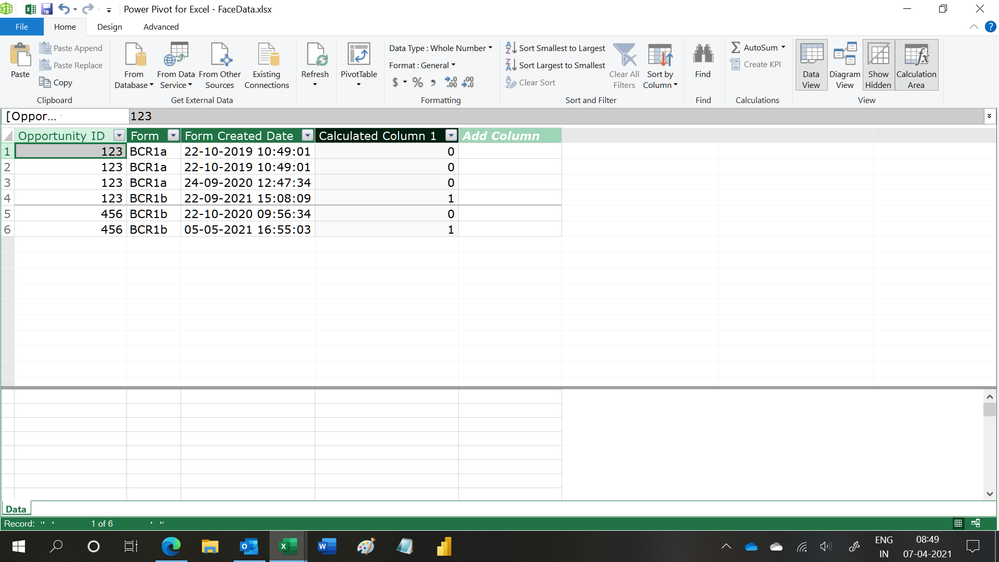
I am wanting to create a column that assigns a 1 next to the most recent entry within my dataset per Form. So from the data below, the 3rd and 4th entry would have a 1 assigned as would the last entry. 


Opportunity IDForm Form Created Date
123BCR1a

22/10/2019 10:49:01

123BCR1a22/10/2019 10:49:01
123BCR1a24/09/2020 12:47:34
123BCR1b22/09/2021 15:08:09
456BCR1b22/10/2020 09:56:34
456BCR1b05/05/2021 16:55:03


How would I go about doing this, please?


1 ACCEPTED SOLUTION

Hi,

Try this calculated column formula

=1*(CALCULATE(MAX(Data[Form Created Date]),FILTER(Data,Data[Opportunity ID]=EARLIER(Data[Opportunity ID])&&Data[Form]=EARLIER(Data[Form])))=Data[Form Created Date])

Regards,
Ashish Mathur
http://www.ashishmathur.com
https://www.linkedin.com/in/excelenthusiasts/

View solution in original post

5 REPLIES 5
Ashish_Mathur
Super User
Super User

Hi,

This calculated column formula works

=1*(CALCULATE(MAX(Data[Form Created Date]),FILTER(Data,Data[Opportunity ID]=EARLIER(Data[Opportunity ID])))=Data[Form Created Date])

Hope this helps.

Untitled.png


Regards,
Ashish Mathur
http://www.ashishmathur.com
https://www.linkedin.com/in/excelenthusiasts/

Hi, thanks for the quick response - I should have been a little clearer...


The Form type, (i.e., BCR1a/BCR1b) needs to be taken into account. Per Opportunity ID there can be multiple Form types and so I need to be able to say what the latest Form type is per Opportunity ID. So from my example, these should be the ones highlighted: 

Opportunity ID       Form        Form Created Date

- 123                       BCR1a       24/09/2020

-123                        BCR1b       22/09/2021

-456                        BCR1b       05/05/2021


Hope this makes more sense.


P.s. I couldn't post this in a table as I was accused of "Post Flooding"


amitchandak
Super User
Super User

@deanbland , Either 4th or 4 and 6th can be, not sure how is the 3 rd entry is max too


Try a new column


New column =
var _max = maxx(Table, [Form Created Date])
return
if(_max =[Form Created Date] ,1,0)


or


New column =
var _max = maxx(filter(Table,[OpportunityId] =earlier([OpportunityId])), [Form Created Date])
return
if(_max =[Form Created Date] ,1,0)

Share with Power BI Enthusiasts: Full Power BI Video (20 Hours) YouTube
Microsoft Fabric Series 60+ Videos YouTube
Microsoft Fabric Hindi End to End YouTube

Hi, thanks for the quick response 

 - I should have been a little clearer...


The Form type, (i.e., BCR1a/BCR1b) needs to be taken into account. Per Opportunity ID there can be multiple Form types and so I need to be able to say what the latest Form type is per Opportunity ID. So from my example, these should be the ones highlighted: 

Opportunity ID       Form        Form Created Date

- 123                       BCR1a       24/09/2020

-123                        BCR1b       22/09/2021

-456                        BCR1b       05/05/2021


Hope this makes more sense.


P.s. I couldn't post this in a table as I was accused of "Post Flooding


Hi,

Try this calculated column formula

=1*(CALCULATE(MAX(Data[Form Created Date]),FILTER(Data,Data[Opportunity ID]=EARLIER(Data[Opportunity ID])&&Data[Form]=EARLIER(Data[Form])))=Data[Form Created Date])

Regards,
Ashish Mathur
http://www.ashishmathur.com
https://www.linkedin.com/in/excelenthusiasts/

Helpful resources

Announcements
November Power BI Update Carousel

Power BI Monthly Update - November 2025

Check out the November 2025 Power BI update to learn about new features.

Fabric Data Days Carousel

Fabric Data Days

Advance your Data & AI career with 50 days of live learning, contests, hands-on challenges, study groups & certifications and more!

FabCon Atlanta 2026 carousel

FabCon Atlanta 2026

Join us at FabCon Atlanta, March 16-20, for the ultimate Fabric, Power BI, AI and SQL community-led event. Save $200 with code FABCOMM.

Top Solution Authors
Top Kudoed Authors