cancel
Showing results for 
Search instead for 
Did you mean: 

The Power BI Data Visualization World Championships is back! Get ahead of the game and start preparing now! Learn more

Reply
Anonymous
Not applicable

Comparing Prices in Different Markets for Same Vendors

Hello there,


I want to create a true/ false column for items that have different prices in diffrent markets for the same vendor for the same item.


In the below table, Big Al's Supply is $2.00 across all 3 markets so the result should be false. Fruits R US is $1.15 in 2 markets but $2.50 in one, so it would be true. Ringo's Grocery is all over the place with their prices for an apple so they also get a true. There are also many items (banana, pear, etc) that also have price discrepancies.


MARKETVENDORITEM NAMEPRICEDiscrepancy
OKBIG AL'S SUPPLYAPPLE2.000
OKFRUITS R USAPPLE1.151
OKRINGO'S GROCERYAPPLE1.001
TXBIG AL'S SUPPLYAPPLE2.000
TXFRUITS R USAPPLE1.151
TXRINGO'S GROCERYAPPLE1.501
LABIG AL'S SUPPLYAPPLE2.000
LAFRUITS R USAPPLE2.501
LARINGO'S GROCERYAPPLE1.751


I know I need to make a new column with a formula but I have no idea the logic to make Power BI compare the columns based on these criteria. Any advise is appreciated!


Edit: I want to also note that the end goal of this is to create a dashboard that notes shows all of the items across all markets that have different prices. I just thought it would be easier if I had a column that I could easily filter if there were a price discrepancy!


Thanks,


KL


1 ACCEPTED SOLUTION
Anonymous
Not applicable

Hi @Anonymous 

I build a sample to have a test.

My Table contains different VENDORs and different ITEM NAMEs.

1.png

Add a calculated column to achieve your goal.

Discrepancy = 
VAR _Discount =
    CALCULATE (
        DISTINCTCOUNT ( 'Table'[PRICE] ),
        FILTER (
            'Table',
            'Table'[VENDOR] = EARLIER ( 'Table'[VENDOR] )
                && 'Table'[ITEM NAME] = EARLIER ( 'Table'[ITEM NAME] )
        )
    )
RETURN
    IF ( _Discount > 1, "True", "FALSE" )

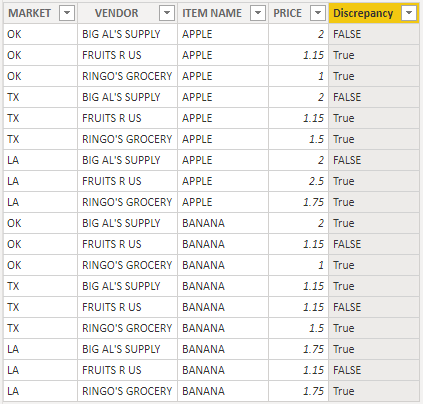
Result is as below.

2.png

You can download the pbix file from this link: Comparing Prices in Different Markets for Same Vendors


Best Regards,

Rico Zhou


If this post helps, then please consider Accept it as the solution to help the other members find it more quickly. 

View solution in original post

2 REPLIES 2
Anonymous
Not applicable

Hi @Anonymous 

I build a sample to have a test.

My Table contains different VENDORs and different ITEM NAMEs.

1.png

Add a calculated column to achieve your goal.

Discrepancy = 
VAR _Discount =
    CALCULATE (
        DISTINCTCOUNT ( 'Table'[PRICE] ),
        FILTER (
            'Table',
            'Table'[VENDOR] = EARLIER ( 'Table'[VENDOR] )
                && 'Table'[ITEM NAME] = EARLIER ( 'Table'[ITEM NAME] )
        )
    )
RETURN
    IF ( _Discount > 1, "True", "FALSE" )

Result is as below.

2.png

You can download the pbix file from this link: Comparing Prices in Different Markets for Same Vendors


Best Regards,

Rico Zhou


If this post helps, then please consider Accept it as the solution to help the other members find it more quickly. 

Anonymous
Not applicable

Thanks @Anonymous !


I knew I had to do some sort of filter but did not know where to start.


Thank you 🙂


KL

Helpful resources

Announcements
Power BI DataViz World Championships

Power BI Dataviz World Championships

The Power BI Data Visualization World Championships is back! Get ahead of the game and start preparing now!

December 2025 Power BI Update Carousel

Power BI Monthly Update - December 2025

Check out the December 2025 Power BI Holiday Recap!

FabCon Atlanta 2026 carousel

FabCon Atlanta 2026

Join us at FabCon Atlanta, March 16-20, for the ultimate Fabric, Power BI, AI and SQL community-led event. Save $200 with code FABCOMM.