cancel
Showing results for 
Search instead for 
Did you mean: 

The Power BI Data Visualization World Championships is back! Get ahead of the game and start preparing now! Learn more

Reply
AM_VRSResearch
Frequent Visitor

Comparing Percentage of employee time in different labor groups over multiple months

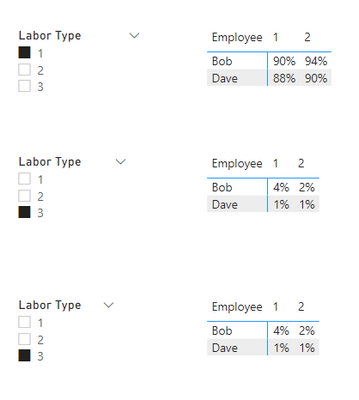
I am trying to create a matrix that compares the percentage of labor that each employee used in the selected labor type (chosen from a slicer) during each period over the course of the year.  Below I have recreated what this matrix would look like for when three different labor types have been selected.  So each employee in each month would have a percentage that totals to 100% across the different labor groups.  So Bob in month 1 is 90%+6%+4%=100.  The example data won't come out to exactly 100% below because I only have shown three labor types when there are a varying number.  Any help with this would be appreciated.


EmployeePercentByLaborGroup.PNG


And Below is the layout of my data.  I believe the data below matches the exact percentages that I gave in the example above.


EmployeeMonthLabor TypeLabor Cost
Bob11712.8
Bob11343.2
Bob11132
Bob1226.4
Bob1252.8
Bob1313.2
Bob1339.6
Bob21290.4
Bob21924
Bob2226.4
Bob2213.2
Bob2213.2
Bob2313.2
Bob2313.2
Dave11957.1
Dave1290.08
Dave1222.52
Dave1211.26
Dave1311.26
Dave130
Dave21821.98
Dave21157.64
Dave2267.56
Dave2233.78
Dave2311.26


1 ACCEPTED SOLUTION
v-yanjiang-msft
Community Support
Community Support

Hi @AM_VRSResearch ,

According to your description, here's my solution.

Create a measure.

Measure =
DIVIDE (
    SUM ( 'Table'[Labor Cost] ),
    SUMX (
        FILTER (
            ALL ( 'Table' ),
            'Table'[Employee] = MAX ( 'Table'[Employee] )
                && 'Table'[Month] = MAX ( 'Table'[Month] )
        ),
        'Table'[Labor Cost]
    )
)

Put the measure in the matrix Values, get the correct result.

vkalyjmsft_0-1652334150134.png

I attach my sample below for reference.


Best Regards,
Community Support Team _ kalyj

If this post helps, then please consider Accept it as the solution to help the other members find it more quickly.

View solution in original post

4 REPLIES 4
v-yanjiang-msft
Community Support
Community Support

Hi @AM_VRSResearch ,

According to your description, here's my solution.

Create a measure.

Measure =
DIVIDE (
    SUM ( 'Table'[Labor Cost] ),
    SUMX (
        FILTER (
            ALL ( 'Table' ),
            'Table'[Employee] = MAX ( 'Table'[Employee] )
                && 'Table'[Month] = MAX ( 'Table'[Month] )
        ),
        'Table'[Labor Cost]
    )
)

Put the measure in the matrix Values, get the correct result.

vkalyjmsft_0-1652334150134.png

I attach my sample below for reference.


Best Regards,
Community Support Team _ kalyj

If this post helps, then please consider Accept it as the solution to help the other members find it more quickly.

Ashish_Mathur
Super User
Super User

Hi,

Share the source data.


Regards,
Ashish Mathur
http://www.ashishmathur.com
https://www.linkedin.com/in/excelenthusiasts/

Hello,  I have added an example of what my data looks like to my post.


Thank you.

Share data in a form that can be pasted in an MS Excel workbook.


Regards,
Ashish Mathur
http://www.ashishmathur.com
https://www.linkedin.com/in/excelenthusiasts/

Helpful resources

Announcements
Power BI DataViz World Championships

Power BI Dataviz World Championships

The Power BI Data Visualization World Championships is back! Get ahead of the game and start preparing now!

December 2025 Power BI Update Carousel

Power BI Monthly Update - December 2025

Check out the December 2025 Power BI Holiday Recap!

FabCon Atlanta 2026 carousel

FabCon Atlanta 2026

Join us at FabCon Atlanta, March 16-20, for the ultimate Fabric, Power BI, AI and SQL community-led event. Save $200 with code FABCOMM.