Advance your Data & AI career with 50 days of live learning, dataviz contests, hands-on challenges, study groups & certifications and more!
Get registeredGet Fabric Certified for FREE during Fabric Data Days. Don't miss your chance! Request now
Hello All!
I've got data that is set out as:
| Sales Person | Month | Sales | Expenses |
| Person 1 | Jan-16 | 1000 | 100 |
| Person 1 | Feb-16 | 2000 | 200 |
| Person 1 | Mar-16 | 3000 | 300 |
| Person 2 | Jan-16 | 1000 | 100 |
| Person 2 | Feb-16 | 2000 | 200 |
| Person 2 | Mar-16 | 3000 | 300 |
| Person 3 | Jan-16 | 1000 | 100 |
| Person 3 | Feb-16 | 2000 | 200 |
| Person 3 | Mar-16 | 3000 | 300 |
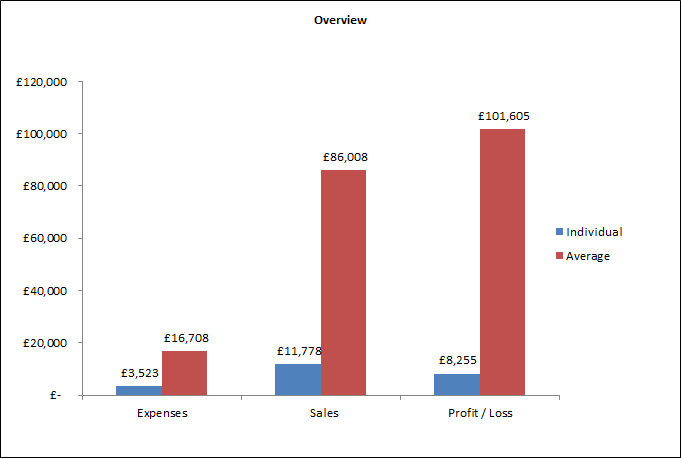
and I am trying to create a clustered column chart that shows an individual's Sales, Expenses and Profit/Loss goverened by a Slicer choosing Month and a Slicer choosing Sales Person compared against an average across all Sales Persons for the selected month. Similar to this:
Through unpivoting and calculating, I can get the individual columns to be created but I'm struggling with getting the Average columns to be created and to be added to a column chart, clustered as shown in the photo.
Thanks for any help you can provide!
Solved! Go to Solution.
Hi @Anonymous,
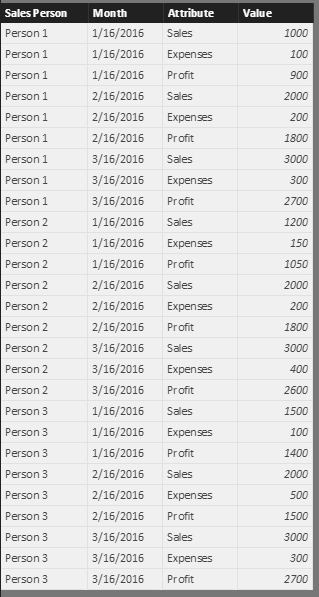
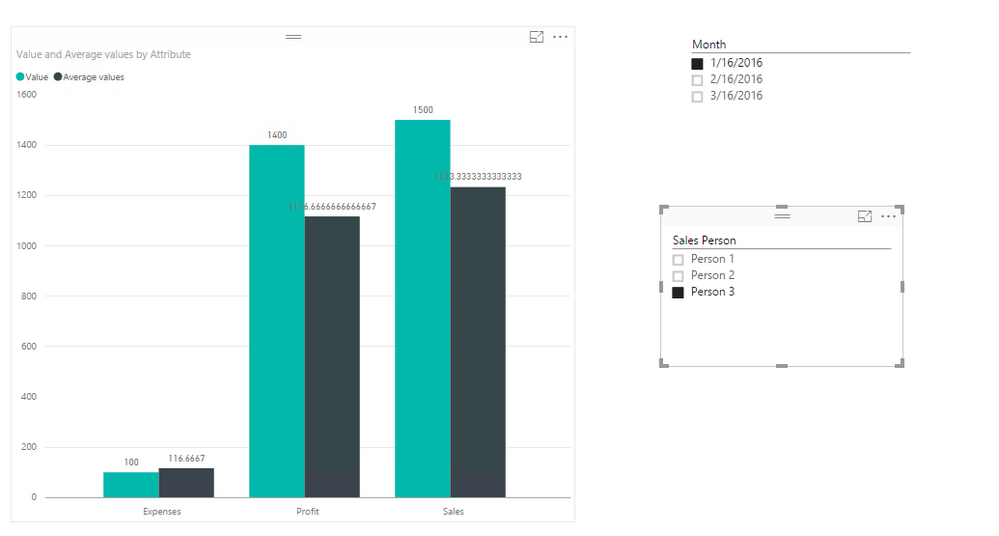
In your scenario, you can create a measure like this to calculate average for all persons on selected month like below:
Average values = CALCULATE( SUM(Sheet4[Value]), ALLEXCEPT( Sheet4, Sheet4[Month], Sheet4[Attribute] ) ) / CALCULATE( DISTINCTCOUNT( Sheet4[Sales Person] ), ALLEXCEPT( Sheet4, Sheet4[Month], Sheet4[Attribute] ) )
If you have any question, please feel free to ask.
Best Regards,
Qiuyun Yu
Hi @Anonymous,
In your scenario, you can create a measure like this to calculate average for all persons on selected month like below:
Average values = CALCULATE( SUM(Sheet4[Value]), ALLEXCEPT( Sheet4, Sheet4[Month], Sheet4[Attribute] ) ) / CALCULATE( DISTINCTCOUNT( Sheet4[Sales Person] ), ALLEXCEPT( Sheet4, Sheet4[Month], Sheet4[Attribute] ) )
If you have any question, please feel free to ask.
Best Regards,
Qiuyun Yu
Advance your Data & AI career with 50 days of live learning, contests, hands-on challenges, study groups & certifications and more!
Check out the October 2025 Power BI update to learn about new features.