cancel
Showing results for 
Search instead for 
Did you mean: 

Learn from the best! Meet the four finalists headed to the FINALS of the Power BI Dataviz World Championships! Register now

Reply
Kevdie11
Frequent Visitor

Comparing Days Sales

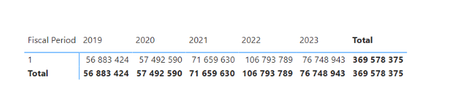
I am trying to calculate Sales This period compared to Sales Previous period, which is a simple formula I know. But what's complicated about this, is the client works on Retail Calendars. So for example their Fiscal year starts on the 1st of March. 

So Period 1 is therefore March. But every year's calendar does not necessarily run from 01/03 - 31/03.


Here are examples of how their year's calendars for March (AKA Period 1) run:

Fiscal Year 2023: 01/03 - 29/03

FY2022: 01/03 - 26/03

FY2021: 01/03 - 26/03

FY2020: 01/03/ - 27/03 Etc.


So because of this complication, I am not able to use SAMEPERIODLASTYEAR, as this compares day to day. I am looking for something like Period to Period.


How would I Calculate Period 1 this year vs Period 1 Last Year?


Kevdie11_0-1649321085477.png


3 REPLIES 3
BITomS
Solution Supplier
Solution Supplier

You need to change the syntax slightly:


Sales PY Parallel = CALCULATE('Sales Fact Table'[Total Sales],PARALLELPERIOD('Fiscal Calendar'[Date Field],-1,Year))


The -1 indicates the interval and you want Year instead of Month as your periods are a year apart.


I'm not sure if 'Fiscal Calendar'[Fiscal Period] is a date field, but the expression requires the field to be a date data type. Instead of the text string that presumably makes up 'Period 1', you could create a date column, if there is not one already, with values such as 01/03/2019 for '01/03/2019-27/03/2019', so that everything for that period is recorded on the first day of the month. Then you could use this field in the DAX expression - Having said this, this date field should allow you to use SAMEPERIODLASTYEAR.


If you don't have the date field already, you could extract this from the text string using LEFT (https://docs.microsoft.com/en-us/dax/left-function-dax) and DATEVALUE (https://docs.microsoft.com/en-us/dax/datevalue-function-dax)

Kevdie11
Frequent Visitor

Thanks for this. Can I ask you to kindly elaborate, as I don't quite understand?

What would the formula look like? I tried this, but I think I'm misunderstanding you.

Sales PY Parallel = CALCULATE('Sales Fact Table'[Total Sales],PARALLELPERIOD('Fiscal Calendar','Fiscal Calendar'[Fiscal Period],MONTH))
 
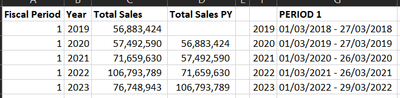
Below is essentially what I am looking for
Kevdie11_0-1649323179193.png


BITomS
Solution Supplier
Solution Supplier

Think PARALLELPERIOD will help you here: https://docs.microsoft.com/en-us/dax/parallelperiod-function-dax


Once you have period 1, you can use this with PARALLELPERIOD to get the same period for the prior year.

Helpful resources

Announcements
Power BI DataViz World Championships carousel

Power BI DataViz World Championships - June 2026

A new Power BI DataViz World Championship is coming this June! Don't miss out on submitting your entry.

Join our Fabric User Panel

Join our Fabric User Panel

Share feedback directly with Fabric product managers, participate in targeted research studies and influence the Fabric roadmap.

March Power BI Update Carousel

Power BI Community Update - March 2026

Check out the March 2026 Power BI update to learn about new features.