This time we’re going bigger than ever. Fabric, Power BI, SQL, AI and more. We're covering it all. You won't want to miss it.
Learn moreLevel up your Power BI skills this month - build one visual each week and tell better stories with data! Get started
Hi,
I appreciate that this is a question that has been asked and answered many times before but despite my best efforts in looking in to date tables, I have not been able to wrap my head around it.
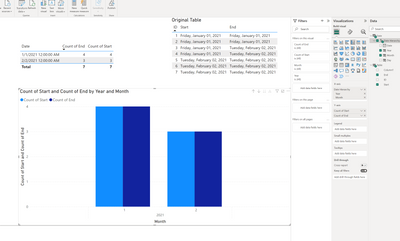
I'd like to compare two counts of dates along a timeline, a started date and and end date, while keeping date hierarchies available.
Desired output: Jan should have 4 started, 2 ended, and Feb should have 3 started, 5 ended.
It's very likely something simple but any help in connecting the dots will be appreciated, beginner PowerBI user here.
Onedrive link to pbix file: https://capilanou1-my.sharepoint.com/:u:/g/personal/cshier_capilanou_ca/EUc08R9JKd1EqXxUXBLde9EBW8A7...
Solved! Go to Solution.
I wouldn't say it is simple but it is something to learn to understand relationships and DAX.
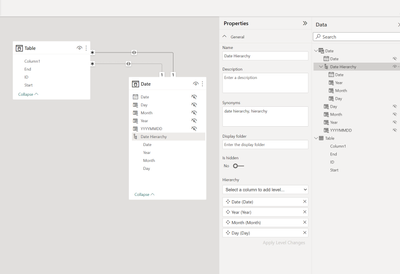
First you want the date table to filter the Fact table so change the relationship to one-way.
The important thing, though, is to activate the relationship when using the 'End' measure. So you'll write an explicit measure to get the Count of end records while using the relationship which is inactive currently.
It'll be a simple Calculate with count and the keyword USERELATIONSHIP.
Here's an example
https://www.learndax.com/power-bi-userelationship-function-with-example/
I wouldn't say it is simple but it is something to learn to understand relationships and DAX.
First you want the date table to filter the Fact table so change the relationship to one-way.
The important thing, though, is to activate the relationship when using the 'End' measure. So you'll write an explicit measure to get the Count of end records while using the relationship which is inactive currently.
It'll be a simple Calculate with count and the keyword USERELATIONSHIP.
Here's an example
https://www.learndax.com/power-bi-userelationship-function-with-example/
Check out the April 2026 Power BI update to learn about new features.
Sign up to receive a private message when registration opens and key events begin.
If you have recently started exploring Fabric, we'd love to hear how it's going. Your feedback can help with product improvements.
| User | Count |
|---|---|
| 38 | |
| 29 | |
| 28 | |
| 20 | |
| 18 |
| User | Count |
|---|---|
| 65 | |
| 35 | |
| 30 | |
| 25 | |
| 23 |