Hi Selimovd,
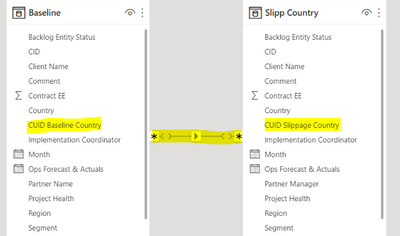
I have one table with 1534 CUIDs (Baseline table)
& I have another table with 478 CUIDs (Cuid that slipped the Go Live Date)
I am trying to create a table that shows x month and Country the Baseline...how many CUIDs slipped and the % x country x month.
Real numbers should be:
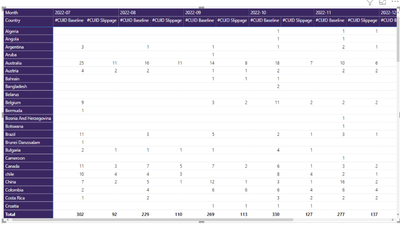
July – 302 Baseline vs 90 slipped (30%)
Aug – 229 Baseline vs 78 slipped (34%)
Sep – 269 Baseline vs 83 slipped (31%)
Oct – 330 baseline vs 89 slipped (27%)
Nov – 277 Baseline vs 103 slipped (37%)
Dec – 127 baseline vs 35 slipped (28%)
Total – 1534 Baseline vs 478 slipped (31.16%)
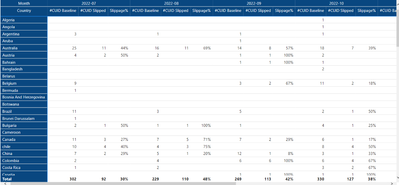
When I try to build the table I show correctly yhe CUID baseline but CUID slipped are wrong. It's showing wrong numbers.
Baseline Excel file looks like:
| Client Name |
Country |
CUID Baseline Country |
Project Health |
SL_CUID |
Month |
| |
Czech Republic |
1000886CZ01 |
Green |
- |
2022-07 |
| |
United Kingdom |
1000886GB01 |
Green |
- |
2022-07 |
| |
France |
ALLVFR01 |
Green |
- |
2022-07 |
| |
Netherlands |
ALLVNL01 |
Green |
- |
2022-07 |
| |
Singapore |
ALLVSG01 |
Green |
- |
2022-07 |
| |
Canada |
ANYSCA01 |
Green |
- |
2022-07 |
| |
Australia |
ASHDAU01 |
Green |
- |
2022-07 |
| |
Lebanon |
380227LB01 |
Green |
- |
2022-07 |
| |
Lebanon |
380227LB02 |
Green |
- |
2022-07 |
| |
Canada |
CSAUCA01 |
Green |
- |
2022-07 |
| |
Czech Republic |
DELLCZ01 |
Green |
- |
2022-07 |
| |
United States |
1000204US01 |
Green |
- |
2022-07 |
| |
United States |
1000204US02 |
Green |
- |
2022-07 |
| |
Mexico |
1000220MX01 |
Green |
- |
2022-07 |
| |
United Kingdom |
1000220GB01 |
Green |
- |
2022-07 |
| |
United States |
1000220US01 |
Green |
- |
2022-07 |
| |
France |
1000542FR01 |
Green |
- |
2022-07 |
| |
France |
1000542FR02 |
Green |
- |
2022-07 |
| |
France |
1000542FR03 |
Green |
- |
2022-07 |
| |
France |
1000542FR04 |
Green |
- |
2022-07 |
And Slippage Excel file
| Client Name |
Country |
CUID Slippage Country |
Project Health |
SL_CUID |
Month |
| |
Singapore |
380305SG01 |
Green |
- |
2022-07 |
| |
Singapore |
380305SG02 |
Green |
- |
2022-07 |
| |
France |
ALLVFR01 |
Green |
- |
2022-07 |
| |
Netherlands |
ALLVNL01 |
Green |
- |
2022-07 |
| |
Singapore |
ALLVSG01 |
Green |
- |
2022-07 |
| |
Australia |
1000061AU02 |
Green |
- |
2022-07 |
| |
Australia |
380227AU01 |
Green |
- |
2022-07 |
| |
France |
380221FR02 |
Green |
- |
2022-07 |
| |
Netherlands |
380291NL01 |
Green |
- |
2022-07 |
| |
chile |
EIDUCL01 |
Green |
- |
2022-07 |
| |
chile |
EIDUCL02 |
Green |
- |
2022-07 |
| |
chile |
EIDUCL03 |
Green |
- |
2022-07 |
| |
India |
1000322IN01 |
Green |
- |
2022-07 |
| |
Hong Kong |
EDGCHK01 |
Green |
- |
2022-07 |
| |
Panama |
1000501PA01 |
Green |
- |
2022-07 |
| |
Venezuela |
1000501VE01 |
Green |
- |
2022-07 |
| |
Bulgaria |
HAPABG01 |
Green |
- |
2022-07 |
| |
New Zealand |
ICESNZ02 |
Green |
- |
2022-07 |
| |
United States |
380306US01 |
Green |
- |
2022-07 |
| |
France |
380263FR01 |
Green |
- |
2022-07 |
| |
United kingdom |
1000464GB01 |
Green |
- |
2022-07 |
| |
United Arab Emirates |
1000301AE01 |
Green |
- |
2022-07 |
| |
United kingdom |
380245GB01 |
Green |
- |
2022-07 |
| |
United kingdom |
380245GB02 |
Green |
- |
2022-07 |
| |
Mexico |
1000267MX01 |
Green |
- |
2022-07 |
| |
Mexico |
1000267MX02 |
Green |
- |
2022-07 |
What I was trying with your formula is to match the slipped CUIDs using CUID and Month from the Baseline table vs CUID and month from the SLippage Table.
Matching Measure =
VAR vIntersectionTable =
INTERSECT (
SUMMARIZE ( 'Slippage Country', 'Slippage Country'[CUID Slippage Country], 'Slippage Country'[Month] ),
SUMMARIZE ( 'Baseline Country', 'Baseline Country'[CUID Baseline Country], 'Baseline Country'[Month] )
)
RETURN
IF( COUNTROWS( vIntersectionTable ) > 0, "Yes", "No" )
But everything is showing "yes" .
Tried different formulas to add the slipped CUIDs in the table but not showing the good numbers.
Slipped2 = IF('Baseline Country'[CUID] IN VALUES ('Slippage Country'[CUID]),"True","False")
If I don't mix the tables....i get the correct "slippage" numbers (Blue square)...but when combined with the other table, numbers are different

@jgeddes