Hi everyone,
I am struggling with some DAX-formulas and hopefully someone of you can help me.
I have 2 tables, an invoice-table and a calendar-table. The information of the invoice-table:
| Customer | Invoice | Invoice_Date | Year_Invoice | Amount_Excl_VAT | YMD-key | Quarter | Year-Quarter |
| 1 | 1001 | 1-3-2014 | 2014 | 25 | 20140301 | 1 | 2014 - Q1 |
| 2 | 1002 | 5-6-2014 | 2014 | 40 | 20140605 | 2 | 2014 - Q2 |
| 3 | 1003 | 9-9-2014 | 2014 | 35 | 20140909 | 3 | 2014 - Q3 |
| 4 | 1004 | 10-12-2014 | 2014 | 12 | 20141210 | 4 | 2014 - Q4 |
| 1 | 1005 | 1-4-2015 | 2015 | 45 | 20150401 | 2 | 2015 - Q2 |
| 2 | 1006 | 3-3-2015 | 2015 | 38 | 20150303 | 1 | 2015 - Q1 |
| 3 | 1007 | 2-2-2015 | 2015 | 27 | 20150202 | 1 | 2015 - Q1 |
| 5 | 1008 | 4-6-2015 | 2015 | 30 | 20150604 | 2 | 2015 - Q2 |
| 6 | 1009 | 2-8-2015 | 2015 | 60 | 20150802 | 3 | 2015 - Q3 |
| 7 | 1010 | 7-7-2015 | 2015 | 40 | 20150707 | 3 | 2015 - Q3 |
| 8 | 1011 | 15-10-2015 | 2015 | 35 | 20151015 | 4 | 2015 - Q4 |
| 1 | 1012 | 21-2-2016 | 2016 | 73 | 20160221 | 1 | 2016 - Q1 |
| 2 | 1013 | 7-11-2016 | 2016 | 45 | 20161107 | 4 | 2016 - Q4 |
| 5 | 1014 | 15-7-2016 | 2016 | 60 | 20160715 | 3 | 2016 - Q3 |
| 6 | 1015 | 2-4-2016 | 2016 | 60 | 20160402 | 2 | 2016 - Q2 |
| 7 | 1016 | 28-8-2016 | 2016 | 38 | 20160828 | 3 | 2016 - Q3 |
| 9 | 1017 | 14-1-2016 | 2016 | 10 | 20160114 | 1 | 2016 - Q1 |
| 10 | 1018 | 8-11-2016 | 2016 | 15 | 20161108 | 4 | 2016 - Q4 |
| 11 | 1019 | 25-11-2016 | 2016 | 27 | 20161125 | 4 | 2016 - Q4 |
| 1 | 1020 | 1-4-2017 | 2017 | 98 | 20170401 | 2 | 2017 - Q2 |
| 5 | 1021 | 23-2-2017 | 2017 | 58 | 20170223 | 1 | 2017 - Q1 |
| 7 | 1022 | 8-12-2017 | 2017 | 36 | 20171208 | 4 | 2017 - Q4 |
| 9 | 1023 | 24-12-2017 | 2017 | 20 | 20171224 | 4 | 2017 - Q4 |
| 10 | 1024 | 6-6-2017 | 2017 | 12 | 20170606 | 2 | 2017 - Q2 |
| 11 | 1025 | 1-6-2017 | 2017 | 27 | 20170601 | 2 | 2017 - Q2 |
| 12 | 1026 | 8-6-2017 | 2017 | 25 | 20170608 | 2 | 2017 - Q2 |
Format of a report: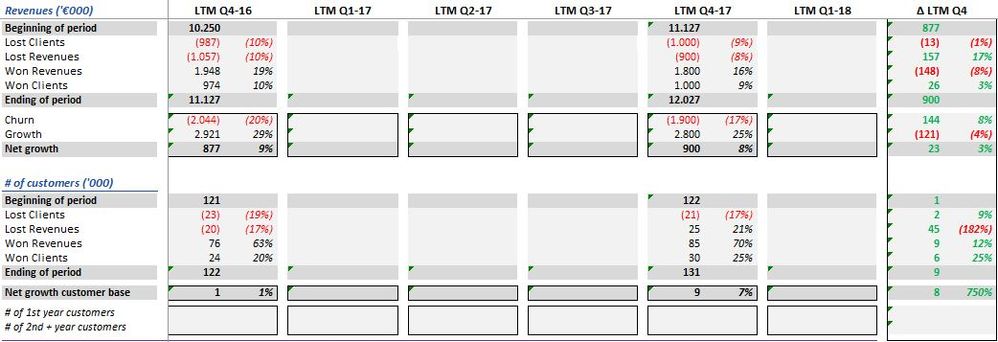
The end result of the dummy data should be:

I want to compare each quarter the information from the last 4 quarters (current) with the information from the prior period.
For example on LTM (Last Twelve Months) Q1-17, I want to compare the periods 2016-Q2 until 2017-Q1 (current) with the period 2016-Q1 until 2016-Q4 (prior period) and than calculate the number of lost clients, steady clients and won clients.
For example, I want to calculate the won clients, that are the clients who bought in the current period and not in de prior period.
Won Customers LTM =
VAR CustomerLTM = CALCULATE(DISTINCTCOUNT(Invoices[Customer]);
FILTER(ALL('Calendar');
** what do I have to put here?
VAR PriorCustomers = CALCULATE(DISTINCTCOUNT(Invoices[Customer]);
FILTER(ALL('Calendar' );
** what do I have to put here?
RETURN
COUNTROWS(
EXCEPT(CustomerLTM; PriorCustomers ) )
))
Can someone help me?
Thanks in advance,
With kind regards,
Cor
@Zubair_Muhammad


