cancel
Showing results for 
Search instead for 
Did you mean: 

The Power BI Data Visualization World Championships is back! Get ahead of the game and start preparing now! Learn more

Reply
LostintheBIu
Helper II
Helper II

Compared this month status with previous month status.

Hello everyone,


It is the first time when I have to do more complex things with PowerBI and I got stuck on this one.


I have a set of data with the following columns: ID, Date, Stage, Status. Important to notice that this is kind of a panel data where we follow observations (projects) over a few months. The data will be updated monthly and this is why we want to add a new column called "Status previous month" that will tell us the status that a project had in the previous month. This will enable us to see what projects advance and what projects make no progress.


For example, in the screenshot below you can see projects that were updated on 18.08.2020 and 18.09.2020 (just an example). If we look at the first column, ID 800680 we can see that the status changes from one month to another (from approved to active), therefore the value for the new column in the highlighted raw should be "Approved" because that was the status of that project in the previous month. Since 18.08.2020 is the first date with data available, the "previous status" for these rows should just show "N/A".  Once the "Previous Status" column is created, I would like to add a new one called "Progress" where based on the new status and previous status, I can see what the progress was. Perhaps this will be done with some IF statements.
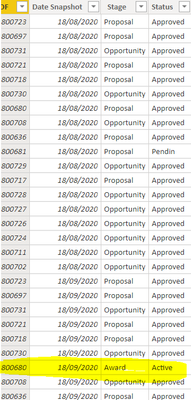
 

LostintheBIu_2-1597930962166.png


I have read lots of posts on this topic and tried solutions involving functions such as "PreviousMonth" or "Earlier" but doesn't seem to match my needs.


Thanks a lot for helping and feel free to ask if more details are needed


1 ACCEPTED SOLUTION
v-yingjl
Community Support
Community Support

Hi @LostintheBIu ,

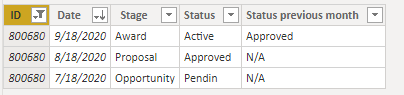
Based on your description, I have added another row on ID 800680

result.png

You can create a calculated column like this:


Status previous month = 
IF (
    CALCULATE ( COUNTROWS ( 'Table' ), ALLEXCEPT ( 'Table', 'Table'[ID] ) ) > 1,
    IF (
        'Table'[Date]
            = CALCULATE ( MAX ( 'Table'[Date] ), ALLEXCEPT ( 'Table', 'Table'[ID] ) ),
        CALCULATE (
            MAX ( 'Table'[Status] ),
            FILTER ( ALL ( 'Table' ), 'Table'[Date] = EARLIER ( 'Table'[Date] ) )
        ),
        "N/A"
    ),
    "N/A"
)


Attached a sample file in the below, hopes to help you.


Best Regards,
Yingjie Li

If this post helps then please consider Accept it as the solution to help the other members find it more quickly.

View solution in original post

2 REPLIES 2
v-yingjl
Community Support
Community Support

Hi @LostintheBIu ,

Based on your description, I have added another row on ID 800680

result.png

You can create a calculated column like this:


Status previous month = 
IF (
    CALCULATE ( COUNTROWS ( 'Table' ), ALLEXCEPT ( 'Table', 'Table'[ID] ) ) > 1,
    IF (
        'Table'[Date]
            = CALCULATE ( MAX ( 'Table'[Date] ), ALLEXCEPT ( 'Table', 'Table'[ID] ) ),
        CALCULATE (
            MAX ( 'Table'[Status] ),
            FILTER ( ALL ( 'Table' ), 'Table'[Date] = EARLIER ( 'Table'[Date] ) )
        ),
        "N/A"
    ),
    "N/A"
)


Attached a sample file in the below, hopes to help you.


Best Regards,
Yingjie Li

If this post helps then please consider Accept it as the solution to help the other members find it more quickly.

amitchandak
Super User
Super User

@LostintheBIu , try , new columns

maxx(filter(table, [ID] =earlier([ID]) && eomonth([Date],0) = eomonth(earlier([Date]),-1)),[Status])

ot

maxx(filter(table, [ID] =earlier([ID]) && eomonth([Date],0) = eomonth(earlier([Date]),-1)),earlier([Status]))

Share with Power BI Enthusiasts: Full Power BI Video (20 Hours) YouTube
Microsoft Fabric Series 60+ Videos YouTube
Microsoft Fabric Hindi End to End YouTube

Helpful resources

Announcements
Power BI DataViz World Championships

Power BI Dataviz World Championships

The Power BI Data Visualization World Championships is back! Get ahead of the game and start preparing now!

December 2025 Power BI Update Carousel

Power BI Monthly Update - December 2025

Check out the December 2025 Power BI Holiday Recap!

FabCon Atlanta 2026 carousel

FabCon Atlanta 2026

Join us at FabCon Atlanta, March 16-20, for the ultimate Fabric, Power BI, AI and SQL community-led event. Save $200 with code FABCOMM.