cancel
Showing results for 
Search instead for 
Did you mean: 

The Power BI Data Visualization World Championships is back! Get ahead of the game and start preparing now! Learn more

Reply
Anonymous
Not applicable

Compare one customer to multiple other (user selected) customers

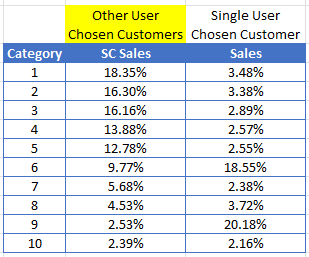
I need to output a table like below where "Single User Chosen Customer" is filtered with a single selection slicer and "Other User Chosen Customers" is filtered with multi-select slicer. Both are filtered by the user. The table needs to show Top N (10 in this example) categories sorted by SC Sales. I need the Sales column to output the sales for the single select customer for the same categories.
vikaal_5-1674472846294.png


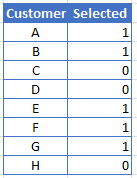
I managed to do this before by creating a separate data table for the multi customer column, but I had to hard code in the customers for that like below and I need the report to filter for customers chosen by the user without having to manually change the data table. 


Hardcoded table:
vikaal_4-1674472836709.png

Measure with hardcoded table: 

OtherCustomerSales = 

VAR AllCatsTotal = CALCULATE(SUMX(ALL('Data'[Cat]), CALCULATE(SUM('Data'[Sales]))),'Customer'[Selected]=1)

RETURN

CALCULATE(DIVIDE(SUM('Data'[Sales]),AllCatsTotal),'Customer'[Selected]=1)


I've made a separate data table using distinct values from my category lookup table which works if I need to output only the selected customers but since I need both both the single select slicer and the multiselect slicer to interact with the same table this isn't working.


I've also played around with the idea of outputting two tables (one for each slicer) and partially hiding one behind the other, but this won't work let me sort the categories in the same order for both tables. 


Thanks, 

vikaal

1 ACCEPTED SOLUTION
amitchandak
Super User
Super User

@Anonymous , You need independent Slicer/s for that


refer

Compare Categorical Data Using Slicers - Compare two Brands: https://youtu.be/exN4nTewgbc

Share with Power BI Enthusiasts: Full Power BI Video (20 Hours) YouTube
Microsoft Fabric Series 60+ Videos YouTube
Microsoft Fabric Hindi End to End YouTube

View solution in original post

2 REPLIES 2
amitchandak
Super User
Super User

@Anonymous , You need independent Slicer/s for that


refer

Compare Categorical Data Using Slicers - Compare two Brands: https://youtu.be/exN4nTewgbc

Share with Power BI Enthusiasts: Full Power BI Video (20 Hours) YouTube
Microsoft Fabric Series 60+ Videos YouTube
Microsoft Fabric Hindi End to End YouTube
Anonymous
Not applicable

This is perfect, thank you!

Helpful resources

Announcements
Power BI DataViz World Championships

Power BI Dataviz World Championships

The Power BI Data Visualization World Championships is back! Get ahead of the game and start preparing now!

November Power BI Update Carousel

Power BI Monthly Update - November 2025

Check out the November 2025 Power BI update to learn about new features.

FabCon Atlanta 2026 carousel

FabCon Atlanta 2026

Join us at FabCon Atlanta, March 16-20, for the ultimate Fabric, Power BI, AI and SQL community-led event. Save $200 with code FABCOMM.