cancel
Showing results for 
Search instead for 
Did you mean: 

View all the Fabric Data Days sessions on demand. View schedule

Reply

Compare null dates with TODAY with conditions from other column?

Hi all - 


Further to another issue yesterday around date formatting and null values I am struggling with the next step 🙄


I want to add a conditional column which looks at one text column and one date column and returns possible 3 values. 


This is what I am trying to achieve -

If action_completed_flag is Y = null 

else if action_target_date is before today = Action overdue 

else if action_target_date is after today = Action current


2 issues 


1 - cannot get any type of TODAY/LOCALNOW function to work at all 


2 -  error returns because of the null values in some of the action_target_date rows


HOWEVER - i have tested this on a set date (31/12/2022) using a date field which has no nulls and it works - so I know I must be on the right tracks but cannot make it work 😞 


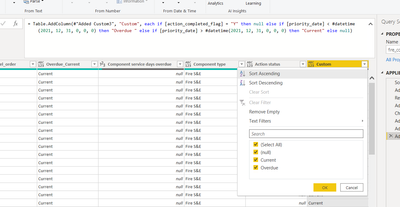
Heres what I've used to test it - sorry if its messy, total beginner here 🙂 


= Table.AddColumn(#"Added Custom3", "Custom", each if [action_completed_flag] = "Y" then null else if [priority_date] < #datetime(2021, 12, 31, 0, 0, 0) then "Overdue " else if [priority_date] > #datetime(2021, 12, 31, 0, 0, 0) then "Current" else null)
 

Googlecanthelp_0-1645176676573.png


Thanks!!!!

1 ACCEPTED SOLUTION
v-luwang-msft
Community Support
Community Support

Hi @Googlecanthelp ,

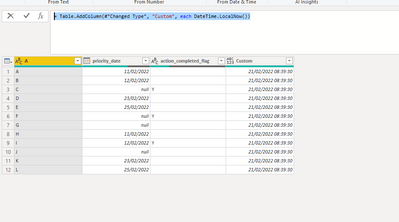
Use the following to get the today first:

= Table.AddColumn(#"Changed Type", "Custom", each DateTime.LocalNow())

vluwangmsft_0-1645429252428.png

Then custom column:

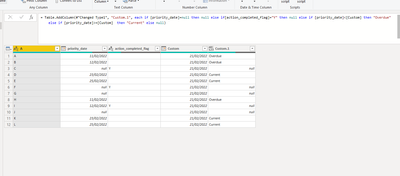
= Table.AddColumn(#"Changed Type1", "Custom.1", each if [priority_date]=null then null else if[action_completed_flag]="Y" then null else if [priority_date]<[Custom] then "Overdue" else if [priority_date]>=[Custom]  then "Current" else null)


All the content:

let
    Source = Table.FromRows(Json.Document(Binary.Decompress(Binary.FromText("i45WclTSUTIyMDLSN9I3NASylWJ1opWckASNYILOIIaOUiSY44JQYWQMU+GKJGgKE3RD1uYO4YDZHths9kSzGaLNC0mbNzabfTBsjgUA", BinaryEncoding.Base64), Compression.Deflate)), let _t = ((type nullable text) meta [Serialized.Text = true]) in type table [A = _t, priority_date = _t, action_completed_flag = _t]),
    #"Changed Type" = Table.TransformColumnTypes(Source,{{"priority_date", type date}}),
    #"Added Custom" = Table.AddColumn(#"Changed Type", "Custom", each DateTime.LocalNow()),
    #"Changed Type1" = Table.TransformColumnTypes(#"Added Custom",{{"Custom", type date}}),
    #"Added Custom1" = Table.AddColumn(#"Changed Type1", "Custom.1", each if [priority_date]=null then null else if[action_completed_flag]="Y" then null else if [priority_date]<[Custom] then "Overdue" else if [priority_date]>=[Custom]  then "Current" else null)
 
in
    #"Added Custom1"

Final output:

vluwangmsft_1-1645429318078.png


You could download my pbix file if you need.

Did I answer your question? Mark my post as a solution!


Best Regards

Lucien

View solution in original post

2 REPLIES 2

Thank you @v-luwang-msft  yes that is perfect 🤗

v-luwang-msft
Community Support
Community Support

Hi @Googlecanthelp ,

Use the following to get the today first:

= Table.AddColumn(#"Changed Type", "Custom", each DateTime.LocalNow())

vluwangmsft_0-1645429252428.png

Then custom column:

= Table.AddColumn(#"Changed Type1", "Custom.1", each if [priority_date]=null then null else if[action_completed_flag]="Y" then null else if [priority_date]<[Custom] then "Overdue" else if [priority_date]>=[Custom]  then "Current" else null)


All the content:

let
    Source = Table.FromRows(Json.Document(Binary.Decompress(Binary.FromText("i45WclTSUTIyMDLSN9I3NASylWJ1opWckASNYILOIIaOUiSY44JQYWQMU+GKJGgKE3RD1uYO4YDZHths9kSzGaLNC0mbNzabfTBsjgUA", BinaryEncoding.Base64), Compression.Deflate)), let _t = ((type nullable text) meta [Serialized.Text = true]) in type table [A = _t, priority_date = _t, action_completed_flag = _t]),
    #"Changed Type" = Table.TransformColumnTypes(Source,{{"priority_date", type date}}),
    #"Added Custom" = Table.AddColumn(#"Changed Type", "Custom", each DateTime.LocalNow()),
    #"Changed Type1" = Table.TransformColumnTypes(#"Added Custom",{{"Custom", type date}}),
    #"Added Custom1" = Table.AddColumn(#"Changed Type1", "Custom.1", each if [priority_date]=null then null else if[action_completed_flag]="Y" then null else if [priority_date]<[Custom] then "Overdue" else if [priority_date]>=[Custom]  then "Current" else null)
 
in
    #"Added Custom1"

Final output:

vluwangmsft_1-1645429318078.png


You could download my pbix file if you need.

Did I answer your question? Mark my post as a solution!


Best Regards

Lucien

Helpful resources

Announcements
November Power BI Update Carousel

Power BI Monthly Update - November 2025

Check out the November 2025 Power BI update to learn about new features.

Fabric Data Days Carousel

Fabric Data Days

Advance your Data & AI career with 50 days of live learning, contests, hands-on challenges, study groups & certifications and more!

FabCon Atlanta 2026 carousel

FabCon Atlanta 2026

Join us at FabCon Atlanta, March 16-20, for the ultimate Fabric, Power BI, AI and SQL community-led event. Save $200 with code FABCOMM.

Top Solution Authors
Top Kudoed Authors