Get Fabric or SQL Certified for Free.
Get certified for free when you join Fabric Data Days 2026 and dive into Fabric, Power BI, SQL, AI, and other essential data skills.
Join now- Power BI forums
- Get Help with Power BI
- Desktop
- Service
- Report Server
- Power Query
- Mobile Apps
- Developer
- DAX Commands and Tips
- Custom Visuals Development Discussion
- Health and Life Sciences
- Power BI Spanish forums
- Translated Spanish Desktop
- Training and Consulting
- Instructor Led Training
- Dashboard in a Day for Women, by Women
- Galleries
- Data Stories Gallery
- Themes Gallery
- Contests Gallery
- QuickViz Gallery
- Quick Measures Gallery
- Visual Calculations Gallery
- Notebook Gallery
- Translytical Task Flow Gallery
- TMDL Gallery
- R Script Showcase
- Webinars and Video Gallery
- Ideas
- Custom Visuals Ideas (read-only)
- Issues
- Issues
- Events
- Upcoming Events
July 7 - July 17 | Round 2 of the Power BI Dataviz World Championships. Don't miss your chance! Learn more
- Power BI forums
- Forums
- Get Help with Power BI
- Desktop
- Re: Compare difference between two tables.
- Subscribe to RSS Feed
- Mark Topic as New
- Mark Topic as Read
- Float this Topic for Current User
- Bookmark
- Subscribe
- Printer Friendly Page


- Mark as New
- Bookmark
- Subscribe
- Mute
- Subscribe to RSS Feed
- Permalink
- Report Inappropriate Content
Compare difference between two tables.
Hi Experts,
I am in need of some dax help in relation to the below. In short i need to capture where contacts opt 'OUT' of Email/Phone/SMS/Mail for tracking reasons where they were previosuly optied 'In'.
I have two tables. 1st is a pre loaded static table i import into PowerBI. this is my base level
Pre-Campaign status Table name = Pre Campaign Consents
| Name | Medium | Opted |
| Brian | In | |
| Brian | Out | |
| Brian | SMS | In |
| Brian | Phone | In |
2nd is the live in progress updates to the above. so i need to recird changes. where the 'Opted" value will possibly change or remain unchanged.
Post Campaign changes - Table name = Consents
| Name | Medium | Opted |
| Brian | Out | |
| Brian | Out | |
| Brian | SMS | In |
| Brian | Phone | Out |
The 'Pre Campaign Consents' & 'Consents' tables are realted by Donor ID as a unique Key
I want to capture where Brian was opted 'In' for Email and Phone but has not Opted 'Out'
Possible Result visual
| Name | Medium | Pre Campaign Value | New Opted Value |
| Brian | In | Out | |
| Brian | Phone | In | Out |
I am not interested in where a contact has opted 'IN' to a medium or if remained unchanged i just need to tracked the change where a contact was opted into Email/Phone/SMS/Post and has opted out for any of these mediums.
Can provide any screen shots needed etc..
Thanks in advance.
Solved! Go to Solution.


- Mark as New
- Bookmark
- Subscribe
- Mute
- Subscribe to RSS Feed
- Permalink
- Report Inappropriate Content
The proper way would be to create a data model with Name and Medium dimension tables that would then control the two fact tables. But a simpler option would be to take advantage of the merging functions in Power Query that allow you to link tables by more than one column.
Pre Contents table:
let
    Source = Table.FromRows(Json.Document(Binary.Decompress(Binary.FromText("i45WcirKTMxT0lFyzU3MzAHSnnlKsToIYV+IqH9pCYpwsG8wptqAjPy8VKhwLAA=", BinaryEncoding.Base64), Compression.Deflate)), let _t = ((type nullable text) meta [Serialized.Text = true]) in type table [Name = _t, Medium = _t, Opted = _t])
in
    Source
Contents table:
let
    Source = Table.FromRows(Json.Document(Binary.Decompress(Binary.FromText("i45WcirKTMxT0lFyzU3MzAHS/qUlSrE6CHFf7MLBvsFA0jMPRTAgIz8vFaY4FgA=", BinaryEncoding.Base64), Compression.Deflate)), let _t = ((type nullable text) meta [Serialized.Text = true]) in type table [Name = _t, Medium = _t, Opted = _t]),
    #"Merged Queries" = Table.NestedJoin(Source, {"Name", "Medium"}, #"Pre Consents", {"Name", "Medium"}, "Pre Consents", JoinKind.LeftOuter),
    #"Expanded Pre Consents" = Table.ExpandTableColumn(#"Merged Queries", "Pre Consents", {"Opted"}, {"Opted.1"}),
    #"Renamed Columns" = Table.RenameColumns(#"Expanded Pre Consents",{{"Opted.1", "Pre"}}),
    #"Added Custom" = Table.AddColumn(#"Renamed Columns", "Concern", each if [Pre]="In" and [Opted] = "Out" then 1 else 0),
    #"Filtered Rows" = Table.SelectRows(#"Added Custom", each ([Concern] = 1))
in
    #"Filtered Rows"

- Mark as New
- Bookmark
- Subscribe
- Mute
- Subscribe to RSS Feed
- Permalink
- Report Inappropriate Content
when are tables with different columns and a column the same as the merge would do?

- Mark as New
- Bookmark
- Subscribe
- Mute
- Subscribe to RSS Feed
- Permalink
- Report Inappropriate Content
Hi @Brookied ,
If you just want a table visual, you could create a relationship between thest two tables.
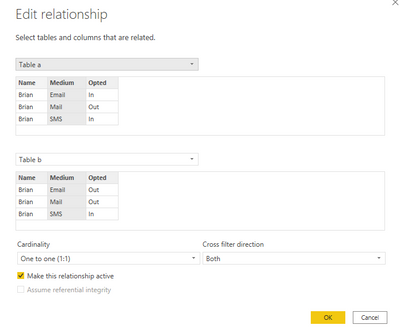
Then create a measure as below and add it to visual level filter.
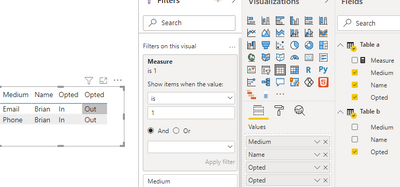
If you want a new table, you could use merge queries feature in Query Editor to create a new table and create a custom colum.
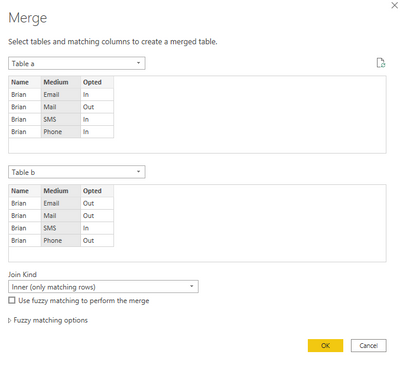

Then filter the custom = 1 and remove the custom column.
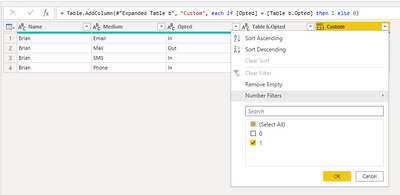

Best Regards,
Jay
- Mark as New
- Bookmark
- Subscribe
- Mute
- Subscribe to RSS Feed
- Permalink
- Report Inappropriate Content
You need to do a merge, not an append. (Bit of an academic discussion as internally Power Query does not care).
You said your data source is XML which is a hierarchical data structure. But your screenshots are already flattened out. Please elaborate.
- Mark as New
- Bookmark
- Subscribe
- Mute
- Subscribe to RSS Feed
- Permalink
- Report Inappropriate Content
The proper way would be to create a data model with Name and Medium dimension tables that would then control the two fact tables. But a simpler option would be to take advantage of the merging functions in Power Query that allow you to link tables by more than one column.
Pre Contents table:
let
    Source = Table.FromRows(Json.Document(Binary.Decompress(Binary.FromText("i45WcirKTMxT0lFyzU3MzAHSnnlKsToIYV+IqH9pCYpwsG8wptqAjPy8VKhwLAA=", BinaryEncoding.Base64), Compression.Deflate)), let _t = ((type nullable text) meta [Serialized.Text = true]) in type table [Name = _t, Medium = _t, Opted = _t])
in
    Source
Contents table:
let
    Source = Table.FromRows(Json.Document(Binary.Decompress(Binary.FromText("i45WcirKTMxT0lFyzU3MzAHS/qUlSrE6CHFf7MLBvsFA0jMPRTAgIz8vFaY4FgA=", BinaryEncoding.Base64), Compression.Deflate)), let _t = ((type nullable text) meta [Serialized.Text = true]) in type table [Name = _t, Medium = _t, Opted = _t]),
    #"Merged Queries" = Table.NestedJoin(Source, {"Name", "Medium"}, #"Pre Consents", {"Name", "Medium"}, "Pre Consents", JoinKind.LeftOuter),
    #"Expanded Pre Consents" = Table.ExpandTableColumn(#"Merged Queries", "Pre Consents", {"Opted"}, {"Opted.1"}),
    #"Renamed Columns" = Table.RenameColumns(#"Expanded Pre Consents",{{"Opted.1", "Pre"}}),
    #"Added Custom" = Table.AddColumn(#"Renamed Columns", "Concern", each if [Pre]="In" and [Opted] = "Out" then 1 else 0),
    #"Filtered Rows" = Table.SelectRows(#"Added Custom", each ([Concern] = 1))
in
#"Filtered Rows"- Mark as New
- Bookmark
- Subscribe
- Mute
- Subscribe to RSS Feed
- Permalink
- Report Inappropriate Content
Hi Stumbling along here so decided to post the tables to see if that makes things simpler to figure out.
Below is my "Pre-Consent" table
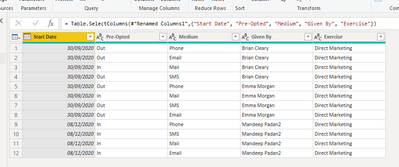
Below is the "Consents" table - these are realted by "Given By"
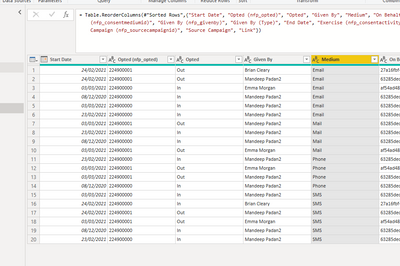
Thinking about it i would like to "Append" new Consents given to the 'Pre Consents' table in new columns. These would be Given By, Medium, Opted. When i do this it just adds new rows and i get a multiplcation of information. What i want is to add new Columns where the name matches and medium matches with new Opted values.
So the "Pre-Consents" table with be added with the new columns from 'Consents' Table where it pulls in updated preferences.

The above should allow me to report on where someone was Opted IN to a Medium but now Opted OUT.
Many Thanks
- Mark as New
- Bookmark
- Subscribe
- Mute
- Subscribe to RSS Feed
- Permalink
- Report Inappropriate Content
Morning, Many thanks for the above, if my queries is built from XML can the above be added ? Sorry for stupid question but never attempted this before.
Cheers
Helpful resources

FabCon & SQLCon – Barcelona 2026
Join us in Barcelona for FabCon and SQLCon, the Fabric, Power BI, SQL, and AI community event. Save €200 with code FABCMTY200.

Data Days 2026
Join Data Days 2026: 60 days of free live/on-demand sessions, challenges, study groups, and certification opportunities.

Power BI DataViz World Championships - June 2026
A new Power BI DataViz World Championship is coming this June! Don't miss out on submitting your entry.

| User | Count |
|---|---|
| 29 | |
| 27 | |
| 26 | |
| 24 | |
| 16 |


| User | Count |
|---|---|
| 54 | |
| 47 | |
| 41 | |
| 31 | |
| 21 |


