We've captured the moments from FabCon & SQLCon that everyone is talking about, and we are bringing them to the community, live and on-demand. Starts on April 14th. Register now
I am a former Tableau user and I trying to figure out how to recrease a cacluated field from Tableau with DAX in PowerBI. The formula I was using in Tableau was:
If {fixed [Academic Year], [Academic Term], [Program], [Degree], [People Code Id], [Stage App Decision], [Create Time]: MAX([DATE + TIME])} = {fixed [Academic Year], [Academic Term], [Program], [Degree], [People Code Id]: MAX([DATE + TIME])} THEN [Stage App Decision] ELSE NULL END
This formula is comparing records based on the max date and context of certain fields. I am thinking utlizing the LASTDATE function seems right, but I am not certain how to set the context. I assume it is using the FILTER function, but I am not sure.
Any thoughts on how to accomplish this in DAX?
Solved! Go to Solution.
Hi @rrhutch,
Based on above sample data, firstly, create new column in Power BI Desktop using the formula below, then change the data type of newfield to Date/Time using Data Type option under Modeling ribbon.
newfield = CONCATENATE(Table[Date],CONCATENATE(" ",Table[Time]))
Secondly, create a new column using the following formula.
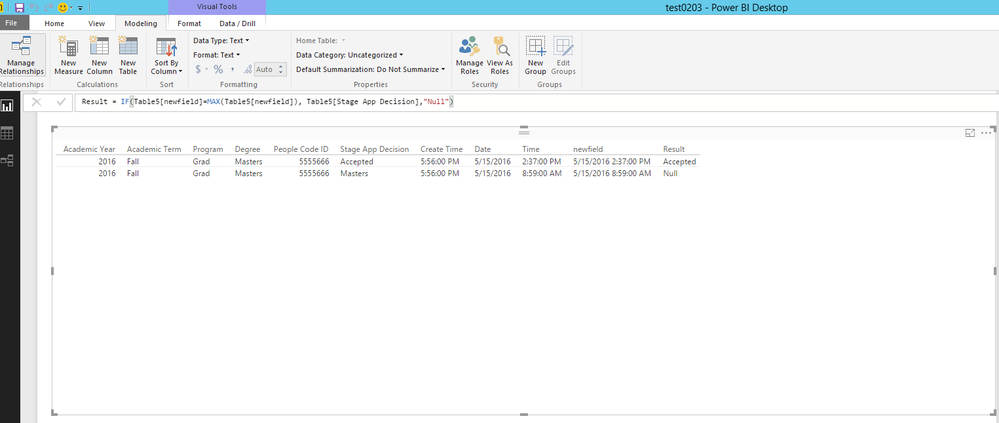
Result = IF(Table[newfield]=MAX(Table[newfield]), Table[Stage App Decision],"Null")
Thirdly, create a table visual, see my example.
Thanks,
Lydia Zhang
Hi @rrhutch,
Could you please share raw data of your tables and post expected result here?
Thanks,
Lydia Zhang
| Academic Year | Academic Term | Program | Degree | People Code ID | Stage App Decision | Create Time | Date | Time |
| 2016 | Fall | Grad | Masters | 5555666 | Accepted | 5:56pm | 5/15/2016 | 2:37PM |
| 2016 | Fall | Grad | Masters | 5555666 | Pending | 5:56pm | 5/15/2016 | 8:59AM |
Above is the dataset after the user filters the data with a date slicer. This is when the measure above is applied.
The result would create the following:
| Academic Year | Academic Term | Program | Degree | People Code ID | Stage App Decision | Create Time | Date | Time | Result |
| 2016 | Fall | Grad | Masters | 5555666 | Accepted | 5:56pm | 5/15/2016 | 2:37PM | Accepted |
| 2016 | Fall | Grad | Masters | 5555666 | Pending | 5:56pm | 5/15/2016 | 8:59AM | Null |
Basically it is determining the max row of the filtered dataset and giving me a field off of which I can filter the visualization since I only want to include the max row based on a combo of the Date and Time field.
Hi @rrhutch,
Based on above sample data, firstly, create new column in Power BI Desktop using the formula below, then change the data type of newfield to Date/Time using Data Type option under Modeling ribbon.
newfield = CONCATENATE(Table[Date],CONCATENATE(" ",Table[Time]))
Secondly, create a new column using the following formula.
Result = IF(Table[newfield]=MAX(Table[newfield]), Table[Stage App Decision],"Null")
Thirdly, create a table visual, see my example.
Thanks,
Lydia Zhang
If you have recently started exploring Fabric, we'd love to hear how it's going. Your feedback can help with product improvements.
A new Power BI DataViz World Championship is coming this June! Don't miss out on submitting your entry.
Share feedback directly with Fabric product managers, participate in targeted research studies and influence the Fabric roadmap.
| User | Count |
|---|---|
| 57 | |
| 38 | |
| 33 | |
| 19 | |
| 16 |
| User | Count |
|---|---|
| 67 | |
| 66 | |
| 40 | |
| 34 | |
| 25 |