Get certified for free when you join Fabric Data Days 2026 and dive into Fabric, Power BI, SQL, AI, and other essential data skills.
Join nowTry your skills in the Power BI Dataviz World Championship! Round one ends June 26. Join now
Hello ,
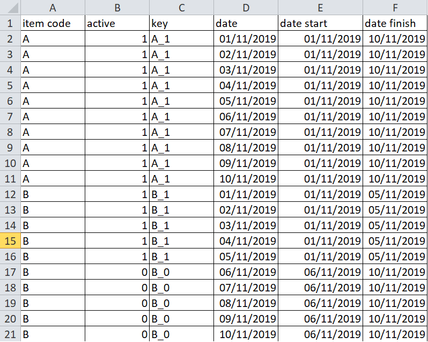
I own set of data with 6 columns like this under power bi :
With measure and a slicer I want show in a table or matrix severals columns. The slicer must be built with the "date" column, similar to a calendar .
All columns that I want show in table/matrix of exit :
key column
date min choise in the slicer by a user
date max choise in the slicer by a user
column with start date in function of key
colum with finish date in function of key
a binary system (1 or 0) to compare the "date min choise from the slicer" with the "date start" , here the comparaison it's >/=/<
a binary system (1 or 0) to compare the "date max choise from the slicer" with the "date finish" , here the comparaison it's >/=/<
Thanks to help me to obtain only with a measure (not in column mode 😉 )
Solved! Go to Solution.
Hi @Anonymous ,
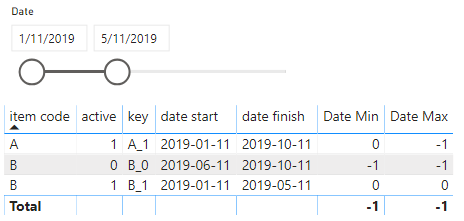
I create a sample that you can reference.
Date Min =
var mi = MIN('Date'[Date])
return
SWITCH(TRUE(),MAX('Table'[date start])>mi,-1,MAX('Table'[date start])=mi,0,MAX('Table'[date start])<mi,1)
Date Max =
var ma = MAX('Date'[Date])
return
SWITCH(TRUE(),MAX('Table'[date finish])>ma,-1,MAX('Table'[date finish])=ma,0,MAX('Table'[date finish])<ma,1)
Case 1
Case 2
Best Regards,
Xue Ding
If this post helps, then please consider Accept it as the solution to help the other members find it more quickly. Kudos are nice too.
Hello @Anonymous ,
The time intelligence features in power bi provide slicers with so much capabilities that I think you won't need a measure. I am not clear on all the columns you described. Could you provide a sample result of what you would like the table to contain, please?
Best regards,
Hello,
4 cases to illustrate the wanted result :
Hi @Anonymous ,
I create a sample that you can reference.
Date Min =
var mi = MIN('Date'[Date])
return
SWITCH(TRUE(),MAX('Table'[date start])>mi,-1,MAX('Table'[date start])=mi,0,MAX('Table'[date start])<mi,1)
Date Max =
var ma = MAX('Date'[Date])
return
SWITCH(TRUE(),MAX('Table'[date finish])>ma,-1,MAX('Table'[date finish])=ma,0,MAX('Table'[date finish])<ma,1)
Case 1
Case 2
Best Regards,
Xue Ding
If this post helps, then please consider Accept it as the solution to help the other members find it more quickly. Kudos are nice too.
Hello ,
Thanks for this solution , I write the formulas on my calculation .
Don't miss out on Data Days, June 15 through August 7. Learn Fabric, Power BI, SQL, AI and more.
Check out the May 2026 Power BI update to learn about new features.
| User | Count |
|---|---|
| 24 | |
| 22 | |
| 21 | |
| 20 | |
| 14 |
| User | Count |
|---|---|
| 59 | |
| 53 | |
| 41 | |
| 31 | |
| 31 |