Join the FabCon + SQLCon recap series. Up next: Power BI, Real-Time Intelligence, IQ and AI, and Data Factory take center stage. All sessions are available on-demand after the live show. Register now
Hello,
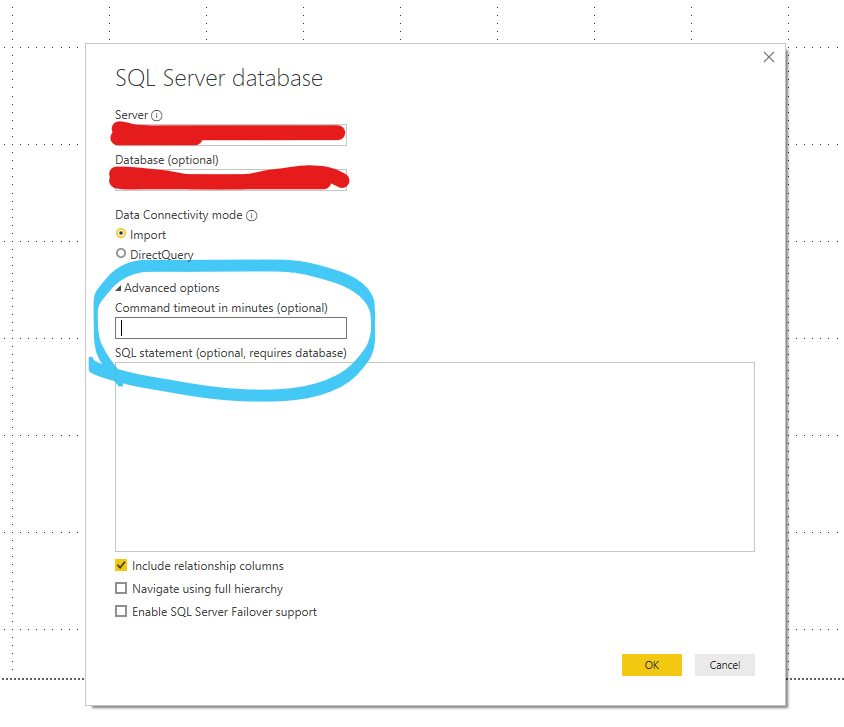
What is the default command timeout when connecting to an SQL server database query in Power BI Desktop?
I have a query that requires 20 minutes to run in SSMS but fails to run through Power BI because the timeout period elapsed.
Thank you.
Solved! Go to Solution.
Hi , @SabineOussi
The default command timeout is 10 minutes.
For more details , please refer to this article about Power Query M formula language :
url: https://docs.microsoft.com/en-us/powerquery-m/sql-database
According to you description, you can try to change the command timeout in Advanced options of Data source settings directly.
Best Regards,
Community Support Team _ Eason
If this post helps, then please consider Accept it as the solution to help the other members find it more quickly.
Hi , @SabineOussi
The default command timeout is 10 minutes.
For more details , please refer to this article about Power Query M formula language :
url: https://docs.microsoft.com/en-us/powerquery-m/sql-database
According to you description, you can try to change the command timeout in Advanced options of Data source settings directly.
Best Regards,
Community Support Team _ Eason
If this post helps, then please consider Accept it as the solution to help the other members find it more quickly.
I always try changing the command timeout duration in the query where you noted, but it seems that this never works, it stil defaults to the 10 minute default timeout duration....anyone with the same issue?
I couldn't find any document/information about the default timeout.
However, You will be able to overwrite the command timeout as mentioned here - https://community.powerbi.com/t5/Desktop/How-to-set-command-timeout-option/m-p/489726/highlight/true...
Check out the April 2026 Power BI update to learn about new features.
If you have recently started exploring Fabric, we'd love to hear how it's going. Your feedback can help with product improvements.
A new Power BI DataViz World Championship is coming this June! Don't miss out on submitting your entry.
| User | Count |
|---|---|
| 40 | |
| 39 | |
| 31 | |
| 20 | |
| 15 |
| User | Count |
|---|---|
| 67 | |
| 58 | |
| 29 | |
| 27 | |
| 25 |