Join us at FabCon Atlanta from March 16 - 20, 2026, for the ultimate Fabric, Power BI, AI and SQL community-led event. Save $200 with code FABCOMM.
Register now!The Power BI Data Visualization World Championships is back! Get ahead of the game and start preparing now! Learn more
Hi all
I have this measure which allows me to put in a card the total amount without all numbers:
Measure = IF(CALCULATE(SUM(Table[Amount]),ALLSELECTED(Table[Concept]))>999999,
CONCATENATE("$",CONCATENATE(ROUND(CALCULATE(SUM(Table[Amount])/1000000,ALLSELECTED(Table[Field])),0)," millions")),
IF(ISBLANK(CALCULATE(SUM(Table[Amount]),ALLSELECTED(Table[Field]))),"Zero",
CONCATENATE("$",CONCATENATE(ROUND(CALCULATE(SUM(Table[Amount])/1000,ALLSELECTED(Table[FIeld])),0)," k"))))
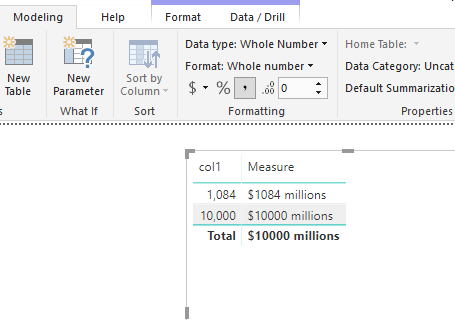
It gaves me values like this: $1084 millions
What I want is to put a comma like this when first condition is met: $1,084 millions | $10,000 millions
How can i achieve it inside the measure?
Regards,
Julián
Solved! Go to Solution.
Hi @Juramirez
As tested, here is a workaround.
1.Create measures as below to replace the formula you use in your [measure].
ROUND(CALCULATE(SUM(Table[Amount])/1000000,ALLSELECTED(Table[Field])),0)->Measure2
ROUND(CALCULATE(SUM(Table[Amount])/1000,ALLSELECTED(Table[FIeld])),0)->Measure4
Measure2 = ROUND(CALCULATE(SUM('Table'[Amount])/1000000,ALLSELECTED('Table'[Field])),0)
Measure4 = ROUND( CALCULATE(SUM('Table'[Amount])/1000,ALLSELECTED('Table'[Field])),0)
2. displays the number with your currency locale formatting by measures below
Measure3 = FORMAT([Measure2], "Currency") Measure5 = FORMAT([Measure4],"Currency")
3 concatenate the currency and "millions" or"k".
Measure
final output = IF(CALCULATE(SUM('Table'[Amount]),ALLSELECTED('Table'[Concept]))>999999,
CONCATENATE([Measure3]," millions"),
IF(ISBLANK(CALCULATE(SUM('Table'[Amount]),ALLSELECTED('Table'[Field]))),"Zero",
CONCATENATE([Measure5]," k")))
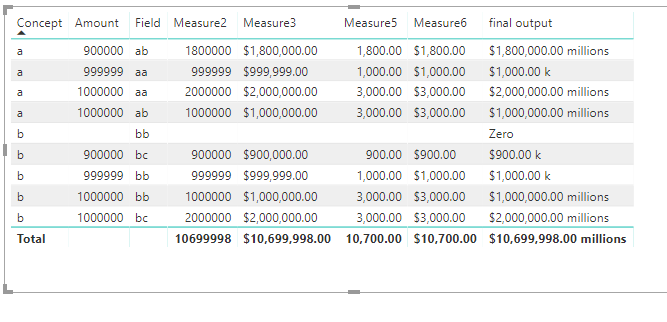
Or you could nest measures in one measure which works as lists of measures above .
Measure =
VAR Measure2 =
ROUND (
CALCULATE ( SUM ( 'Table'[Amount] ) / 1000000, ALLSELECTED ( 'Table'[Field] ) ),
0
)
VAR Measure4 =
ROUND (
CALCULATE ( SUM ( 'Table'[Amount] ) / 1000, ALLSELECTED ( 'Table'[Field] ) ),
0
)
VAR Measure3 =
FORMAT ( Measure2, "Currency" )
VAR Measure5 =
FORMAT ( Measure4, "Currency" )
RETURN
IF (
CALCULATE ( SUM ( 'Table'[Amount] ), ALLSELECTED ( 'Table'[Concept] ) ) > 999999,
CONCATENATE ( Measure3, " millions" ),
IF (
ISBLANK (
CALCULATE ( SUM ( 'Table'[Amount] ), ALLSELECTED ( 'Table'[Field] ) )
),
"Zero",
CONCATENATE ( Measure5, " k" )
)
)
Best Regards
Maggie
Hi @Juramirez
As tested, here is a workaround.
1.Create measures as below to replace the formula you use in your [measure].
ROUND(CALCULATE(SUM(Table[Amount])/1000000,ALLSELECTED(Table[Field])),0)->Measure2
ROUND(CALCULATE(SUM(Table[Amount])/1000,ALLSELECTED(Table[FIeld])),0)->Measure4
Measure2 = ROUND(CALCULATE(SUM('Table'[Amount])/1000000,ALLSELECTED('Table'[Field])),0)
Measure4 = ROUND( CALCULATE(SUM('Table'[Amount])/1000,ALLSELECTED('Table'[Field])),0)
2. displays the number with your currency locale formatting by measures below
Measure3 = FORMAT([Measure2], "Currency") Measure5 = FORMAT([Measure4],"Currency")
3 concatenate the currency and "millions" or"k".
Measure
final output = IF(CALCULATE(SUM('Table'[Amount]),ALLSELECTED('Table'[Concept]))>999999,
CONCATENATE([Measure3]," millions"),
IF(ISBLANK(CALCULATE(SUM('Table'[Amount]),ALLSELECTED('Table'[Field]))),"Zero",
CONCATENATE([Measure5]," k")))
Or you could nest measures in one measure which works as lists of measures above .
Measure =
VAR Measure2 =
ROUND (
CALCULATE ( SUM ( 'Table'[Amount] ) / 1000000, ALLSELECTED ( 'Table'[Field] ) ),
0
)
VAR Measure4 =
ROUND (
CALCULATE ( SUM ( 'Table'[Amount] ) / 1000, ALLSELECTED ( 'Table'[Field] ) ),
0
)
VAR Measure3 =
FORMAT ( Measure2, "Currency" )
VAR Measure5 =
FORMAT ( Measure4, "Currency" )
RETURN
IF (
CALCULATE ( SUM ( 'Table'[Amount] ), ALLSELECTED ( 'Table'[Concept] ) ) > 999999,
CONCATENATE ( Measure3, " millions" ),
IF (
ISBLANK (
CALCULATE ( SUM ( 'Table'[Amount] ), ALLSELECTED ( 'Table'[Field] ) )
),
"Zero",
CONCATENATE ( Measure5, " k" )
)
)
Best Regards
Maggie
Hi @Juramirez
As tested, we could get the comma in nuber type value by "Modeling"->"Format"->comma, but it can be put into measure in text type.
Best Regards
Maggie
The Power BI Data Visualization World Championships is back! Get ahead of the game and start preparing now!
| User | Count |
|---|---|
| 155 | |
| 131 | |
| 115 | |
| 79 | |
| 54 |