Learn from the best! Meet the four finalists headed to the FINALS of the Power BI Dataviz World Championships! Register now
I have a field named Flood Details which is text type contains mix of numbers plus text value like i show below.
i want to format number values with comma separated like this example below;
if value is
2,50,000 = 250,000(change to like this)
1,00,000 = 100,000(change to like this)
1000000 = 1,000,000(change to like this).
Above column column conatin mix of type (number + text).I can't format to whole number .
How can i do this ?
Solved! Go to Solution.
Please see this sample PBIX file for this M Code to do what you want.
let
Source = Table.FromRows(Json.Document(Binary.Decompress(Binary.FromText("i45WMjLVMTAwUIrVATJ1TA3gHEMgC8ExAAMw2y+/RME5vyy1KDUFzIdoVVXIzcxTMETSo6sUGwsA", BinaryEncoding.Base64), Compression.Deflate)), let _t = ((type nullable text) meta [Serialized.Text = true]) in type table [all = _t]),
#"Added Custom" = Table.AddColumn(Source, "Custom", each try Number.ToText(Number.From([all]),"N") otherwise [all]),
#"Added Custom1" = Table.AddColumn(#"Added Custom", "Custom.1", each try if Text.Contains([Custom],".00") then Text.Start([Custom],Text.Length([Custom])-3) else [Custom] otherwise ""),
#"Removed Columns" = Table.RemoveColumns(#"Added Custom1",{"Custom"})
in
#"Removed Columns"
Regards
Phil
If I answered your question please mark my post as the solution.
If my answer helped solve your problem, give it a kudos by clicking on the Thumbs Up.
Proud to be a Super User!
Please see this sample PBIX file for this M Code to do what you want.
let
Source = Table.FromRows(Json.Document(Binary.Decompress(Binary.FromText("i45WMjLVMTAwUIrVATJ1TA3gHEMgC8ExAAMw2y+/RME5vyy1KDUFzIdoVVXIzcxTMETSo6sUGwsA", BinaryEncoding.Base64), Compression.Deflate)), let _t = ((type nullable text) meta [Serialized.Text = true]) in type table [all = _t]),
#"Added Custom" = Table.AddColumn(Source, "Custom", each try Number.ToText(Number.From([all]),"N") otherwise [all]),
#"Added Custom1" = Table.AddColumn(#"Added Custom", "Custom.1", each try if Text.Contains([Custom],".00") then Text.Start([Custom],Text.Length([Custom])-3) else [Custom] otherwise ""),
#"Removed Columns" = Table.RemoveColumns(#"Added Custom1",{"Custom"})
in
#"Removed Columns"
Regards
Phil
If I answered your question please mark my post as the solution.
If my answer helped solve your problem, give it a kudos by clicking on the Thumbs Up.
Proud to be a Super User!
thanks....this help me to solve my issue
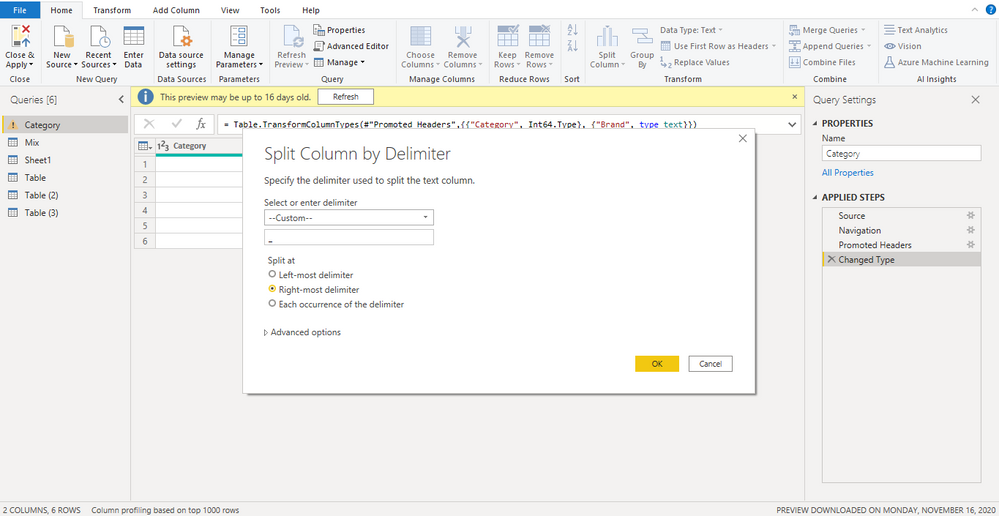
Create a column likein power query
= " " & [flood details]
split by last occurance of space " "
and then remove/replace comma
Replace : https://www.howtoexcel.org/power-query/bulk-replace-values/
I need to change numbers only to format with commas...
example value from flood details like
2,50,000 = 250,000(change to like this)
1,00,000 = 100,000(change to like this)
1000000 = 1,000,000(change to like this).
I want to put the value like 2% min 100,000 this as itself in column.Only this type of values to be changed from 2,50,000 to 250,000. Is it possible?plse help...
If you have recently started exploring Fabric, we'd love to hear how it's going. Your feedback can help with product improvements.
A new Power BI DataViz World Championship is coming this June! Don't miss out on submitting your entry.
Share feedback directly with Fabric product managers, participate in targeted research studies and influence the Fabric roadmap.
| User | Count |
|---|---|
| 57 | |
| 38 | |
| 34 | |
| 19 | |
| 16 |
| User | Count |
|---|---|
| 70 | |
| 66 | |
| 42 | |
| 32 | |
| 25 |