cancel
Showing results for 
Search instead for 
Did you mean: 

Learn from the best! Meet the four finalists headed to the FINALS of the Power BI Dataviz World Championships! Register now

Reply
adean137
Helper I
Helper I

Combo chart visual help

Hello,


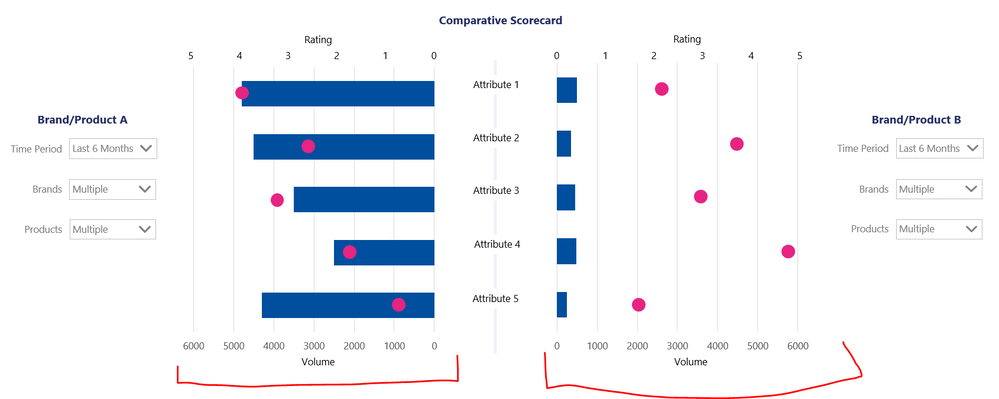
I'm trying to create a visual like below or something similar. Ideally this would be a bar chart but I believe there is no dual axis bar chart available so a column / line chart combo would be fine. The key thing is that the Volume axis is the same for both brand/product selections to make them comparable. 


Any ideas would be much appreicated!


Capture.PNG


5 REPLIES 5
amitchandak
Super User
Super User

@adean137 , I doubt a visual like that. But check id tornado Visual can help

https://appsource.microsoft.com/en-us/product/power-bi-visuals/WA104380768?tab=Overview

Share with Power BI Enthusiasts: Full Power BI Video (20 Hours) YouTube
Microsoft Fabric Series 60+ Videos YouTube
Microsoft Fabric Hindi End to End YouTube

Thanks @amitchandak , I have tried the Tornado but this isn't going to work as it doesn't allow comparison of both Volume and Rating and also I cannot see how it could enable comparison of selected topics (combinations of brands and products)!

vanessafvg
Community Champion
Community Champion

i am not quite sure I undertand what you are asking, have you tried to adjust these settings in the settings of the visual of a combo chart?  


If I took the time to answer your question and I came up with a solution, please mark my post as a solution and /or give kudos freely for the effort 🙂 Thank you!

Proud to be a Super User!


if you share some data maybe i can come up with something?


If I took the time to answer your question and I came up with a solution, please mark my post as a solution and /or give kudos freely for the effort 🙂 Thank you!

Proud to be a Super User!


Hi @vanessafvg ,


Thanks for the quick response.


This is just a screenshot of a dummy chart made in PPT. I have no idea how to make this chart in Power BI - I don't think it's possible so just looking for other ideas or suggestions. I believe there is currently no way to sync the axes and I would want them to be dynamic as the volumes differ greatly.


Just wondering if there is any way to achieve this visualisation or any ideas to acehive something similar. The objective is to easily compare selected Brands/products A with selected Brands/products B in terms of Volume and Ratings across attributes.

Helpful resources

Announcements
Power BI DataViz World Championships carousel

Power BI DataViz World Championships - June 2026

A new Power BI DataViz World Championship is coming this June! Don't miss out on submitting your entry.

Join our Fabric User Panel

Join our Fabric User Panel

Share feedback directly with Fabric product managers, participate in targeted research studies and influence the Fabric roadmap.

March Power BI Update Carousel

Power BI Community Update - March 2026

Check out the March 2026 Power BI update to learn about new features.