cancel
Showing results for 
Search instead for 
Did you mean: 

Level up your Power BI skills this month - build one visual each week and tell better stories with data! Get started

Reply
lukhe81
New Member

Combo Graph & Date Alignment

Hi,


I am new here and new to Power Bi, so apologies if this post is in the wrong section. I was just wondering if it is possible to create a report similar to the image below. It needs to fulfill two criteria:


1) For each graph the x/date axis needs to match up with the one above/below,

2) I am able to have two vertical axes (combo graphs), such as EC and pH (top graph) and Rainfall and Water Level (middle)


If this is possible, any help or direction to how this can be done would be greatly appreciated. I have been struggling to figure out how to do these. In Excel I can do the combo graphs but not the x-axis alignment (in a straight forward way at least)


ExampleReport.jpg

Kind regards,


Luke

1 ACCEPTED SOLUTION
Anonymous
Not applicable

Hi @lukhe81 ,


There's no visual you mentioned.

As a workaround,

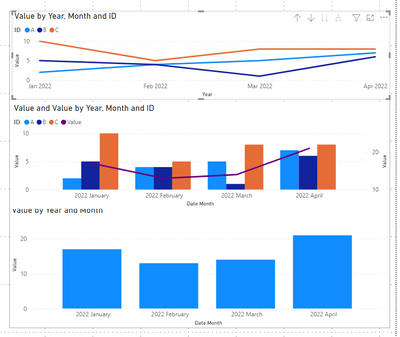
you could create a clustered column chart, a line chart and a line and clustered column chart. And then group three visuals. This way you can get a whole object.

For date alignment, you may need to change the visual size to keep the date aligned.

vstephenmsft_1-1649142872900.png


Reference: Use grouping in Power BI Desktop - Power BI | Microsoft Docs


Best Regards,

Stephen Tao


If this post helps, then please consider Accept it as the solution to help the other members find it more quickly.

View solution in original post

3 REPLIES 3
lukhe81
New Member

Thanks. I'll have a play around with it some more, and post back when I have something I am happy with.


Cheers,

Luke

Anonymous
Not applicable

Hi @lukhe81 ,


There's no visual you mentioned.

As a workaround,

you could create a clustered column chart, a line chart and a line and clustered column chart. And then group three visuals. This way you can get a whole object.

For date alignment, you may need to change the visual size to keep the date aligned.

vstephenmsft_1-1649142872900.png


Reference: Use grouping in Power BI Desktop - Power BI | Microsoft Docs


Best Regards,

Stephen Tao


If this post helps, then please consider Accept it as the solution to help the other members find it more quickly.

amitchandak
Super User
Super User

@lukhe81 , small multiples or small multiples with Calculation groups

Calculation Groups - Use Measure with small multiple : https://www.youtube.com/watch?v=LEn6ZnScMZc

Share with Power BI Enthusiasts: Full Power BI Video (20 Hours) YouTube
Microsoft Fabric Series 60+ Videos YouTube
Microsoft Fabric Hindi End to End YouTube

Helpful resources

Announcements
April Power BI Update Carousel

Power BI Monthly Update - April 2026

Check out the April 2026 Power BI update to learn about new features.

Fabric SQL PBI Data Days

Data Days 2026 coming soon!

Sign up to receive a private message when registration opens and key events begin.

New to Fabric survey Carousel

New to Fabric Survey

If you have recently started exploring Fabric, we'd love to hear how it's going. Your feedback can help with product improvements.

Power BI DataViz World Championships carousel

Power BI DataViz World Championships - June 2026

A new Power BI DataViz World Championship is coming this June! Don't miss out on submitting your entry.