Don't miss your chance to take the Fabric Data Engineer (DP-600) exam for FREE! Find out how by attending the DP-600 session on April 23rd (pacific time), live or on-demand.
Learn moreNext up in the FabCon + SQLCon recap series: The roadmap for Microsoft SQL and Maximizing Developer experiences in Fabric. All sessions are available on-demand after the live show. Register now
I am attempting to combine every 2 rows together so: rows 1 and 2, rows 3 and 4, rows 5 and 6 and so on.
How would I do this in power query?
Solved! Go to Solution.
Hi @Anonymous
Download sample PBIX file with the following code
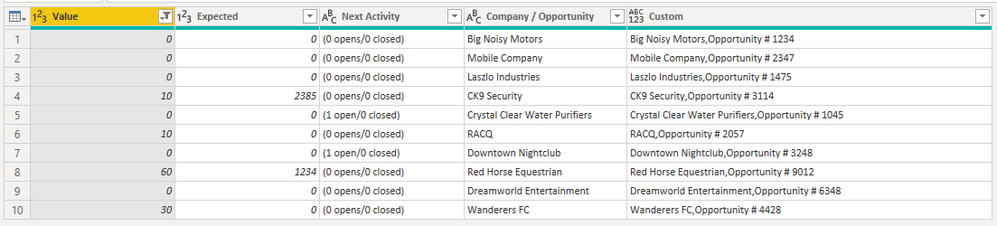
This query does what you want.
let
Source = Table.FromRows(Json.Document(Binary.Decompress(Binary.FromText("jZLLTsMwEEV/ZRQ2IFVg59HHEtIiELQUWHQRdeEmQ7Hk2MEPVeHrcaIuQEWpJVuW7PG5M3emKCISjSJyTbrjkoBqUJobAqVQBqsrf3nH97BS3LSwVFZpE21HRSSdEP7tePj10jRKWye5beECaJykfdw5+FLtuEDIVd0w2YagPXkShH5m5lsoeJSVM1ZzDEs8nWR9HO24cTLNBhTypxm8Y+m0/xsCTyg9dYX24L9c3RrLBOQCmYYNs6hh7VU+OAbaT9JfVQyZ9Habvwa5TrJT1/9Jfa4O0voNK77/tKVwuyBj4nTax407bjc8QyljBQ9+DhEWXw671jIZIjIjNA4anLlGVh+UFhUspPfeMi5rlDZEZJwcK0nOqWyYrFD7hsJ9HkJO09iTtz8=", BinaryEncoding.Base64), Compression.Deflate)), let _t = ((type nullable text) meta [Serialized.Text = true]) in type table [Value = _t, Expected = _t, #"Next Activity" = _t, #"Company / Opportunity" = _t]),
#"Changed Type" = Table.TransformColumnTypes(Source,{{"Value", Int64.Type}, {"Expected", Int64.Type}, {"Next Activity", type text}, {"Company / Opportunity", type text}}),
#"Added Index" = Table.AddIndexColumn(#"Changed Type", "Index", 0, 1, Int64.Type),
#"Added Custom" = Table.AddColumn(#"Added Index", "Custom", each if Number.Mod([Index],2) = 0 then try Text.Combine({[#"Company / Opportunity"], #"Added Index"[#"Company / Opportunity"]{[Index]+1}}, "," ) otherwise "" else ""),
#"Removed Columns" = Table.RemoveColumns(#"Added Custom",{"Index"}),
#"Filtered Rows" = Table.SelectRows(#"Removed Columns", each ([Value] <> null))
in
#"Filtered Rows"
Regards
Phil
Proud to be a Super User!
You could create a duplicate of the table. In table 1, add an index column starting at 1; in Table 2, add an index column starting at 0. Then merge both table based on the index columns
Proud to be a Super User!
Paul on Linkedin.
Hi @Anonymous
You could transpose your table then merge pairs of columns, then transpose the table again (back to rows).
But without seeing your data I don't know if that is a viable solution for you. You might have too many rows to do this by hand initially. Please supply some sample data or preferably your PBIX file.
Regards
Phil
Proud to be a Super User!
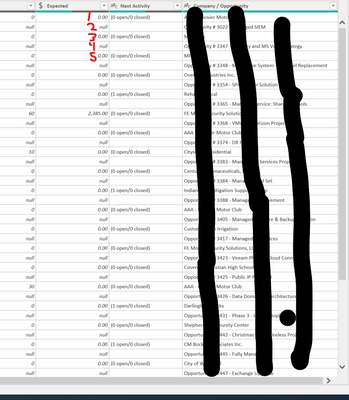
Here is a sceen shot of the data if that helps:
For the company opportunity column I am wanting to have data in row 2 appended on to row 1, with the same pattern continuing for row 4 being appended to row 3, but just for the company/ opportunity column so that I can go through and delete the even rows that have the null value. Thanks so much!
Hi @Anonymous
Download sample PBIX file with the following code
This query does what you want.
let
Source = Table.FromRows(Json.Document(Binary.Decompress(Binary.FromText("jZLLTsMwEEV/ZRQ2IFVg59HHEtIiELQUWHQRdeEmQ7Hk2MEPVeHrcaIuQEWpJVuW7PG5M3emKCISjSJyTbrjkoBqUJobAqVQBqsrf3nH97BS3LSwVFZpE21HRSSdEP7tePj10jRKWye5beECaJykfdw5+FLtuEDIVd0w2YagPXkShH5m5lsoeJSVM1ZzDEs8nWR9HO24cTLNBhTypxm8Y+m0/xsCTyg9dYX24L9c3RrLBOQCmYYNs6hh7VU+OAbaT9JfVQyZ9Habvwa5TrJT1/9Jfa4O0voNK77/tKVwuyBj4nTax407bjc8QyljBQ9+DhEWXw671jIZIjIjNA4anLlGVh+UFhUspPfeMi5rlDZEZJwcK0nOqWyYrFD7hsJ9HkJO09iTtz8=", BinaryEncoding.Base64), Compression.Deflate)), let _t = ((type nullable text) meta [Serialized.Text = true]) in type table [Value = _t, Expected = _t, #"Next Activity" = _t, #"Company / Opportunity" = _t]),
#"Changed Type" = Table.TransformColumnTypes(Source,{{"Value", Int64.Type}, {"Expected", Int64.Type}, {"Next Activity", type text}, {"Company / Opportunity", type text}}),
#"Added Index" = Table.AddIndexColumn(#"Changed Type", "Index", 0, 1, Int64.Type),
#"Added Custom" = Table.AddColumn(#"Added Index", "Custom", each if Number.Mod([Index],2) = 0 then try Text.Combine({[#"Company / Opportunity"], #"Added Index"[#"Company / Opportunity"]{[Index]+1}}, "," ) otherwise "" else ""),
#"Removed Columns" = Table.RemoveColumns(#"Added Custom",{"Index"}),
#"Filtered Rows" = Table.SelectRows(#"Removed Columns", each ([Value] <> null))
in
#"Filtered Rows"
Regards
Phil
Proud to be a Super User!
If you have recently started exploring Fabric, we'd love to hear how it's going. Your feedback can help with product improvements.
A new Power BI DataViz World Championship is coming this June! Don't miss out on submitting your entry.
Share feedback directly with Fabric product managers, participate in targeted research studies and influence the Fabric roadmap.
| User | Count |
|---|---|
| 44 | |
| 43 | |
| 38 | |
| 18 | |
| 15 |
| User | Count |
|---|---|
| 67 | |
| 63 | |
| 30 | |
| 30 | |
| 23 |