
cancel
Showing results for 
Search instead for 
Did you mean: 

Vote for your favorite vizzies from the Power BI Dataviz World Championship submissions. Vote now!

Reply
IF
Post Prodigy
Post Prodigy

Combining data from

Hi,


I want to combine two tables by including all values. Below I represented it with sample data on how I want to have the table.


Table1:

DateUnitSubunitValue1
05.2021AA110
05.2021AA212
06.2021BB222


Table2:

DateUnitSubUnitValue2

DateUnitSubunitValue2
05.2021BB130
06.2021BB120
06.2021BB222


Joined Table should be:

DateUnitSubunitValue2Value1
05.2021BB130 
06.2021BB120 
06.2021BB222 
05.2021AA1 10
05.2021AA2 12
06.2021BB2 22


How can I combine the data in this way? Thanks in advance!


1 ACCEPTED SOLUTION
FarhanAhmed
Community Champion
Community Champion

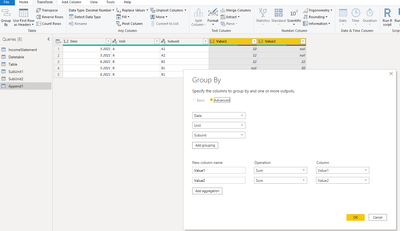
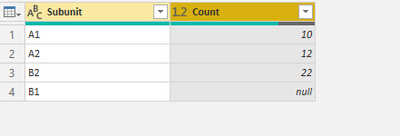
After doing @NidhiBhusari solution you can use group by in Power Query Editor to give you desired result. As it will combine the same row and SUM all the values in Value1, Value2


FarhanAhmed_0-1627900484108.png


FarhanAhmed_1-1627900516752.png


Did I answer your question? Mark my post as a solution! Appreciate your Kudos!!

Proud to be a Super User!


View solution in original post

6 REPLIES 6
NidhiBhusari
Helper IV
Helper IV

@IF Do you want output like this?

Please ignore column name.

NidhiBhusari_0-1627901097082.png


NidhiBhusari
Helper IV
Helper IV

Hi @IF ,

Try using append in Power query editor.

NidhiBhusari_0-1627899446045.png


I tried that one but the table is not really the one I am looking for. If there is a value for matching data, I want to show them in the same row. For example, Unit:B, Date:06.2021 and Subunit:B2 is repeated value. How can I show them in the same row?

27.jpg

FarhanAhmed
Community Champion
Community Champion

After doing @NidhiBhusari solution you can use group by in Power Query Editor to give you desired result. As it will combine the same row and SUM all the values in Value1, Value2


FarhanAhmed_0-1627900484108.png


FarhanAhmed_1-1627900516752.png


Did I answer your question? Mark my post as a solution! Appreciate your Kudos!!

Proud to be a Super User!


FarhanAhmed
Community Champion
Community Champion

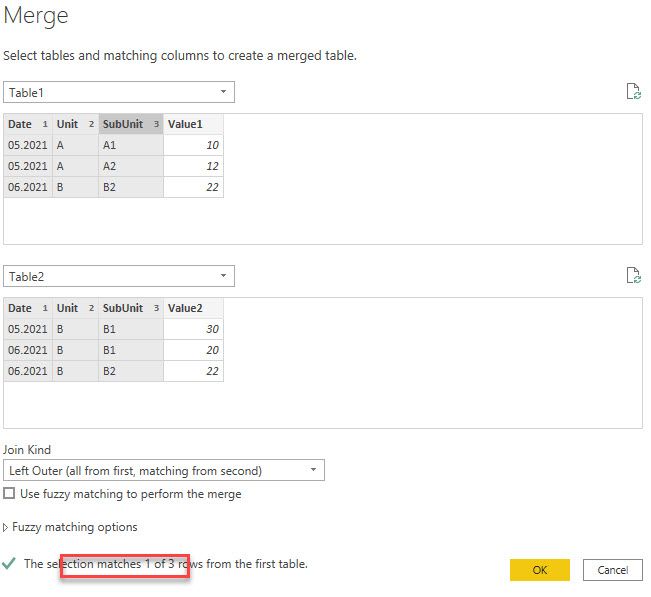
You can use Merge Queries in Power Query Editor to combine data


https://www.c-sharpcorner.com/article/merge-two-tables-in-power-bi/


https://blog.enterprisedna.co/how-to-merge-queries-in-power-bi/


Did I answer your question? Mark my post as a solution! Appreciate your Kudos!!

Proud to be a Super User!


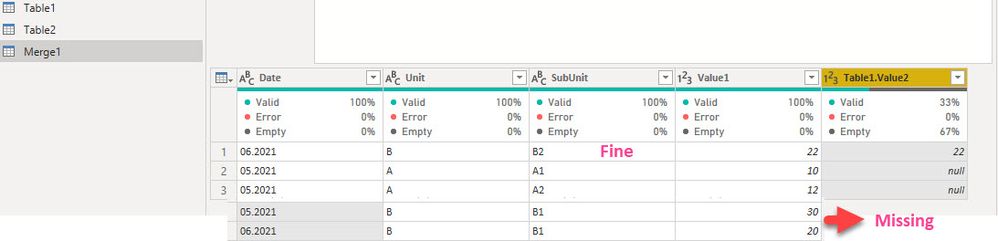
Hi, Thanks for the answer, but it doesn't work when the columns date, unit and subunit don't match exactly. It gives the following result:

25.jpg26.jpg

Helpful resources

Announcements
Power BI DataViz World Championships

Power BI Dataviz World Championships

Vote for your favorite vizzies from the Power BI World Championship submissions!

Sticker Challenge 2026 Carousel

Join our Community Sticker Challenge 2026

If you love stickers, then you will definitely want to check out our Community Sticker Challenge!

January Power BI Update Carousel

Power BI Monthly Update - January 2026

Check out the January 2026 Power BI update to learn about new features.

FabCon Atlanta 2026 carousel

FabCon Atlanta 2026

Join us at FabCon Atlanta, March 16-20, for the ultimate Fabric, Power BI, AI and SQL community-led event. Save $200 with code FABCOMM.