cancel
Showing results for 
Search instead for 
Did you mean: 

We've captured the moments from FabCon & SQLCon that everyone is talking about, and we are bringing them to the community, live and on-demand. Starts on April 14th. Register now

Reply
frieso
Regular Visitor

Combining Filter with AND

Hello Community,


I have two Tables: Customers and Contracts. In the contracts table I have one column "type". I then have a matrix where I display per client which typ's of contracts he has. 


I want now to be able to filter the customers by contract typs. This works but it filters the customer with "OR" on every type I filter. How could I set the filter to "AND" the typs in the way: all customers that have e contract of type A AND B AND E? 


Thanks for your help!

1 ACCEPTED SOLUTION

Ah, you desire the mythical AND Slicer. Luckily, it exists. This one is of my own invention and is in my book actually:

https://community.powerbi.com/t5/Quick-Measures-Gallery/Patient-Cohort-AND-Slicer/m-p/391883#M130


With an explanation because the way it works is not obvious at all. But, I think it is the most concise AND slicer out there if not intuitive in how it operates.


Follow on LinkedIn
@ me in replies or I'll lose your thread!!!
Instead of a Kudo, please vote for this idea
Become an expert!: Enterprise DNA
External Tools: MSHGQM
YouTube Channel!: Microsoft Hates Greg
Latest book!:
DAX For Humans

DAX is easy, CALCULATE makes DAX hard...

View solution in original post

5 REPLIES 5
amitchandak
Super User
Super User

If you need on of the value


Table[ e contract of type] in {"A", "B","E"}


I am not how both can be true , but this example of and

Table[ e contract of type]= "A" && Table[ e contract of type]= "B" && Table[ e contract of type]= "E"


Example of OR

Table[ e contract of type]= "A" || Table[ e contract of type]= "B" || Table[ e contract of type]= "E"

Share with Power BI Enthusiasts: Full Power BI Video (20 Hours) YouTube
Microsoft Fabric Series 60+ Videos YouTube
Microsoft Fabric Hindi End to End YouTube
Greg_Deckler
Community Champion
Community Champion

FILTER('Table', [Column1] = "A" && [Column2] = "B")


Follow on LinkedIn
@ me in replies or I'll lose your thread!!!
Instead of a Kudo, please vote for this idea
Become an expert!: Enterprise DNA
External Tools: MSHGQM
YouTube Channel!: Microsoft Hates Greg
Latest book!:
DAX For Humans

DAX is easy, CALCULATE makes DAX hard...

Hi @Greg_Deckler ,

thanks for the quick response. The data structure is as Follows:

Customer:

Customer NameCustomer ID
Foo123
Bar456


Contracts:

IDCustomerIDType
C12123A
C13123B
C14456A
C15456B
C16456E


I now want to ad a filter to the report, so that the report users can analyze which customers have contracts of type "A AND B" or "A AND B AND E" (Results in Customer 456, named Bar). 

Hi , @frieso 

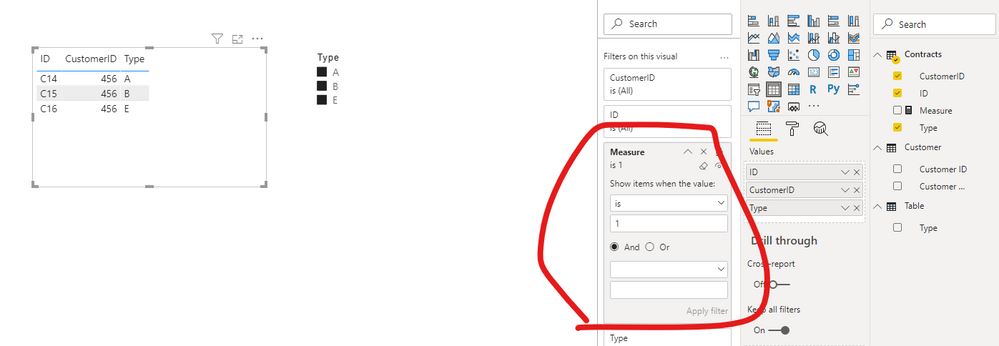
Is this the result you want?      pbix attached

22.png

If so ,please   create a visual control measure and apply it to the table filter pane. 


Measure =
VAR tab =
    FILTER ( ALL ( Contracts ), Contracts[Type] IN FILTERS ( 'Table'[Type] ) )
VAR numoftypes =
    DISTINCTCOUNT ( 'Table'[Type] )
VAR _customerid =
    SELECTEDVALUE ( Contracts[CustomerID] )
VAR num =
    COUNTROWS ( FILTER ( tab, [CustomerID] = _customerid ) )
RETURN
    IF (
        ISFILTERED ( 'Table'[Type] ),
        IF (
            SELECTEDVALUE ( Contracts[Type] ) IN FILTERS ( 'Table'[Type] ),
            IF ( numoftypes = num, 1, 0 ),
            0
        ),
        0
    )


Best Regards,
Community Support Team _ Eason
If this post helps, then please consider Accept it as the solution to help the other members find it more quickly.


Ah, you desire the mythical AND Slicer. Luckily, it exists. This one is of my own invention and is in my book actually:

https://community.powerbi.com/t5/Quick-Measures-Gallery/Patient-Cohort-AND-Slicer/m-p/391883#M130


With an explanation because the way it works is not obvious at all. But, I think it is the most concise AND slicer out there if not intuitive in how it operates.


Follow on LinkedIn
@ me in replies or I'll lose your thread!!!
Instead of a Kudo, please vote for this idea
Become an expert!: Enterprise DNA
External Tools: MSHGQM
YouTube Channel!: Microsoft Hates Greg
Latest book!:
DAX For Humans

DAX is easy, CALCULATE makes DAX hard...

Helpful resources

Announcements
New to Fabric survey Carousel

New to Fabric Survey

If you have recently started exploring Fabric, we'd love to hear how it's going. Your feedback can help with product improvements.

Power BI DataViz World Championships carousel

Power BI DataViz World Championships - June 2026

A new Power BI DataViz World Championship is coming this June! Don't miss out on submitting your entry.

Join our Fabric User Panel

Join our Fabric User Panel

Share feedback directly with Fabric product managers, participate in targeted research studies and influence the Fabric roadmap.

March Power BI Update Carousel

Power BI Community Update - March 2026

Check out the March 2026 Power BI update to learn about new features.