cancel
Showing results for 
Search instead for 
Did you mean: 

The Power BI Data Visualization World Championships is back! Get ahead of the game and start preparing now! Learn more

Reply
Anonymous
Not applicable

Combining 2 tables

Hi  see sample below

I have 2 tables, Company column combines the table.

How do I get a table combining Table 1 and 2 in table 3.

For my output I need a table 3 which looks at various breakdowns in the combined table.

The table 3 need to be used standalone.


Capture.JPG

1 ACCEPTED SOLUTION
v-juanli-msft
Community Support
Community Support

Hi @Anonymous 

Code in Advanced editor of Table2_copy

3.png


let
Source = Table.FromRows(Json.Document(Binary.Decompress(Binary.FromText("i45WSs7PLUjMq1RwVNJRMjYwAJKW+sYG+kYGhhZAtlN+fnZYYk5pKpANohNLMvPzlGJ1EPqcgDImZOhzBsqYEqsvFgA=", BinaryEncoding.Base64), Compression.Deflate)), let _t = ((type text) meta [Serialized.Text = true]) in type table [company = _t, amount = _t, date = _t, transaction = _t, type2 = _t]),
#"Changed Type" = Table.TransformColumnTypes(Source,{{"company", type text}, {"amount", Int64.Type}, {"date", type date}, {"transaction", type text}, {"type2", type text}}),
#"Added Custom" = Table.AddColumn(#"Changed Type", "Custom", each Table1),
#"Expanded Custom" = Table.ExpandTableColumn(#"Added Custom", "Custom", {"company", "sector", "deal type"}, {"Custom.company", "Custom.sector", "Custom.deal type"}),
#"Added Conditional Column" = Table.AddColumn(#"Expanded Custom", "Custom", each if [company] = [Custom.company] then 1 else null),
#"Filtered Rows" = Table.SelectRows(#"Added Conditional Column", each [Custom] <> null and [Custom] <> ""),
#"Removed Columns" = Table.RemoveColumns(#"Filtered Rows",{"Custom.company", "Custom"}),
#"Reordered Columns" = Table.ReorderColumns(#"Removed Columns",{"company", "Custom.sector", "Custom.deal type", "amount", "date", "transaction", "type2"}),
#"Renamed Columns" = Table.RenameColumns(#"Reordered Columns",{{"Custom.sector", "sector"}, {"Custom.deal type", "deal type"}, {"transaction", "transaction"}}),
#"Appended Query" = Table.Combine({#"Renamed Columns", Table1}),
#"Sorted Rows" = Table.Sort(#"Appended Query",{{"amount", Order.Ascending}})
in
#"Sorted Rows"

Change source path with yours


Best Regards
Maggie


Community Support Team _ Maggie Li
If this post helps, then please consider Accept it as the solution to help the other members find it more quickly.

View solution in original post

4 REPLIES 4
Ashish_Mathur
Super User
Super User

Hi,

There are no Sector and Deal Type columns in Table 2.  Is that deliberate?


Regards,
Ashish Mathur
http://www.ashishmathur.com
https://www.linkedin.com/in/excelenthusiasts/
v-juanli-msft
Community Support
Community Support

Hi @Anonymous 

Code in Advanced editor of Table2_copy

3.png


let
Source = Table.FromRows(Json.Document(Binary.Decompress(Binary.FromText("i45WSs7PLUjMq1RwVNJRMjYwAJKW+sYG+kYGhhZAtlN+fnZYYk5pKpANohNLMvPzlGJ1EPqcgDImZOhzBsqYEqsvFgA=", BinaryEncoding.Base64), Compression.Deflate)), let _t = ((type text) meta [Serialized.Text = true]) in type table [company = _t, amount = _t, date = _t, transaction = _t, type2 = _t]),
#"Changed Type" = Table.TransformColumnTypes(Source,{{"company", type text}, {"amount", Int64.Type}, {"date", type date}, {"transaction", type text}, {"type2", type text}}),
#"Added Custom" = Table.AddColumn(#"Changed Type", "Custom", each Table1),
#"Expanded Custom" = Table.ExpandTableColumn(#"Added Custom", "Custom", {"company", "sector", "deal type"}, {"Custom.company", "Custom.sector", "Custom.deal type"}),
#"Added Conditional Column" = Table.AddColumn(#"Expanded Custom", "Custom", each if [company] = [Custom.company] then 1 else null),
#"Filtered Rows" = Table.SelectRows(#"Added Conditional Column", each [Custom] <> null and [Custom] <> ""),
#"Removed Columns" = Table.RemoveColumns(#"Filtered Rows",{"Custom.company", "Custom"}),
#"Reordered Columns" = Table.ReorderColumns(#"Removed Columns",{"company", "Custom.sector", "Custom.deal type", "amount", "date", "transaction", "type2"}),
#"Renamed Columns" = Table.RenameColumns(#"Reordered Columns",{{"Custom.sector", "sector"}, {"Custom.deal type", "deal type"}, {"transaction", "transaction"}}),
#"Appended Query" = Table.Combine({#"Renamed Columns", Table1}),
#"Sorted Rows" = Table.Sort(#"Appended Query",{{"amount", Order.Ascending}})
in
#"Sorted Rows"

Change source path with yours


Best Regards
Maggie


Community Support Team _ Maggie Li
If this post helps, then please consider Accept it as the solution to help the other members find it more quickly.

v-juanli-msft
Community Support
Community Support

Hi @Anonymous 

Open Edit queries

1.Copy Table2, get Table2_Copy

The following steps are all in Table2_Copy


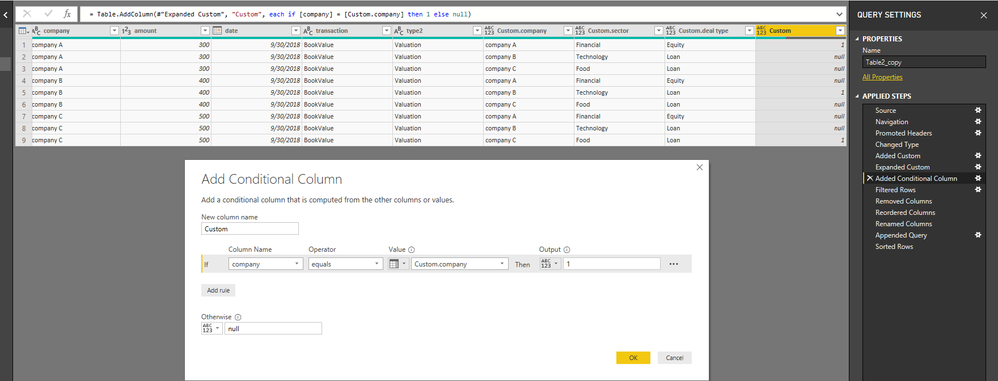
2.Add a custom column

Custom column formula

=Table1


3.select columns "company","sector","deal type" to expand


4.add a conditional column

1.png


5.filter "custom" column to remove empty


6.remove columns "Custom.company", "Custom"


7.reorder  (drag columns) and rename columns to make it order as Table1


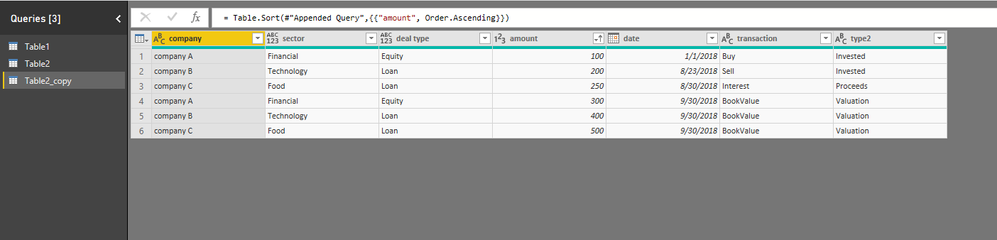
8.in Table2_copy, append Table1 with Table2_copy

2.png

You could open my file to see details.


Best Regards
Maggie


Community Support Team _ Maggie Li
If this post helps, then please consider Accept it as the solution to help the other members find it more quickly.

Mariusz
Community Champion
Community Champion

Hi @Anonymous,

1 Go to Query Editor.

2 Select Yor Teble 1
3 Find Append Queries in the Home Tab and click add as New, as below.

image.png
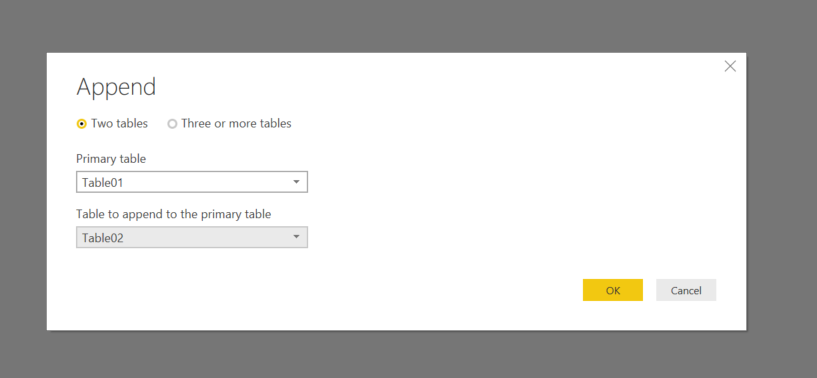
4 Select Your Tables as below, and klick OK.
image.png
Hope this helps 
Mariusz

Helpful resources

Announcements
Power BI DataViz World Championships

Power BI Dataviz World Championships

The Power BI Data Visualization World Championships is back! Get ahead of the game and start preparing now!

December 2025 Power BI Update Carousel

Power BI Monthly Update - December 2025

Check out the December 2025 Power BI Holiday Recap!

FabCon Atlanta 2026 carousel

FabCon Atlanta 2026

Join us at FabCon Atlanta, March 16-20, for the ultimate Fabric, Power BI, AI and SQL community-led event. Save $200 with code FABCOMM.